- 1 Conclusion of This Article
- 2 1. Role of This Logic
- 3 2. Basic Concept
- 4 3. Common Design Patterns
- 5 4. Implementation Method
- 6 5. Sample Code
- 7 6. Comparison by Pattern
- 8 7. Situations Where Malfunctions Are Likely
- 9 8. Items to Check in Backtesting
- 10 9. Items to Check in Forward Testing
- 11 10. Notes for Live Operation
- 12 11. Improvements and Alternatives
- 13 12. Summary
- 14 FAQ
- 14.1 Q1. What is the difference between MQL5 backtesting and forward testing?
- 14.2 Q2. Can I trade live if the backtest results are good?
- 14.3 Q3. What should I check in forward testing?
- 14.4 Q4. Why do backtest and forward test results differ?
- 14.5 Q5. What should I watch for when using CopyBuffer in an MQL5 EA?
- 14.6 Q6. How can I avoid overfitting?
- 14.7 Q7. Why is OrderCheck necessary?
- 14.8 Q8. Is forward testing on a demo account enough?
Conclusion of This Article
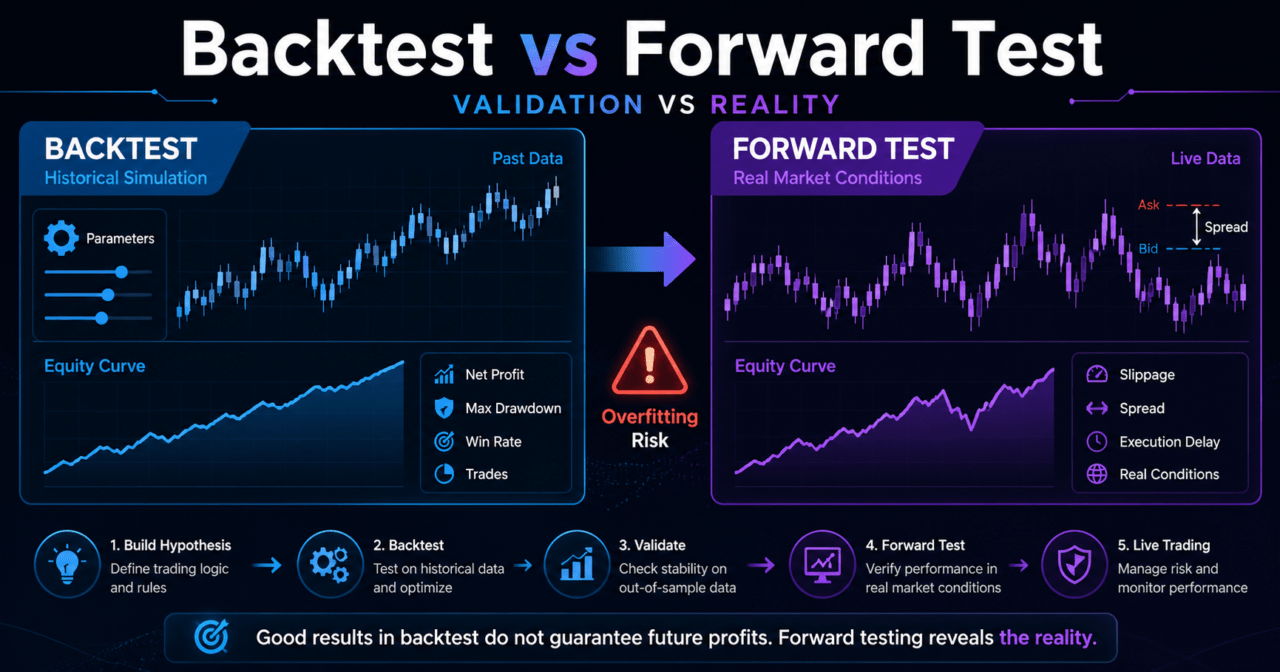
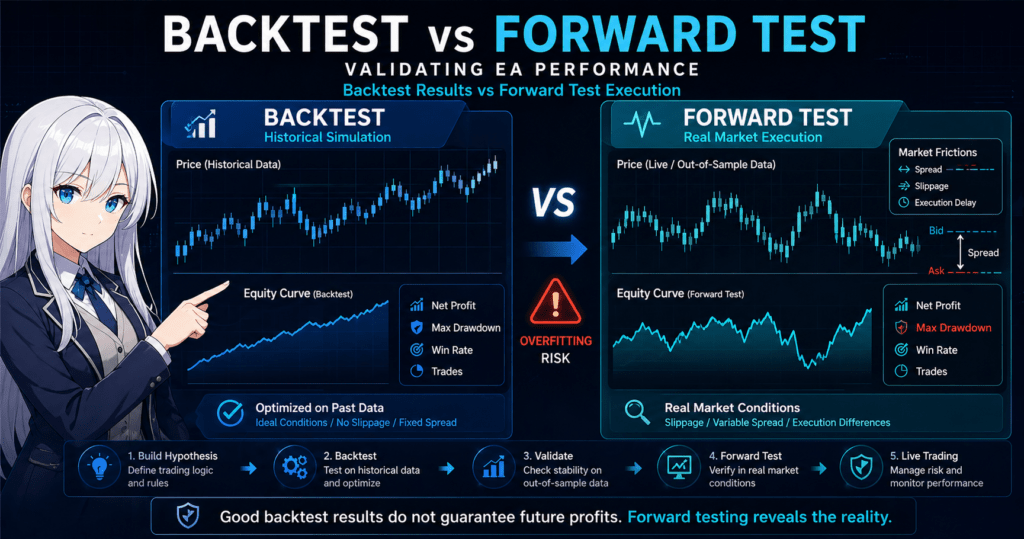
MQL5 backtesting and forward testing are separate steps for validating an EA’s trading logic from different angles.
Backtesting checks how the logic behaves on historical data, while forward testing checks reproducibility on unused periods or in a demo environment.
Even if a backtest shows strong results, it does not guarantee future profits or live trading performance.
When designing an EA, the important flow is to narrow the hypothesis with backtesting, then use forward testing to check differences in spread, execution, and broker conditions.
To avoid overfitting, do not add too many parameters, and confirm that performance does not collapse on out-of-sample data.
1. Role of This Logic
[Conclusion]
In MQL5, the role of backtesting and forward testing is to check whether an EA’s trading logic depends only on historical data.
Backtesting should be treated as hypothesis testing, and forward testing should be treated as reproducibility checking.
If backtesting and forward testing are confused, EA evaluation can become biased toward how well the EA fits past data.
In an MQL5 EA, OnTick evaluates trading conditions and, when needed, combines indicator handles, CopyBuffer, pre-order checks, and position management.
For that reason, validation must check not only trading conditions but also order processing and execution conditions.
[Definition]
Backtesting is a validation process that uses historical price data to check an EA’s behavior and results.
Forward testing is a validation process that checks an EA’s reproducibility on a period not used for optimization or in a demo environment.
1.1 What Backtesting Can Show
Backtesting lets you check how an EA behaved in past markets.
The main items to review are listed below.
- Total profit and loss
- Maximum drawdown
- Win rate
- Profit-loss ratio
- Number of trades
- Number of consecutive losses
- Performance differences by period
- Sensitivity to parameter changes
Backtesting is useful for checking the direction of a trading logic.
However, backtesting does not perfectly reproduce future markets or real execution conditions.
1.2 What Forward Testing Can Show
Forward testing checks whether an EA has been fitted too closely to historical data.
By running it on a period not used in the backtest or in an environment such as a demo account, problems closer to live operation become easier to see.
The important point in forward testing is not only the profit amount.
You should also check the number of trades, drawdown, execution differences, behavior when spreads widen, and stability in a VPS environment.
2. Basic Concept
[Conclusion]
When validating an EA in MQL5, it is easier to organize the process if you treat backtesting as the step for building the logic and forward testing as the step for checking how hard it is to break.
If you make live trading decisions from backtesting alone, overfitting becomes easy to miss.
EA validation usually follows this flow.
Create a trading hypothesis
↓
Backtest
↓
Adjust parameters
↓
Check with out-of-sample data
↓
Forward test
↓
Check live trading risks
In an MQL5 EA, not only the quality of the logic but also the event-handling design affects performance.
OnInit creates indicator handles, OnTick evaluates signals, and OnDeinit releases handles when needed.
If this structure is unstable, the EA may work in backtesting but behave unexpectedly in a forward environment.
2.1 Use Backtesting to Narrow the Hypothesis
Backtesting is used to remove logic that clearly does not work at an early stage.
For example, when combining a moving average crossover, an ATR filter, and a time filter, you can check how much each condition affects performance.
However, if you add too many conditions, the logic becomes more likely to fit only historical data.
The more finely you tune parameters, the higher the chance that performance will break in forward testing.
2.2 Use Forward Testing to Check Reproducibility
Forward testing checks whether an EA’s behavior remains stable in an environment outside the validation data.
Spreads, execution delays, slippage, trading hours, and differences in broker specifications are especially important.
Backtest and forward test results do not need to match perfectly.
What matters is whether the trading tendency, risk level, drawdown, and reason for the logic’s behavior stay within an explainable range.
3. Common Design Patterns
[Conclusion]
In MQL5 EA validation, do not judge from a single backtest result. Combine period splitting, parameter stability checks, and forward confirmation.
This combination makes dependency on historical data easier to find.
The three common design patterns are below.
3.1 Simple Backtest Pattern
The simple backtest pattern runs an EA over one period and checks the results.
It is an easy method for beginners who are starting to check how an EA works.
On the other hand, it has the drawback that results fitted only to a specific period are hard to detect.
You should avoid making live trading decisions with this method alone.
3.2 Period-Split Pattern
The period-split pattern divides historical data into a tuning period and a confirmation period.
You select parameters during the tuning period, then check whether performance collapses during the confirmation period.
This method helps detect overfitting.
However, the confirmation period is still historical data, so it cannot verify actual execution conditions.
3.3 Forward Operation Check Pattern
The forward operation check pattern runs the EA in a demo environment or a small validation environment after backtesting.
It lets you check the effects of real tick updates, spreads, execution, server time, and VPS conditions.
Problems close to live trading may become visible only during forward testing.
Examples include more entries when spreads widen, stop-loss levels shifting because of execution delays, and orders being rejected outside trading hours.
4. Implementation Method
[Conclusion]
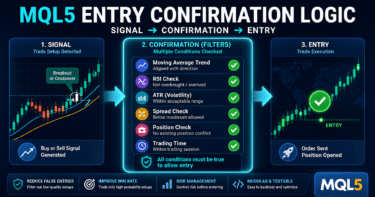
To create an EA that is easy to validate in MQL5, separate signal judgment, filter judgment, pre-order checks, and log output.
Keeping validation logs makes it easier to track differences between backtesting and forward testing.
The basic EA structure can be separated as follows.
Market recognition
↓
Filter judgment
↓
Signal judgment
↓
Risk check
↓
Pre-order check
↓
Order submission
↓
Post-execution management
↓
Close and stop judgment
In MQL5, many indicator functions do not return values directly. Instead, they create a handle, and values are then retrieved with CopyBuffer.
For this reason, the basic design is to create handles in OnInit, retrieve values in OnTick, and call IndicatorRelease in OnDeinit when needed.
4.1 EA Structure That Is Easy to Validate
In an EA that is easy to validate, separate the following processes.
- Signal judgment
- Filter judgment
- Lot calculation
- Existing position check
- Pre-order check
- Order submission
- Error handling
- Log output
If signal judgment and order processing are packed into one long OnTick function, it becomes harder to trace the cause of validation results.
When the article topic is comparing backtesting and forward testing, separating processes is especially important.
4.2 Keep Log Items That Can Be Compared
In forward testing, you need logs that show not only trading results but also why the EA traded.
For example, record the following information.
- Entry time
- Trade direction
- Indicator values
- Spread
- Lot size
- Stop-loss width
- Pre-order check result
- OrderSend result
If logs are insufficient, it becomes hard to judge whether the difference between backtesting and forward testing comes from the logic or from execution conditions.
5. Sample Code
[Conclusion]
In an EA that compares backtesting and forward testing, it is important to record not only trading signals but also spread checks, CopyBuffer retrieval checks, OrderCheck, and OrderSend results.
The following code is a sample that shows a validation-oriented structure.
The code below is a simple validation sample that uses moving averages.
It is not a finished EA intended for live operation.
Lots, stop loss, trading hours, and symbol conditions must be adjusted according to the validation purpose.
#property strict

input int FastMAPeriod = 20;
input int SlowMAPeriod = 50;
input double Lots = 0.10;
input int StopLossPoints = 300;
input int TakeProfitPoints = 600;
input int MaxSpreadPoints = 30;

int fastHandle = INVALID_HANDLE;
int slowHandle = INVALID_HANDLE;

int OnInit()
{
   fastHandle = iMA(_Symbol, _Period, FastMAPeriod, 0, MODE_SMA, PRICE_CLOSE);
   slowHandle = iMA(_Symbol, _Period, SlowMAPeriod, 0, MODE_SMA, PRICE_CLOSE);

   if(fastHandle == INVALID_HANDLE || slowHandle == INVALID_HANDLE)
   {
      Print("Failed to create indicator handle");
      return INIT_FAILED;
   }

   return INIT_SUCCEEDED;
}

void OnDeinit(const int reason)
{
   if(fastHandle != INVALID_HANDLE)
      IndicatorRelease(fastHandle);

   if(slowHandle != INVALID_HANDLE)
      IndicatorRelease(slowHandle);
}

void OnTick()
{
   if(!IsSpreadAcceptable())
      return;

   if(PositionSelect(_Symbol))
      return;

   double fastMA[];
   double slowMA[];

   ArraySetAsSeries(fastMA, true);
   ArraySetAsSeries(slowMA, true);

   int fastCopied = CopyBuffer(fastHandle, 0, 0, 3, fastMA);
   int slowCopied = CopyBuffer(slowHandle, 0, 0, 3, slowMA);

   if(fastCopied < 3 || slowCopied < 3)
   {
      Print("CopyBuffer failed or not enough data");
      return;
   }

   bool buySignal = (fastMA[1] > slowMA[1] && fastMA[2] <= slowMA[2]);
   bool sellSignal = (fastMA[1] < slowMA[1] && fastMA[2] >= slowMA[2]);

   if(buySignal)
      SendMarketOrder(ORDER_TYPE_BUY);

   if(sellSignal)
      SendMarketOrder(ORDER_TYPE_SELL);
}

bool IsSpreadAcceptable()
{
   long spread = SymbolInfoInteger(_Symbol, SYMBOL_SPREAD);

   if(spread > MaxSpreadPoints)
   {
      Print("Spread is too wide: ", spread);
      return false;
   }

   return true;
}

void SendMarketOrder(ENUM_ORDER_TYPE orderType)
{
   double volumeMin = SymbolInfoDouble(_Symbol, SYMBOL_VOLUME_MIN);
   double volumeMax = SymbolInfoDouble(_Symbol, SYMBOL_VOLUME_MAX);
   double volumeStep = SymbolInfoDouble(_Symbol, SYMBOL_VOLUME_STEP);

   double volume = NormalizeVolume(Lots, volumeMin, volumeMax, volumeStep);

   if(volume < volumeMin || volume > volumeMax)
   {
      Print("Invalid volume after normalization: ", volume);
      return;
   }

   MqlTick tick;
   if(!SymbolInfoTick(_Symbol, tick))
   {
      Print("Failed to get tick data");
      return;
   }

   double price = (orderType == ORDER_TYPE_BUY) ? tick.ask : tick.bid;
   double sl = 0.0;
   double tp = 0.0;

   if(orderType == ORDER_TYPE_BUY)
   {
      sl = price - StopLossPoints * _Point;
      tp = price + TakeProfitPoints * _Point;
   }
   else
   {
      sl = price + StopLossPoints * _Point;
      tp = price - TakeProfitPoints * _Point;
   }

   MqlTradeRequest request;
   MqlTradeResult result;
   MqlTradeCheckResult check;

   ZeroMemory(request);
   ZeroMemory(result);
   ZeroMemory(check);

   request.action = TRADE_ACTION_DEAL;
   request.symbol = _Symbol;
   request.volume = volume;
   request.type = orderType;
   request.price = price;
   request.sl = NormalizeDouble(sl, _Digits);
   request.tp = NormalizeDouble(tp, _Digits);
   request.deviation = 20;
   request.type_filling = ORDER_FILLING_FOK;

   if(!OrderCheck(request, check))
   {
      Print("OrderCheck failed. retcode=", check.retcode);
      return;
   }

   if(!OrderSend(request, result))
   {
      Print("OrderSend failed. retcode=", result.retcode);
      return;
   }

   Print("Order sent. retcode=", result.retcode,
         " order=", result.order,
         " deal=", result.deal,
         " spread=", SymbolInfoInteger(_Symbol, SYMBOL_SPREAD));
}

double NormalizeVolume(double volume, double minVolume, double maxVolume, double step)
{
   volume = MathMax(minVolume, MathMin(maxVolume, volume));
   double steps = MathFloor((volume - minVolume) / step);
   return NormalizeDouble(minVolume + steps * step, 2);
}
5.1 Key Points to Check in the Code
This sample includes the following MQL5-style structure.
- Create indicator handles in OnInit
- Retrieve moving average values with CopyBuffer
- Stop processing if the number of retrieved values is insufficient
- Judge signals using confirmed bars instead of the latest bar
- Do not place orders when the spread is wide
- Adjust lots to the minimum lot, maximum lot, and lot step
- Run OrderCheck before OrderSend
- Record OrderSend results in the log
Because the latest bar is still forming, its value changes on each tick. If you use it for signal judgment, behavior can easily differ between backtesting and forward testing.
For validation, a design that uses confirmed bars is easier to compare.
5.2 Processes Missing for Live Operation
This sample does not include every process that is usually needed for live operation.
If you are considering live operation, add and validate the following elements.
- Check tradable hours
- Check stop levels
- Check freeze levels
- Check margin
- Differences between netting accounts and hedging accounts
- Adjust type_filling according to the execution method
- Control consecutive entries
- Set daily loss limits
- Stop trading based on maximum drawdown
Available execution methods, minimum lots, and stop levels differ by broker and symbol.
For an EA that includes order processing, checks based on symbol specifications are required.
6. Comparison by Pattern
[Conclusion]
Backtesting, out-of-sample testing, and forward testing each confirm different things.
When evaluating an EA, it is important to combine multiple validation methods instead of relying on only one.
| Method | Advantages | Disadvantages | Best Use Case | Overfitting Risk |
|---|---|---|---|---|
| Simple backtest | Easy to run and results are available quickly | Easy to miss period dependency and overfitting | Initial operation check | High |
| Period-split test | Easy to check performance breakdown on unused periods | Hard to verify real execution conditions | Confirmation after parameter selection | Medium |
| Multiple-period test | Easy to find weaknesses by market condition | Validation work increases | Comparing trending, ranging, and volatile markets | Medium |
| Forward test | Easy to check spreads and execution differences | It takes time to get results | Reproducibility check before live operation | Lower |
| Demo environment test | Can check behavior close to real tick updates | Conditions may differ from a live account | Stability check before operation | Lower |
Backtesting is used to validate an EA hypothesis quickly.
Forward testing is used to check whether backtest results hold up in a real environment without major breakdowns.
6.1 What Order Should You Use?
A common order is as follows.
- Use a simple backtest to confirm that the logic works
- Check parameters across a broad range
- Review how performance breaks down on out-of-sample data
- Check multiple market conditions
- Use forward testing to confirm reproducibility
- Check risk control and stop conditions before live operation
This order helps organize the problems that should be found before live operation.
7. Situations Where Malfunctions Are Likely
[Conclusion]
Differences between backtesting and forward testing come not only from logic problems but also from differences in price data, spreads, execution, tick updates, and account conditions.
If a difference appears, check not only performance but also trade logs and order conditions.
Situations where an EA is likely to malfunction include the following.
- Times when spreads suddenly widen
- Sharp price movements before and after economic releases
- Periods of low liquidity
- Price gaps at the start or end of the trading week
- Symbols with an execution method different from the assumption
- Symbols with wide stop levels
- Cases where signals are judged using the latest bar
- Cases where the number of values retrieved by CopyBuffer is not checked
7.1 Notes When Using the Latest Bar
The latest bar has not yet closed, so indicator values change on each tick.
If you use a crossover or breakout on the latest bar, trade positions may differ between backtesting and forward testing.
When you design the EA to use confirmed bars, signals are fixed, making validation results easier to compare.
However, entries may become later.
7.2 Impact of Spread Widening
When the spread widens, entry and exit prices tend to become less favorable.
In particular, for short-term trading or EAs that target small profit margins, spread differences can have a large impact on performance.
If backtesting looks good but forward testing worsens, check the spread conditions.
Setting an upper limit such as MaxSpreadPoints makes validation conditions easier to control.
8. Items to Check in Backtesting
[Conclusion]
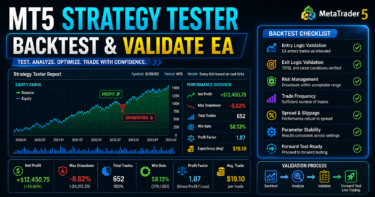
In backtesting, check not only total profit and loss but also maximum drawdown, number of trades, consecutive losses, and parameter dependency.
If you look only at the profit amount, it becomes easy to miss risk and overfitting.
The main items to check in backtesting are below.
| Check Item | Reason to Review | Note |
|---|---|---|
| Total profit and loss | Check the overall direction | Do not judge from this alone |
| Maximum drawdown | Check the size of capital decline | Decide the acceptable range in advance |
| Win rate | Check how often trades win | Review together with the profit-loss ratio |
| Profit-loss ratio | Check the balance between profit and loss | Do not judge by win rate alone |
| Number of trades | Check statistical bias | Hard to judge if too low |
| Consecutive losses | Check psychological pressure and money management | Affects lot design |
| Spread conditions | Check differences from live operation | Especially important for short-term EAs |
| Period dependency | Check whether it is strong only in a specific period | Compare across multiple periods |
| Parameter dependency | Find overfitting | Be careful if nearby values cause large breakdowns |
8.1 Check Parameter Dependency
An EA whose performance collapses after only a small parameter change may depend heavily on historical data.
For example, if changing the moving average period from 20 to 21 causes a major deterioration, the design needs to be reviewed.
In a stable design, results tend not to change extremely within a nearby parameter range.
However, even stable backtest results do not guarantee future profits.
8.2 Check the Number of Trades
If the number of trades is too low, results are more likely to be affected by chance.
On the other hand, if the number of trades is too high, the EA becomes more sensitive to spreads and execution differences.
The necessary number of trades depends on the EA’s timeframe, trading logic, and symbol characteristics.
In validation, check the number of trades together with drawdown.
9. Items to Check in Forward Testing
[Conclusion]
In forward testing, check not only performance differences from the backtest but also execution differences, behavior when spreads widen, and stability in a VPS environment.
Problems close to live operation may be found during forward testing.
Items to check in forward testing are listed below.
- Difference between execution price and expected price
- Entry suppression when spreads widen
- Trading frequency
- Drawdown
- Deviation from backtesting
- Broker differences
- Stability in a VPS environment
- Insufficient log output
- Behavior outside trading hours
- Effect of server time
9.1 Check Deviation From Backtesting
If performance worsens in forward testing, classify the cause.
The main causes are logic overfitting, spread differences, execution differences, changes in trading frequency, and price data differences.
When checking deviation, do not judge by profit and loss alone.
Also compare the number of entries, holding time, number of stop losses, number of take profits, and maximum unrealized loss.
9.2 Check Stability in a VPS Environment
If the EA will run continuously, also check stability in a VPS environment.
Communication delays, terminal restarts, chart settings, EA reinitialization, and log size can affect operation.
If OnInit and OnDeinit are not handled properly, indicator handles may not be created after a restart, or the logs may not let you trace the cause.
In forward testing, also check stability when the EA runs for a long time.
10. Notes for Live Operation
[Conclusion]
When moving an MQL5 EA closer to live operation, focus not on backtest performance alone but on risk management, execution conditions, broker specifications, and stop conditions.
Automated trading involves risk of loss, and validation results do not guarantee future profits.
For live operation, check the following points.
- Performance may worsen when spreads widen
- Execution delays and slippage may occur
- EA behavior may change depending on broker specifications
- Execution conditions may differ between demo and live accounts
- Higher leverage tends to make drawdowns larger
- Overfitting is likely to break down in forward testing
- Drawdown tolerance must be decided in advance
- Trade stop conditions must be included in the EA or operating rules
10.1 Difference Between Netting and Hedging Accounts
In MQL5, the concept of position management changes depending on the account type.
In a netting account, positions for the same symbol are consolidated. In a hedging account, multiple positions may be held.
If the account type differs between backtest conditions and the forward test environment, position management behavior may change.
PositionSelect and existing position checks should be designed with the account type in mind.
10.2 Check Lots and Margin
Lot calculation should consider minimum lot, maximum lot, lot step, margin, stop-loss width, tick value, and tick size.
If you validate only with fixed lots, it becomes easy to miss risk when account equity changes.
Even when using risk-percentage-based lot calculation, lots must be rounded to match the symbol specifications.
Using OrderCheck makes it easier to check margin and trading condition problems before sending an order.
11. Improvements and Alternatives
[Conclusion]
To reduce the gap between backtesting and forward testing, it is more important to clarify validation conditions and lower parameter dependency than to make the logic more complex.
Organize improvements in the order of trading conditions, filters, risk control, and log design.
Possible improvements include the following methods.
| Improvement | Advantages | Disadvantages | Best Use Case |
|---|---|---|---|
| Judge with confirmed bars | Validation results are easier to compare | Entries may be delayed | Crossover and breakout judgment |
| Add a spread limit | Unfavorable periods are easier to avoid | Number of trades decreases | Short-term trading EAs |
| Use an ATR filter | Volatility is easier to reflect | Direction judgment is still needed separately | Symbols with large market movement |
| Use a time filter | Low-liquidity periods are easier to avoid | Trading opportunities are missed | Symbols with large session differences |
| Use risk-percentage-based lots | Easy to match account equity | Stop-loss width must be designed | EAs focused on money management |
| Add daily stop conditions | Helps limit loss expansion | Recovery opportunities also stop | Risk control before live operation |
11.1 Reduce Parameters
An EA with many parameters becomes easier to fit to historical data.
The more filters you add, the more likely it is that the EA looks good in backtesting but breaks in forward testing.
For improvement, first remove unnecessary conditions.
Next, check whether performance changes extremely within nearby parameter ranges.
11.2 Separate the Roles of the Logic
EA conditions become easier to validate when separated by role.
For example, separate trend judgment, entry judgment, exit judgment, and risk control.
When roles are mixed, it becomes harder to identify why performance changed.
When comparing backtesting and forward testing, you need a structure that lets you trace which condition caused the difference.
12. Summary
[Conclusion]
MQL5 backtesting and forward testing are not complete when only one of them is used.
The important flow is to validate the hypothesis with backtesting, then check reproducibility and risks close to live operation with forward testing.
In backtesting, check not only total profit and loss but also maximum drawdown, number of trades, consecutive losses, spread conditions, and parameter dependency.
In forward testing, check execution differences, spread widening, broker differences, and stability in a VPS environment.
In an MQL5 EA, it is important to handle OnInit, OnTick, OnDeinit, indicator handles, CopyBuffer, OrderCheck, and OrderSend correctly and separately.
When the structure is easy to validate, differences between backtesting and forward testing become easier to analyze.
Backtest results do not guarantee future profits.
Before live operation, forward testing, risk control, stop conditions, and broker specifications must be checked.
FAQ
Q1. What is the difference between MQL5 backtesting and forward testing?
Backtesting validates an EA’s behavior using historical data. Forward testing checks the EA’s reproducibility on an unused period or in a demo environment.
Q2. Can I trade live if the backtest results are good?
Making a live trading decision from backtest results alone is risky. Forward testing is needed to check spreads, execution differences, broker specifications, and the impact of overfitting.
Q3. What should I check in forward testing?
In forward testing, check execution differences, behavior when spreads widen, trading frequency, drawdown, deviation from the backtest, and stability in a VPS environment.
Q4. Why do backtest and forward test results differ?
The main causes are differences in price data, spread conditions, execution delays, slippage, trading hours, broker specifications, and overfitting. Check trade logs and order conditions, not only performance.
Q5. What should I watch for when using CopyBuffer in an MQL5 EA?
In MQL5, a common structure is to create an indicator handle and then retrieve values with CopyBuffer. Stop processing if the number of retrieved values is insufficient, and be careful about the difference between the latest bar and confirmed bars.
Q6. How can I avoid overfitting?
Avoid adding too many parameters, and check whether performance changes extremely with nearby values. It is also important to verify that performance does not collapse on periods not used for tuning or in forward testing.
Q7. Why is OrderCheck necessary?
OrderCheck is used before OrderSend to check for problems with margin, lot size, symbol conditions, and related order requirements. In live operation, minimum lot, maximum lot, lot step, and stop levels can affect whether an order is accepted.
Q8. Is forward testing on a demo account enough?
Forward testing on a demo account is useful, but execution conditions may differ from a live account. Before live operation, separately confirm broker conditions, spreads, execution method, and risk tolerance.