- 1 Conclusion of This Article
- 2 1. Role of This Logic
- 3 2. Basic Concept
- 4 3. Common Design Patterns
- 5 4. Implementation Method
- 6 5. Sample Code
- 7 6. Comparison by Pattern
- 8 7. Situations Where Malfunctions Are Likely
- 9 8. Items to Check in Backtesting
- 10 9. Items to Check in Forward Testing
- 11 10. Notes for Live Operation
- 12 11. Improvement Ideas and Alternatives
- 13 12. Summary
- 14 FAQ
- 14.1 What is MQL5 entry confirmation logic?
- 14.2 Should entry confirmation logic be written directly in OnTick?
- 14.3 Should CopyBuffer use the latest candle or a closed candle?
- 14.4 Will adding more RSI or moving average conditions improve entry accuracy?
- 14.5 What should be checked when adding order processing?
- 14.6 Does the design change between netting and hedging accounts?
- 14.7 What is the most important point in backtesting?
- 14.8 Is forward testing necessary before live operation?
Conclusion of This Article
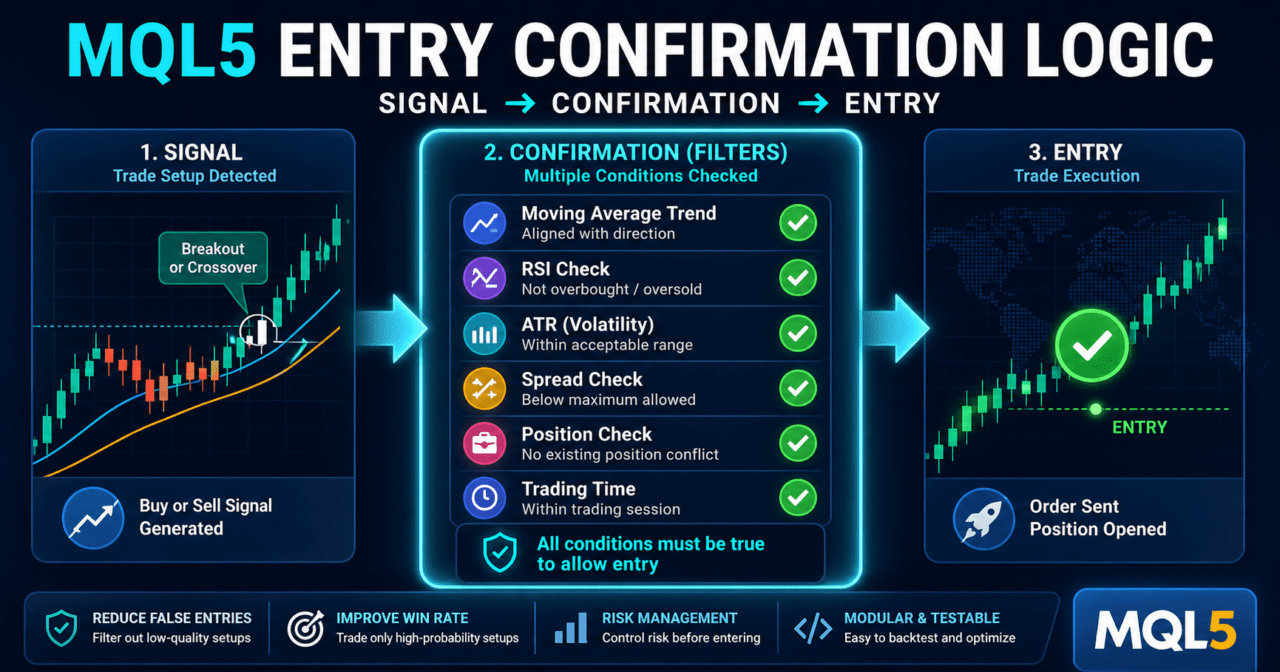
MQL5 entry confirmation logic is a mechanism that checks whether an entry is allowed using multiple conditions instead of placing an order immediately after a trading signal appears.
When moving averages, RSI, ATR, spread, existing positions, and trading hours are judged separately, it becomes easier to verify how an EA behaves.
In MQL5, when indicator values are used, the common structure is to create an indicator handle and retrieve values with CopyBuffer.
Backtest results do not guarantee future profit, so before live operation, you need to use forward testing to check the impact of slippage and spread widening.
1. Role of This Logic
[Conclusion]
The role of entry confirmation logic is to avoid converting an EA trading signal directly into an order, and instead add checks to decide whether the market is suitable for trading.
By separating signal judgment from confirmation judgment, it becomes easier to analyze causes and improve the logic.
[Definition]
Entry confirmation logic is the process of deciding whether an order is allowed after a buy or sell signal appears by checking the market environment, risk, trading conditions, and existing positions.
In an MQL5 EA, if every OnTick execution is connected directly to order processing, unintended repeated orders and overlapping conditions can easily occur.
For that reason, the process is separated as follows.
Market recognition
↓
Filter judgment
↓
Signal judgment
↓
Entry confirmation
↓
Risk check
↓
Pre-order check
↓
Order submission
↓
Post-execution management
1.1 Difference Between Signals and Confirmation Conditions
A signal is the process of finding a “buy or sell candidate.”
A confirmation condition is the process of deciding “whether that candidate can actually be ordered.”
For example, a breakout above a moving average can become a buy signal.
However, if the spread is wide, ATR is too low, a position already exists in the same direction, or the market is near the end of tradable hours, the design needs to skip the order.
1.2 Why Separated Design Matters in MQL5
An MQL5 EA runs OnTick every time it receives a new tick.
Because the same condition may become true multiple times within one candle, it is important to confirm closed candles, check position status, and manage order-submitted flags.
MQL5 entry confirmation logic is not just an added if statement.
By judging EA state, market conditions, and order conditions separately, you can build trading logic that is easier to test.
2. Basic Concept
[Conclusion]
Entry confirmation logic becomes easier to manage when market conditions, signal conditions, risk conditions, and order conditions are separated into different functions.
If too many conditions are packed into one logic, the number of trades decreases and over-optimization can occur, so the purpose of each confirmation condition must be clear.
Entry confirmation is not a magic condition for winning.
Its purpose is to clearly define situations the EA should avoid and decide whether trading is allowed in a testable form.
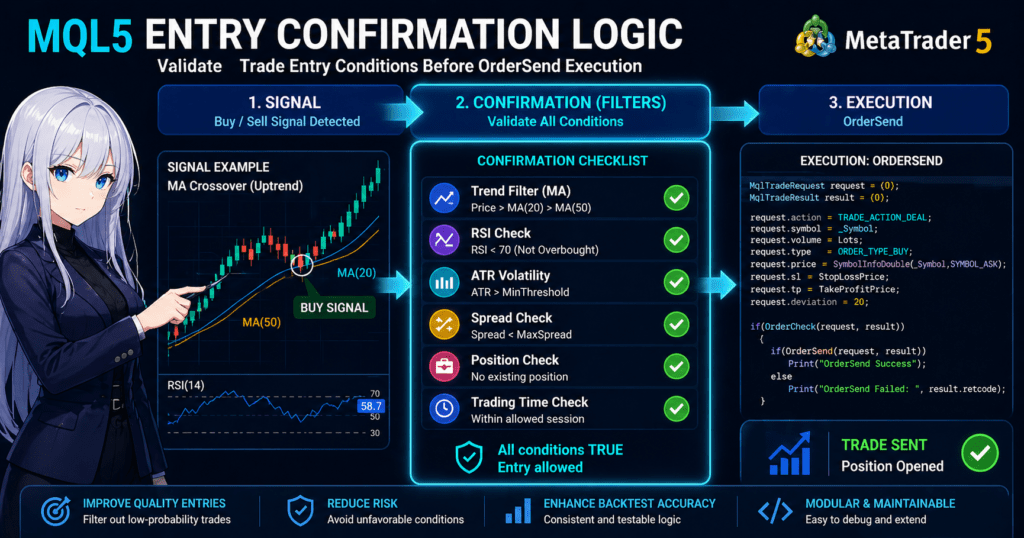
2.1 Main Categories of Confirmation Conditions
| Category | Role | Examples | Notes |
|---|---|---|---|
| Market environment check | Checks whether the market is suitable for trading | Trend direction, volatility | Too many conditions reduce opportunities |
| Signal confirmation | Confirms the basis for the buy or sell direction | Moving averages, RSI, breakouts | Using only the latest candle can increase false signals |
| Risk check | Makes it easier to limit loss expansion | Lot size, stop-loss width, drawdown | Ignoring symbol specifications can distort calculations |
| Order condition check | Checks whether an order can be accepted | Spread, margin, trading hours | Results vary depending on broker conditions |
| State check | Prevents duplicate EA actions | Existing positions, order-submitted flags | Handling differs between netting and hedging accounts |
2.2 Difference Between the Latest Candle and a Closed Candle
In entry confirmation, you need to distinguish between the latest candle and a closed candle.
The latest candle is still forming, so conditions can change as price moves.
A closed candle has already ended, which makes it easier to align judgment between backtesting and live operation.
In general, when an indicator array is handled as a time series in MQL5, index 0 is the latest candle and index 1 is the previous closed candle.
However, the design is easier to understand when the array direction is explicitly set with ArraySetAsSeries.
3. Common Design Patterns
[Conclusion]
Entry confirmation logic includes trend confirmation, volatility confirmation, oscillator confirmation, and trading condition confirmation patterns.
A practical approach is to start with a small number of conditions and verify the meaning of each condition through backtesting and forward testing.
3.1 Trend Confirmation Pattern
The trend confirmation pattern checks whether the trading direction matches the broader market flow.
It uses items such as the slope of moving averages, the relationship between short-term and long-term lines, and the direction of a higher timeframe.
An example of buy confirmation is a state where the short-term moving average is above the long-term moving average and the closing price of the confirmed candle is above the short-term moving average.
Sell confirmation uses the opposite conditions.
3.2 Volatility Confirmation Pattern
The volatility confirmation pattern checks whether the market’s price range is sufficient or too large.
Using ATR makes it easier to turn recent price movement size into a condition.
When ATR is too low, the impact of spreads and commissions tends to become relatively large.
When ATR is too high, you need to pay attention to slippage and wider stop-loss distances.
3.3 Oscillator Confirmation Pattern
The oscillator confirmation pattern checks overbought or oversold conditions and changes in momentum.
When using RSI or a similar indicator, consider combining it with trend direction rather than relying only on a simple threshold.
If RSI alone determines the trading direction, countertrend entries may continue during a strong trend.
Combining it with trend confirmation makes it easier to separate the role of each condition.
3.4 Trading Condition Confirmation Pattern
The trading condition confirmation pattern checks whether the environment is suitable for placing an order, not the quality of the signal itself.
It checks spread, minimum lot, maximum lot, lot step, margin, stop level, tradable hours, and similar conditions.
When order processing is performed in MQL5, it is effective to use OrderCheck before OrderSend to confirm order conditions.
This makes it easier to identify the reason an order cannot be accepted before sending it.
4. Implementation Method
[Conclusion]
In MQL5, the usual implementation is to create indicator handles in OnInit, retrieve values with CopyBuffer in OnTick, and judge confirmation conditions through functions.
It is important to explicitly handle handle creation failure, insufficient data, array direction, and closed-candle usage.
4.1 Overall Implementation Structure
Entry confirmation logic becomes easier to read when functions are separated as follows.
IsNewBar()
GetIndicatorValues()
HasBuySignal()
HasSellSignal()
IsEntryAllowed()
CheckRisk()
CheckTradeCondition()
SendOrder()
If everything is written directly inside OnTick, changing conditions and testing become difficult.
When the logic is functionized, logs make it easier to trace which confirmation condition stopped an order.
4.2 Creating Indicator Handles
In MQL5, many indicator functions such as iMA and iRSI return an indicator handle instead of returning calculated values directly.
In an EA, handles are created in OnInit and released with IndicatorRelease in OnDeinit when needed.
4.3 Retrieving Values with CopyBuffer
CopyBuffer is the process that retrieves buffer values from an indicator handle into an array.
If the retrieved count is lower than expected, the process must stop because the data is insufficient or retrieval failed.
5. Sample Code
[Conclusion]
The following code is a verification sample that performs entry confirmation using moving averages and RSI.
For live operation, you also need to check symbol specifications, lot calculation, spread, stop level, account type, and execution conditions.
#property strict

input int FastMAPeriod = 20;
input int SlowMAPeriod = 50;
input int RSIPeriod = 14;
input double MaxSpreadPoints = 30.0;

int fastMaHandle = INVALID_HANDLE;
int slowMaHandle = INVALID_HANDLE;
int rsiHandle = INVALID_HANDLE;

const int CURRENT_BAR = 0;
const int CONFIRMED_BAR = 1;
const int PREVIOUS_CONFIRMED_BAR = 2;

datetime lastBarTime = 0;

int OnInit()
{
   fastMaHandle = iMA(_Symbol, _Period, FastMAPeriod, 0, MODE_SMA, PRICE_CLOSE);
   slowMaHandle = iMA(_Symbol, _Period, SlowMAPeriod, 0, MODE_SMA, PRICE_CLOSE);
   rsiHandle = iRSI(_Symbol, _Period, RSIPeriod, PRICE_CLOSE);

   if(fastMaHandle == INVALID_HANDLE ||
      slowMaHandle == INVALID_HANDLE ||
      rsiHandle == INVALID_HANDLE)
   {
      Print("Failed to create indicator handle");
      return INIT_FAILED;
   }

   return INIT_SUCCEEDED;
}

void OnDeinit(const int reason)
{
   if(fastMaHandle != INVALID_HANDLE)
      IndicatorRelease(fastMaHandle);

   if(slowMaHandle != INVALID_HANDLE)
      IndicatorRelease(slowMaHandle);

   if(rsiHandle != INVALID_HANDLE)
      IndicatorRelease(rsiHandle);
}

void OnTick()
{
   if(!IsNewBar())
      return;

   if(!IsSpreadAcceptable())
      return;

   if(HasOpenPosition())
      return;

   if(IsBuyEntryConfirmed())
   {
      Print("Buy entry confirmed. SendOrder should be called after OrderCheck.");
   }

   if(IsSellEntryConfirmed())
   {
      Print("Sell entry confirmed. SendOrder should be called after OrderCheck.");
   }
}

bool IsNewBar()
{
   datetime currentBarTime = iTime(_Symbol, _Period, CURRENT_BAR);

   if(currentBarTime == 0)
      return false;

   if(currentBarTime == lastBarTime)
      return false;

   lastBarTime = currentBarTime;
   return true;
}

bool IsSpreadAcceptable()
{
   double ask = SymbolInfoDouble(_Symbol, SYMBOL_ASK);
   double bid = SymbolInfoDouble(_Symbol, SYMBOL_BID);

   if(ask <= 0.0 || bid <= 0.0)
      return false;

   double spreadPoints = (ask - bid) / _Point;

   if(spreadPoints > MaxSpreadPoints)
   {
      Print("Spread is too wide: ", spreadPoints);
      return false;
   }

   return true;
}

bool HasOpenPosition()
{
   if(PositionSelect(_Symbol))
      return true;

   return false;
}

bool GetIndicatorValues(double &fastMa1, double &fastMa2,
                        double &slowMa1, double &slowMa2,
                        double &rsi1)
{
   if(BarsCalculated(fastMaHandle) < 3 ||
      BarsCalculated(slowMaHandle) < 3 ||
      BarsCalculated(rsiHandle) < 3)
   {
      Print("Not enough calculated bars");
      return false;
   }

   double fastMa[];
   double slowMa[];
   double rsi[];

   ArraySetAsSeries(fastMa, true);
   ArraySetAsSeries(slowMa, true);
   ArraySetAsSeries(rsi, true);

   int copiedFast = CopyBuffer(fastMaHandle, 0, 0, 3, fastMa);
   int copiedSlow = CopyBuffer(slowMaHandle, 0, 0, 3, slowMa);
   int copiedRsi = CopyBuffer(rsiHandle, 0, 0, 3, rsi);

   if(copiedFast < 3 || copiedSlow < 3 || copiedRsi < 3)
   {
      Print("CopyBuffer failed or not enough data");
      return false;
   }

   fastMa1 = fastMa[CONFIRMED_BAR];
   fastMa2 = fastMa[PREVIOUS_CONFIRMED_BAR];
   slowMa1 = slowMa[CONFIRMED_BAR];
   slowMa2 = slowMa[PREVIOUS_CONFIRMED_BAR];
   rsi1 = rsi[CONFIRMED_BAR];

   return true;
}

bool IsBuyEntryConfirmed()
{
   double fastMa1, fastMa2, slowMa1, slowMa2, rsi1;

   if(!GetIndicatorValues(fastMa1, fastMa2, slowMa1, slowMa2, rsi1))
      return false;

   bool trendUp = fastMa1 > slowMa1 && fastMa1 > fastMa2;
   bool rsiFilter = rsi1 > 50.0 && rsi1 < 70.0;

   return trendUp && rsiFilter;
}

bool IsSellEntryConfirmed()
{
   double fastMa1, fastMa2, slowMa1, slowMa2, rsi1;

   if(!GetIndicatorValues(fastMa1, fastMa2, slowMa1, slowMa2, rsi1))
      return false;

   bool trendDown = fastMa1 < slowMa1 && fastMa1 < fastMa2;
   bool rsiFilter = rsi1 < 50.0 && rsi1 > 30.0;

   return trendDown && rsiFilter;
}
5.1 Notes When Adding Order Processing
This sample focuses on the entry confirmation part.
When adding order submission, use MqlTradeRequest, MqlTradeResult, and MqlTradeCheckResult, and confirm pre-order conditions with OrderCheck.
The items to check are minimum lot, maximum lot, lot step, margin, stop level, freeze level, tradable hours, spread, and existing positions.
In a netting account, positions for the same symbol are consolidated. In a hedging account, multiple positions can be held, so the position management design changes.
6. Comparison by Pattern
[Conclusion]
Entry confirmation logic is easier to verify when a small number of conditions with different purposes are combined, rather than relying on one condition alone.
However, as the number of conditions increases, the risks of over-optimization and fewer trading opportunities also increase.
| Method | Advantages | Disadvantages | Suitable Use Cases |
|---|---|---|---|
| Moving average confirmation | Easy to implement and useful for seeing direction | False signals are common in ranging markets | Initial design, trend following |
| RSI confirmation | Easy to turn momentum and overheating into conditions | Can lean against the direction of a strong trend | Supporting judgment for entries |
| ATR confirmation | Easy to reflect volatility | Cannot determine trading direction | Avoiding low volatility, adjusting stop-loss width |
| Spread confirmation | Makes it easier to avoid worse live trading costs | May reduce trading opportunities | Short-term trading, low-volatility markets |
| Higher timeframe confirmation | Easy to align with the larger market flow | May slow down reactions | Trend filter |
| Existing position confirmation | Makes duplicate orders easier to prevent | The design intent must be clear in hedging accounts | EA state management |
7. Situations Where Malfunctions Are Likely
[Conclusion]
Entry confirmation logic can malfunction because of insufficient data, changes in the latest candle, spread widening, duplicate orders, and account type differences.
The design needs log output and separated conditions so you can identify which condition stopped an order.
7.1 Conditions Change on the Latest Candle
Indicator values on the latest candle change until the candle closes.
If entry confirmation uses only the latest candle, behavior can easily differ between backtesting and live operation.
7.2 CopyBuffer Return Count Is Not Checked
CopyBuffer does not always return the expected number of values.
If an array is read when the retrieved count is insufficient, invalid judgment can occur.
7.3 Spread Widening Is Ignored
When the spread widens, the unfavorable price difference immediately after entry becomes larger.
Especially in short-term trading, spread conditions can have a large impact on performance.
7.4 Handling of Existing Positions Is Ambiguous
If there is already a position in the same symbol, the design must decide whether to allow or stop a new order.
In netting accounts and hedging accounts, the same order logic may show positions differently.
8. Items to Check in Backtesting
[Conclusion]
In backtesting, check not only total profit and loss, but also maximum drawdown, number of trades, losing streaks, spread conditions, period dependency, and parameter dependency.
When entry confirmation conditions are added, you need to separately check which condition caused the change in performance.
The items to check are as follows.
| Item | Reason for Checking |
|---|---|
| Total profit and loss | To see the overall tendency |
| Maximum drawdown | To understand the size of equity fluctuations |
| Win rate | To confirm direction after a signal occurs |
| Profit/loss ratio | To see the balance between profit size and loss size |
| Number of trades | To check whether the conditions are too strict |
| Losing streak count | To assess psychological and money management tolerance |
| Spread conditions | To estimate the difference from live operation |
| Period dependency | To see whether the logic only fits a specific period |
| Parameter dependency | To check the possibility of over-optimization |
Backtest results do not guarantee profit in live operation.
During verification, add conditions one at a time and record which confirmation condition affected improvement or deterioration.
9. Items to Check in Forward Testing
[Conclusion]
In forward testing, check slippage, spread widening, trading frequency, and stability in a VPS environment, which are difficult to see in backtesting.
Entry confirmation logic is affected by actual tick updates and broker conditions.
The items to check in forward testing are as follows.
| Item | Reason for Checking |
|---|---|
| Slippage | To see the difference between the expected price and the actual execution price |
| Behavior during spread widening | To see whether orders can be avoided during unfavorable times |
| Trading frequency | To confirm whether conditions occur in a live environment |
| Drawdown | To confirm whether equity fluctuations are within the acceptable range |
| Gap from backtesting | To understand differences from the test environment |
| Broker differences | To see differences in symbol specifications and execution conditions |
| Stability in a VPS environment | To confirm whether the EA continues running |
Execution conditions may differ between demo accounts and live accounts.
Before live operation, you need phased verification with reduced lot size and clearly defined stop conditions.
10. Notes for Live Operation
[Conclusion]
In live operation, risk cannot be fully controlled by entry confirmation logic alone.
You need to manage spread, execution delay, slippage, leverage, drawdown, and broker specifications together.
10.1 Separate Risk Management into Another Module
Entry confirmation is the process of narrowing down candidates that may be ordered.
Allowed loss amount, lot calculation, maximum drawdown, and losing-streak stops are safer when separated into another risk management process.
Lot calculation considers minimum lot, maximum lot, lot step, tick value, tick size, stop-loss width, and equity.
If the design uses only fixed lots, it becomes harder to handle equity changes and differences in symbol specifications.
10.2 Use OrderCheck Before Placing an Order
When performing order processing in MQL5, checking pre-order validity with OrderCheck makes it easier to find insufficient margin or trading condition problems.
A design that only checks the OrderSend result tends to delay cause analysis.
10.3 Avoid Over-Optimization
As the number of entry confirmation conditions increases, the logic may fit only past data.
If parameters are adjusted too finely, performance is more likely to break down in forward testing.
11. Improvement Ideas and Alternatives
[Conclusion]
When improving entry confirmation logic, check the purpose of each condition and the stop reason in logs before adding more conditions.
Alternatives include higher timeframe confirmation, ATR-based volatility judgment, time filters, and stronger pre-order checks.
11.1 Use Logs to Record Stop Reasons
When an EA does not place orders, it can be hard to tell whether the conditions are too strict, data retrieval failed, or trading conditions stopped the order.
If each judgment leaves the stop reason with Print, the cause becomes easier to check in tester logs.
11.2 Add Conditions Step by Step
If many confirmation conditions are added from the beginning, it becomes difficult to know which condition was effective.
Verify conditions step by step, such as moving average confirmation, RSI confirmation, spread confirmation, and position confirmation.
11.3 Separate Trading Direction from Trade Permission
Separate the process that decides buy or sell direction from the process that decides whether trading is allowed.
This separation lets you evaluate signal accuracy and trading environment problems independently.
12. Summary
[Conclusion]
MQL5 entry confirmation logic is a design that checks an EA trading signal before order placement and helps reduce malfunctions and excessive trading.
It creates handles in OnInit, retrieves closed-candle values with CopyBuffer in OnTick, and judges risk and order conditions separately.
In entry confirmation logic, market environment, signals, risk, order conditions, and EA state are considered separately.
When comparison tables and logs clarify the role of each condition, it becomes easier to find improvement points in backtesting and forward testing.
In live operation, you should not rely on backtesting alone. You need to check spread, slippage, broker specifications, account type, and drawdown tolerance.
Entry confirmation logic does not guarantee profit; it is a structure for building a verifiable EA design.
FAQ
What is MQL5 entry confirmation logic?
MQL5 entry confirmation logic is the process of deciding whether an order is allowed after a trading signal appears by checking the market environment, risk, trading conditions, and existing positions. It is used to help reduce EA malfunctions and duplicate orders.
Should entry confirmation logic be written directly in OnTick?
It is common to call it from OnTick, but the main process is easier to manage when separated into functions. Separating signal judgment, filter judgment, risk checks, and pre-order checks makes cause analysis easier.
Should CopyBuffer use the latest candle or a closed candle?
If reproducibility matters, using closed-candle values is easier to handle. The latest candle changes while it is forming, so live operation and backtesting judgments may diverge.
Will adding more RSI or moving average conditions improve entry accuracy?
Adding conditions can reduce unnecessary trades, but it can also cause over-optimization and fewer trades. You need to separate the purpose of each condition and verify it through backtesting and forward testing.
What should be checked when adding order processing?
When adding order processing, use MqlTradeRequest, MqlTradeResult, and MqlTradeCheckResult, and confirm pre-order validity with OrderCheck. Also check minimum lot, maximum lot, lot step, margin, stop level, and spread.
Does the design change between netting and hedging accounts?
Yes. Position management for the same symbol differs between netting and hedging accounts. Netting accounts consolidate positions, while hedging accounts can hold multiple positions, so duplicate-order handling must be clearly defined.
What is the most important point in backtesting?
It is important not to judge only by total profit and loss. Check maximum drawdown, number of trades, losing streaks, spread conditions, period dependency, and parameter dependency.
Is forward testing necessary before live operation?
Yes. Forward testing is necessary before live operation because it checks slippage, spread widening, broker conditions, and VPS stability that are difficult to see in backtesting.