- 1 1. What Is EA Crash Debugging?
- 2 2. Debugging Steps to Identify the Cause of an EA Crash
- 3 3. How EA Crashes Happen
- 3.1 3.1 EA Processing Structure: Event-Driven Model
- 3.2 3.2 Asynchronous Processing and Trading Constraints: Execution Traps
- 3.3 3.3 Data Retrieval and Indicator Traps
- 3.4 3.4 Memory and Resource Management Problems
- 3.5 3.5 Market Environment Changes: External Shocks
- 3.6 3.6 Why Failures Become Compound Chains
- 4 4. Comparing Debugging Methods and Choosing the Right One
- 5 5. Common Mistakes and Cautions During EA Crashes
- 5.1 5.1 Fixing Without Checking Logs
- 5.2 5.2 Fixing Without Reproduction
- 5.3 5.3 Fixing Multiple Places at Once
- 5.4 5.4 Underestimating Environment Differences: VPS and Broker
- 5.5 5.5 Insufficient Error Handling
- 5.6 5.6 Ignoring Spread and Slippage
- 5.7 5.7 Inconsistent State Management: Position Recognition Mismatch
- 5.8 5.8 Minimum Checks Beginners Should Do First
- 6 6. Practical Use Cases: When Debugging Matters
- 6.1 6.1 Development Phase: Building Logic
- 6.2 6.2 Validation Phase: Backtest and Forward Test
- 6.3 6.3 Operation Phase: Live Account
- 6.4 6.4 Market Events: Abnormal Environments
- 6.5 6.5 Running Multiple EAs or Multiple Accounts
- 6.6 6.6 Practical Priority: Risk Management View
- 6.7 6.7 Long-Term Debugging Strategy
- 7 7. Frequently Asked Questions (FAQ)
- 7.1 7.1 If It Works in Backtesting, Is It Safe in Live Trading?
- 7.2 7.2 Why Does the EA Not Work When No Error Appears in the Log?
- 7.3 7.3 Why Does It Work on Demo but Stop on a Live Account?
- 7.4 7.4 How Much Should I Output With Print Logs?
- 7.5 7.5 Is It Fine If the EA Only Stops Occasionally?
- 7.6 7.6 Will Changing the VPS Fix EA Crashes?
- 7.7 7.7 How Much Should Spread and Slippage Be Considered?
- 7.8 7.8 Can I Build an EA That Never Crashes?
1. What Is EA Crash Debugging?
Bottom line: EA crash debugging is the process of finding, reproducing, and fixing the reason an EA, or automated trading program, stops or exits abnormally. The fastest path is to isolate the issue using three points: logs, reproduction conditions, and code.
1.1 Definition and Common Symptoms of an EA Crash
Bottom line: A crash means the EA can no longer continue normal trade processing. It often appears as abnormal logs, stopped orders, or forced termination.
Definition:
EA crash: A state where an EA running on MetaTrader (MT4/MT5) stops or behaves abnormally because of an exception, logic mismatch, or environment-related factor.
Common symptoms include the following.
- Orders suddenly stop being placed (execution stops)
- Error logs are repeatedly output in Experts / Journal
- The terminal freezes or restarts
- The EA stops under specific conditions, such as news releases, spread widening, or communication delays
A particularly important case is when the EA appears to be running but does not place orders. This often happens because of logic condition mismatches, spread controls, or slippage controls.
1.2 Why Debugging Is Necessary: Risks of Ignoring Crashes
Bottom line: If you leave crashes unresolved, opportunity loss and unexpected risk happen at the same time, and the reliability of your test results breaks down.
The main risks are below.
- Opportunity loss: The EA cannot place orders when it should enter
- Risk deviation: Stop loss (SL) or lot management does not work
- Broken validation: Backtest and forward test results diverge
- Trust cost: Third-party evaluations such as Myfxbook become less reliable
In EA operation, reproducibility is especially important. If crashes exist, the result can change even under the same conditions, making expectancy metrics such as PF and DD meaningless.
1.3 Classifying Crash Causes: Understanding the Structure
Bottom line: You can isolate causes with high reproducibility by splitting them into three layers: code, trading conditions, and environment.
The main causes fall into these three categories.
■ Code-related causes: internal logic
- Array out-of-range access or NULL reference
- Incorrect branching conditions, such as inconsistent if statements
- Infinite loops or excessive calculation
- Failure to release indicator handles
■ Trading-condition causes: market dependent
- Spread widening
- Excessive slippage
- Execution rejection, such as requote / off quotes
- Insufficient margin
■ Environment-related causes: external factors
- VPS latency or connection loss
- Broker specification differences, including execution method
- MT4/MT5 build differences
- Indicator data not retrieved, such as CopyBuffer failure
The key is not to assume there is only one cause. A common compound pattern is: spread widens, order fails, later logic is not handled, and the EA stops.
1.4 Points Beginners Often Misunderstand
Bottom line: Most failures come from three issues: not checking logs, ignoring reproducibility, and underestimating environment differences.
Common misunderstandings and the reality:
- “It worked in a backtest, so it is safe.”
Backtests can break down in live use because execution conditions and slippage are different. - “There is no error, so it is normal.”
In many cases, the EA simply did not place an order because conditions were not met. - “The EA stopped, so the code must be bad.”
Communication issues and broker specifications can also have a major impact. - “It only stops occasionally, so it is not a problem.”
Bugs that cannot be reproduced are the most dangerous because they distort expectancy.
1.5 Practical Role: Separating Operation and Validation
Bottom line: Debugging should be treated as part of the operation process, not only as a development task.
In practice, it is handled as follows.
- Development phase: Logic validation in Strategy Tester
- Validation phase: Demo account forward testing with clean data
- Operation phase: Monitoring differences in the live environment
Forward-test log collection is especially important.
By recording pure behavior while excluding deposits, withdrawals, and manual trading, you can greatly improve the accuracy of identifying crash causes.
2. Debugging Steps to Identify the Cause of an EA Crash
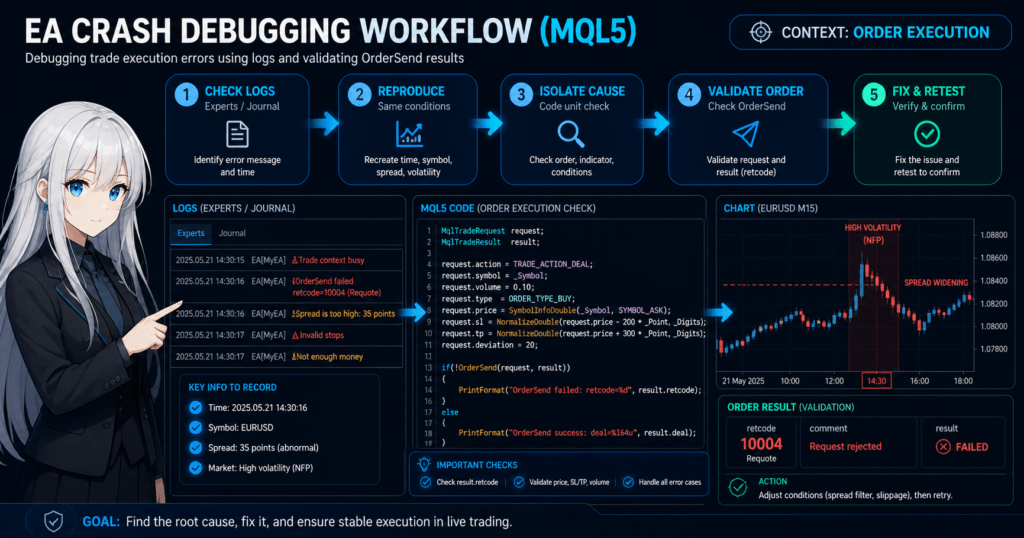
Bottom line: The shortest way to identify an EA crash is to proceed in this order: check logs, reproduce the issue, isolate the cause, and fix it. Judge based on evidence, such as logs and conditions, not intuition.
2.1 Check the Logs First
Bottom line: Logs are the starting point for debugging. Check both the Experts log and the Journal log, then identify the error code and timing.
Steps to check:
- Open MetaTrader
- Open Terminal, then the Experts tab
- Check the Journal tab at the same time
- Record the error time and message
Common error examples:
Trade context busy(trade processing conflict)Off quotes(price unavailable)Invalid stops(invalid SL/TP)Array out of range(array out-of-range access)
Key points:
- Look at when and under what conditions it happened, not only what happened
- Check it together with spread and execution conditions
2.2 Identify Reproduction Conditions
Bottom line: You cannot fix a bug that you cannot reproduce. Fix the conditions, such as time, currency pair, and market state.
Checklist for reproduction:
- Currency pair, such as EURUSD / USDJPY
- Time period, such as London, New York, or news release time
- Spread state, normal or widened
- Volatility, especially during sharp market movement
Practical methods:
- Replay the same period in Strategy Tester
- Run multiple tests with the same parameters
- Match the occurrence timing with the logs
Notes:
- Backtests simplify execution and slippage
- Perfect reproduction is difficult, so approximate conditions are acceptable
2.3 Isolate the Cause by Code Unit
Bottom line: Do not search for the cause all at once. Split the process by unit, such as orders, indicators, and branching conditions.
Basic isolation targets:
- Order processing, such as OrderSend / trade.Buy
- Indicator retrieval, such as iMA / CopyBuffer
- Condition checks, such as if statements
Debugging example in MQL5:
if(!PositionSelect(_Symbol))
{
   Print("No position found");
}

double ma = iMA(_Symbol, PERIOD_CURRENT, 20, 0, MODE_SMA, PRICE_CLOSE);
if(ma == 0)
{
   Print("Indicator error: MA is zero");
}
Key points:
- Always detect abnormal values such as 0 / EMPTY_VALUE
- Add Print logs actively to strengthen log visibility
2.4 Check Order Processing Around Execution
Bottom line: Many crashes occur around order processing. Always validate the full chain from request to result.
Checklist:
- Lot size: Is it valid?
- SL/TP: Does it violate the minimum distance?
- Slippage setting: Is it too strict?
- Price retrieval: Are Bid/Ask normal?
MQL5 example:
MqlTradeRequest request;
MqlTradeResult result;

request.action = TRADE_ACTION_DEAL;
request.symbol = _Symbol;
request.volume = 0.1;
request.type = ORDER_TYPE_BUY;
request.price = SymbolInfoDouble(_Symbol, SYMBOL_ASK);

if(!OrderSend(request, result))
{
   Print("OrderSend failed: ", result.retcode);
}
Important points:
- Always check
result.retcode - Do not leave success or failure ambiguous
2.5 Isolate Environment Factors: VPS and Broker
Bottom line: The same EA can produce different results in different environments. Always rule out non-code factors.
Items to check:
- VPS latency, such as ping value
- Broker execution method, such as ECN / STP
- Minimum lot and minimum stop distance
- MT4/MT5 version differences
Practical responses:
- Run a reproduction test on another VPS
- Run the same EA with another broker
- Validate cleanly on a demo account
2.6 Common Failures and Countermeasures
Bottom line: Failure patterns are predictable. Removing them in advance improves debugging efficiency.
Typical examples:
- Not checking logs
Always check Experts / Journal - Fixing without reproduction
Fix the reproduction conditions before changing code - Changing too much at once
Change and verify one place at a time - Ignoring environment differences
Test VPS and broker differences separately
2.7 Shortest Debugging Flow: Practical Template
Bottom line: Using the following template helps you identify causes with high reproducibility.
Steps:
- Collect logs from Experts / Journal
- Record the time and conditions of the issue
- Approximate the issue in Strategy Tester
- Add Print logs and test again
- Isolate by code unit
- Focus on order processing
- Rule out VPS and broker differences
- Fix, then retest. This is required.
3. How EA Crashes Happen
Bottom line: EA crashes happen through a combination of missing exception handling, asynchronous market behavior, and external constraints such as brokers and communication. The core issue is usually not one cause, but a chain of multiple factors that leads to a stop.
3.1 EA Processing Structure: Event-Driven Model
Bottom line: An EA is event-driven. It runs in response to triggers such as Tick price updates or Timer events. Without understanding this structure, it is easy to misread the cause.
Definition:
Event-driven processing: A mechanism where processing runs when a price update (Tick) or time event occurs.
Basic structure:
OnTick(): Runs on each price updateOnInit(): Runs once at startupOnDeinit(): Runs at shutdown
Important points:
- Processing does not run if no Tick arrives
- Tick frequency varies greatly by currency pair and time period
- Processing load rises sharply during high-frequency Tick periods
Examples that can lead to a crash:
- Heavy processing during concentrated Ticks leads to delay, then trade failure
- Tick-dependent logic does not evaluate conditions, so orders stop
3.2 Asynchronous Processing and Trading Constraints: Execution Traps
Bottom line: An EA may look synchronous, but in practice it behaves asynchronously. The gap between an order request and the execution result is a common source of bugs.
Specific gaps:
- Price at order submission is not always the execution price
- Request submission, broker processing, and result return involve delay
- Slippage can break the expected conditions
Typical problems:
- Order after price retrieval, then price has already moved, causing
Off quotes - Spread widening violates SL/TP conditions, causing
Invalid stops - Repeated orders cause
Trade context busy
Important points:
- Sending an order does not mean it was accepted
- You must always check the result, including retcode
3.3 Data Retrieval and Indicator Traps
Bottom line: Failed retrieval of indicators or price data is a hidden cause of crashes.
Typical examples:
CopyBufferfails, leaving the array emptyiMAand similar functions return 0 before initialization- Historical data has not been retrieved
Common bug:
double ma = iMA(_Symbol, PERIOD_CURRENT, 20, 0, MODE_SMA, PRICE_CLOSE);
if(ma > Close[0])
{
   // The condition should be true, but in reality ma=0 causes incorrect behavior
}
Core countermeasures:
- Validate values such as 0 / EMPTY_VALUE
- Confirm that data retrieval succeeded
- Use the data only after initialization is complete
3.4 Memory and Resource Management Problems
Bottom line: EAs look lightweight, but they still have resource constraints. Poor array and handle management can directly cause crashes.
Representative problems:
- Insufficient array size causes
Array out of range - Indicator handles are not released
- Infinite loops increase CPU load
Notes:
- MT4/MT5 are client-dependent, not server-side systems
- Low VPS performance can cause processing drops
Why these issues are hard to reproduce:
- They depend on environment factors such as CPU, memory, and load
- They may appear only after long operation, such as a leak
3.5 Market Environment Changes: External Shocks
Bottom line: Many crashes happen in abnormal market conditions. You need behavior design not only for normal conditions, but also for abnormal ones.
Typical cases:
- News releases such as NFP and CPI
- Rapid spread widening
- Lower liquidity, such as weekends or rollover
Impact:
- Execution rejection
- Price gaps
- Invalidated stop orders
Practical points:
- Designing the EA not to trade in abnormal conditions is important
- Use filters such as time and spread filters to avoid risky conditions
3.6 Why Failures Become Compound Chains
Bottom line: Crashes usually happen as chains, not isolated events. One abnormal event triggers the next.
A typical chain:
- Spread widens
- Order fails with Invalid stops
- Error handling is insufficient
- State becomes inconsistent, such as mismatched position recognition
- The EA stops or behaves uncontrollably
Once you understand this structure, you can design around two ideas:
- Remove the first abnormal event
- Add processing that stops the chain
This makes the EA more resilient in practice.
4. Comparing Debugging Methods and Choosing the Right One
Bottom line: There are several ways to investigate EA crashes, but no method is universal. Beginners get the best balance of reproducibility and efficiency by using log checks, Print debugging, and Strategy Tester in that order.
4.1 Overview of Common Debugging Methods
Bottom line: EA debugging methods can be grouped into four types: log checking, output from inside the code, tester validation, and live environment checks.
The main methods are as follows.
- Read Experts / Journal logs
- Output internal state with
Print() - Reproduce and validate in Strategy Tester
- Check behavior differences on a VPS or live account environment
The important point is that these methods complement each other. Log checks alone may not show why the EA entered a condition, while Print debugging alone may miss execution differences that occur only in production.
4.2 Characteristics of Print Debugging
Bottom line: Print debugging is the easiest method and should be the first one beginners use. It lets you see variable values, branching conditions, and order results.
Basic example:
Print("spread=", spread, " bid=", bid, " ask=", ask);
Print("signal_buy=", signal_buy, " positions=", PositionsTotal());
Print("retcode=", result.retcode, " volume=", request.volume);
Best uses:
- Checking whether branching conditions work correctly
- Viewing values such as spread, slippage, lot, and price
- Checking the state before and after OrderSend
Common failures:
- Too much output makes the logs unreadable
- Outputting every variable instead of only important ones
- Not recording the occurrence time
The trick is to output only the values needed for each hypothesis. If you suspect order failure, prioritize price / volume / SL / TP / retcode.
4.3 Characteristics of Strategy Tester
Bottom line: Strategy Tester is highly reproducible. Its biggest advantage is that you can test the same conditions repeatedly.
Best uses:
- A bug appears only during a specific period
- The EA stops only on a specific currency pair or time period
- You want to compare behavior before and after a fix
Advantages:
- You can test repeatedly under the same conditions
- Reproducibility is high
- It is strong for logic validation
Disadvantages:
- It cannot fully reproduce live execution or communication delays
- Broker and VPS differences are hard to reflect
- Actual slippage and execution rejection are limited
In short, the tester is strong for isolating code-related causes, but weak for problems that depend on the production environment. Therefore, an EA may work in the tester but stop in real or demo forward testing.
4.4 Characteristics of VPS and Live Environment Checks
Bottom line: VPS and live environment checks are necessary to find production-specific bugs. However, reproducibility is low, so this method alone makes root-cause analysis difficult.
Best uses:
- The EA stops only on a VPS
- Execution fails only on a live account
- The EA works on demo but fails on live
Points to check:
- Ping and connection drops
- Broker execution method
- Minimum lot and stop level
- Server time and session restrictions
A common misunderstanding is thinking that because the issue happened in production, only production should be checked. In reality, production has a lot of noise and fixed reproduction conditions are hard to create. It is usually more efficient to observe the issue in production, then isolate it with the tester and Print logs.
4.5 Recommended Method Selection for Beginners
Bottom line: Beginners should narrow the scope with simple methods first, then move to more advanced methods only when needed. Doing everything from the start creates too much information and often leads to mistakes.
Recommended order:
- 1. Check Experts / Journal logs
- 2. Add
Print() - 3. Try reproduction in Strategy Tester
- 4. Check VPS and broker differences
This order works because it starts with the lowest-cost tasks. Log checking is immediate, Print debugging requires small changes, and the tester makes reproducibility easier. If you suspect only VPS or broker differences from the beginning, the possible causes expand too much and become harder to narrow down.
4.6 How to Understand the Differences Between Methods
Bottom line: The difference between methods becomes clear when you ask what each method is meant to observe.
The methods can be organized as follows.
- Log checking: See what happened
- Print debugging: See what the EA decided internally
- Tester: See whether the same conditions can reproduce the issue
- Live environment checks: See whether production-specific constraints exist
If this distinction is unclear, it leads to poor judgments such as “there is no issue because nothing appears in the log” or “it is safe because it worked in the tester.” In EA crash investigation, it is important to switch methods based on what you need to observe.
5. Common Mistakes and Cautions During EA Crashes
Bottom line: Debugging often fails because of thinking mistakes, not procedural mistakes. The three major causes are fixing without reproduction, not checking logs, and ignoring environment differences.
5.1 Fixing Without Checking Logs
Bottom line: Changing code without checking logs only changes the result while the cause remains unknown. It has a high recurrence rate and is disadvantageous over the long term.
Common actions:
- Changing conditions because an error seems likely
- Adjusting lots or SL randomly because orders do not appear
- Changing code without adding Print logs
Problems:
- You respond to the result, not the cause
- The fix may introduce another bug
- Reproducibility is lost
Countermeasures:
- Always check Experts / Journal logs
- Record the occurrence time and error content
- Follow the order: hypothesis, validation, then fix
5.2 Fixing Without Reproduction
Bottom line: A bug that cannot be reproduced is the most dangerous because you cannot judge whether it was fixed.
Typical examples:
- Deciding that it stopped by chance
- Ignoring a phenomenon because it happened only once
- Not retesting under the same conditions after the fix
Core problem:
- Unknown reproduction conditions make the validity of the fix unknown
- Environment-dependent bugs remain hidden
Countermeasures:
- Record occurrence conditions such as currency, time, spread, and volatility
- Approximate the issue in Strategy Tester
- Retest under the same conditions after the fix
Important points:
- Approximate conditions are enough; perfect reproduction is not required
- Prioritize the number of reproductions over perfect reproduction accuracy
5.3 Fixing Multiple Places at Once
Bottom line: Multiple simultaneous fixes make it difficult to identify the cause. Always change one place at a time.
Common mistakes:
- Changing logic, order processing, and parameters at the same time
- Fixing bugs and optimizing performance at the same time
Problems:
- You cannot tell which change worked
- You may miss remaining bugs
Countermeasures:
- Make only one fix
- Run a test after each fix
- Compare difference logs
Practical rule:
- Follow one fix, one validation, one record
5.4 Underestimating Environment Differences: VPS and Broker
Bottom line: EAs are environment-dependent. The same code can produce different results, so isolating environment differences is required.
Often-overlooked factors:
- VPS latency, such as ping
- Execution method, such as ECN / STP
- Stop level restrictions
- Spread characteristics
Typical misunderstandings:
- “It worked in the tester, so there is no problem.”
- “It works on demo, so it will be the same in live trading.”
Countermeasures:
- Validate demo and live accounts separately
- Compare with another broker
- Retest after changing the VPS
5.5 Insufficient Error Handling
Bottom line: An EA without error handling may not visibly crash. It may stop silently.
Typical problems:
- The return value of
OrderSend()is not checked - No handling when
CopyBuffer()fails - No abnormal value checks
Improvement example:
if(!OrderSend(request, result))
{
   Print("Order failed: ", result.retcode);
   return;
}

if(result.retcode != TRADE_RETCODE_DONE)
{
   Print("Unexpected retcode: ", result.retcode);
}
Important points:
- Do not write code that assumes success
- Always assume failure cases can occur
5.6 Ignoring Spread and Slippage
Bottom line: Many crashes occur because the design ignores market conditions such as spread and slippage.
Common mistakes:
- No maximum spread check
- Slippage tolerance is too small
- Abnormal values during news releases are not considered
Countermeasure example:
double spread = (Ask - Bid) / _Point;
if(spread > 30) // Equivalent to about 3.0 pips
{
   Print("Spread too high: ", spread);
   return;
}
Reason:
- Spread widening can violate SL/TP conditions and cause order failure
- Too little slippage tolerance can cause execution rejection
5.7 Inconsistent State Management: Position Recognition Mismatch
Bottom line: Incorrect recognition of position state can directly cause crashes or uncontrolled behavior.
Typical examples:
- Processing assumes a position exists even though it was not retrieved
- Duplicate simultaneous orders
- A closed position is still treated as open
Countermeasures:
- Always check with
PositionSelect() - Update state before and after orders
- Reference actual data instead of relying only on local variables
5.8 Minimum Checks Beginners Should Do First
Bottom line: Following the checks below prevents most fatal crashes.
Checklist:
- Check logs every time
- Always check the order result, including retcode
- Set a maximum spread
- Reject abnormal values such as 0 / EMPTY_VALUE
- Make fixes one place at a time
6. Practical Use Cases: When Debugging Matters
Bottom line: EA debugging is not enough only during development. In practice, continuous debugging across development, validation, and operation protects reproducibility and stabilizes expectancy.
6.1 Development Phase: Building Logic
Bottom line: During development, the top priority is designing the EA so it does not crash. Stability comes before profit.
Main debugging targets:
- Logical consistency of branching conditions such as if statements
- Indicator value retrieval, such as iMA / CopyBuffer
- Array and variable initialization
Practical points:
- Add Print logs from the early stage
- Always reject abnormal values such as 0 / EMPTY_VALUE
- Even temporary order processing should include error checks
Common failures:
- Prioritizing “make it run first” and postponing exception handling
- Trying to debug everything after the logic is complete
As a result, bugs combine and root-cause analysis becomes difficult.
6.2 Validation Phase: Backtest and Forward Test
Bottom line: In validation, the purpose is to confirm reproducibility and absorb environment differences. Debugging in this phase is the most important.
Types of validation:
- Backtest in Strategy Tester
- Demo account forward test with clean data
Debugging viewpoints:
- Whether the same conditions produce the same result
- Whether behavior breaks only during a specific period
- Whether the EA tolerates spread and slippage
Important points:
- Backtesting alone is not enough
- Use demo forward testing to get closer to the real environment
- Exclude deposits, withdrawals, and manual trading to observe pure behavior
In practice, clean forward logs become the most valuable debugging data.
6.3 Operation Phase: Live Account
Bottom line: Debugging continues during operation. The goal is early detection of abnormalities and damage reduction.
Monitoring targets:
- Abnormal order frequency, such as sharp decrease or increase
- Increase in error logs
- Sudden change in DD, or drawdown
Response flow:
- Detect abnormality, then check logs
- Reproduce conditions, then create a cause hypothesis
- Stop the EA if needed, then fix it
Important points:
- Responding only after a problem appears is too late
- You need a habit of checking logs regularly
6.4 Market Events: Abnormal Environments
Bottom line: Debugging matters most in abnormal markets. Behavior in those conditions defines the real quality of an EA.
Target events:
- Important economic indicators such as CPI / NFP
- Monetary policy announcements
- Sharp trend reversals
Problems that occur:
- Rapid spread widening
- Increased slippage
- Execution failure
Practical responses:
- Stop trading with a time filter
- Strengthen the spread filter
- Test behavior in advance
6.5 Running Multiple EAs or Multiple Accounts
Bottom line: Multiple-EA operation can create interference and state mismatches, making debugging harder than with a single EA.
Main problems:
Trade context busycaused by simultaneous orders- Lot management conflicts
- Position recognition mismatches
Countermeasures:
- Identify orders with magic numbers
- Separate roles by EA
- Control order timing
Important points:
- An EA that is stable alone can break when combined with others
- Reproduction testing across multiple environments is required
6.6 Practical Priority: Risk Management View
Bottom line: Debugging priorities should be decided by risk control, not profit.
Priority order:
- Order failure, or execution problem
- Stop loss not working, or risk deviation
- Logic malfunction
- Performance decline
Reason:
- Higher items have greater risk of capital damage
- Lower items are often limited to opportunity loss
By fixing issues in this order, you can stabilize expectancy, PF, and maximum DD.
6.7 Long-Term Debugging Strategy
Bottom line: In the long term, you need to move from “fixing bugs” to “designing the EA so it does not break even when bugs or abnormal conditions appear.”
Specific strategies:
- Filter design, such as time, spread, and volatility filters
- Fail-safe behavior, such as not trading during abnormal conditions
- Automated log monitoring
Practical core idea:
- A completely bug-free EA is not realistic
- An EA that stops trading under abnormal conditions is usually the most stable
7. Frequently Asked Questions (FAQ)
Bottom line: Most questions about EA crash debugging focus on reproducibility, environment differences, and validation methods. Clarifying them reduces wasted trial and error.
7.1 If It Works in Backtesting, Is It Safe in Live Trading?
Bottom line: No, you cannot assume that. Backtests simplify execution and slippage, so the conditions are different from live trading.
Additional notes:
- Execution rejection such as Off quotes is hard to reproduce
- Spread widening is also limited
- Communication delay is not considered
Therefore, demo forward testing is required.
7.2 Why Does the EA Not Work When No Error Appears in the Log?
Bottom line: The cause is likely unmet conditions or stopped logic, not an error.
Main causes:
- Entry conditions are too strict
- The EA is blocked by spread limits
- The EA incorrectly thinks a position is already held
Countermeasures:
- Use Print logs to visualize condition checks
- Check state with
PositionSelect()
7.3 Why Does It Work on Demo but Stop on a Live Account?
Bottom line: The cause is the difference in broker specifications and execution conditions.
Representative differences:
- Spread, which tends to be narrower on demo
- Slippage, which is often larger on live accounts
- Execution method, such as Instant / Market Execution
Countermeasures:
- Validate demo trading under conditions close to live trading
- Build tolerance for spread and slippage
7.4 How Much Should I Output With Print Logs?
Bottom line: Limit output to the minimum needed to test your hypothesis. Too much output makes analysis difficult.
Guidelines:
- State before and after orders, such as price / volume / SL / TP
- Condition checks, true or false
- Error codes, such as retcode
Unnecessary output:
- All variables on every Tick
- Meaningless strings
7.5 Is It Fine If the EA Only Stops Occasionally?
Bottom line: No. A non-reproducible bug has high risk and can distort expectancy.
Reasons:
- It may stop during an important market situation
- It can diverge from validation results
- DD may expand beyond expectations
Countermeasures:
- Record occurrence conditions
- Try to reproduce the issue
- Do not ignore it until the cause is identified
7.6 Will Changing the VPS Fix EA Crashes?
Bottom line: It may improve the situation temporarily, but it is not a root fix.
Reasons:
- A VPS is only one environment factor
- Code and logic problems may remain
Correct use:
- Use it as an isolation method
- Check whether the issue reproduces on another VPS
7.7 How Much Should Spread and Slippage Be Considered?
Bottom line: You need to assume a worst-case scenario for live operation.
Guidelines:
- Spread: design for tolerance up to about two to three times normal levels
- Slippage: adjust based on broker characteristics
Reasons:
- They can expand rapidly during news releases or low liquidity
- Reproducibility breaks if you design only for normal conditions
7.8 Can I Build an EA That Never Crashes?
Bottom line: In theory, that is difficult. In practice, the best goal is an EA that is hard to crash and stops trading during abnormal conditions.
Practical approach:
- Implement thorough exception handling
- Do not trade under abnormal conditions
- Detect problems early through log monitoring