- 1 1. What Is an MQL5 Spread Filter?
- 2 2. How to Implement a Spread Filter in MQL5
- 3 3. How a Spread Filter Works and Why It Helps
- 3.1 3.1 How the Spread Affects Trading
- 3.2 3.2 Understanding It Through Expected Value
- 3.3 3.3 How the Filter Improves Expected Value
- 3.4 3.4 Why Profit Can Improve Even When Trade Count Drops
- 3.5 3.5 Why Spreads Widen: Market Structure
- 3.6 3.6 Difference From Slippage
- 3.7 3.7 Practical Use Cases
- 3.8 3.8 Common Misunderstandings
- 4 4. Spread Filter Compared With Other Methods
- 5 5. Best Spread Filter Values and Practical Use Cases
- 5.1 5.1 Recommended Spread Guidelines
- 5.2 5.2 Best Settings by Strategy
- 5.3 5.3 Optimization by Time of Day
- 5.4 5.4 Adjustment by Currency Pair
- 5.5 5.5 Dynamic Spread Filter, Advanced
- 5.6 5.6 Practical Use Cases
- 5.7 5.7 Common Mistakes and Improvements
- 5.8 5.8 Basic Optimization Policy
- 5.9 5.9 Practical Summary
- 6 6. Common Spread Filter Mistakes and Notes
- 7 7. Frequently Asked Questions
- 7.1 7.1 Is a Spread Filter Required?
- 7.2 7.2 Should I Use Pips or Points for the Spread Unit?
- 7.3 7.3 What Is the Best Spread Value?
- 7.4 7.4 Is Backtesting Alone Enough?
- 7.5 7.5 Does a Wide Spread Always Cause a Loss?
- 7.6 7.6 Is a Spread Filter Enough by Itself?
- 7.7 7.7 Will a Stricter Filter Increase Profit?
- 7.8 7.8 Where Can I Check the Spread?
- 7.9 7.9 How Can I Confirm the Effect of a Spread Filter?
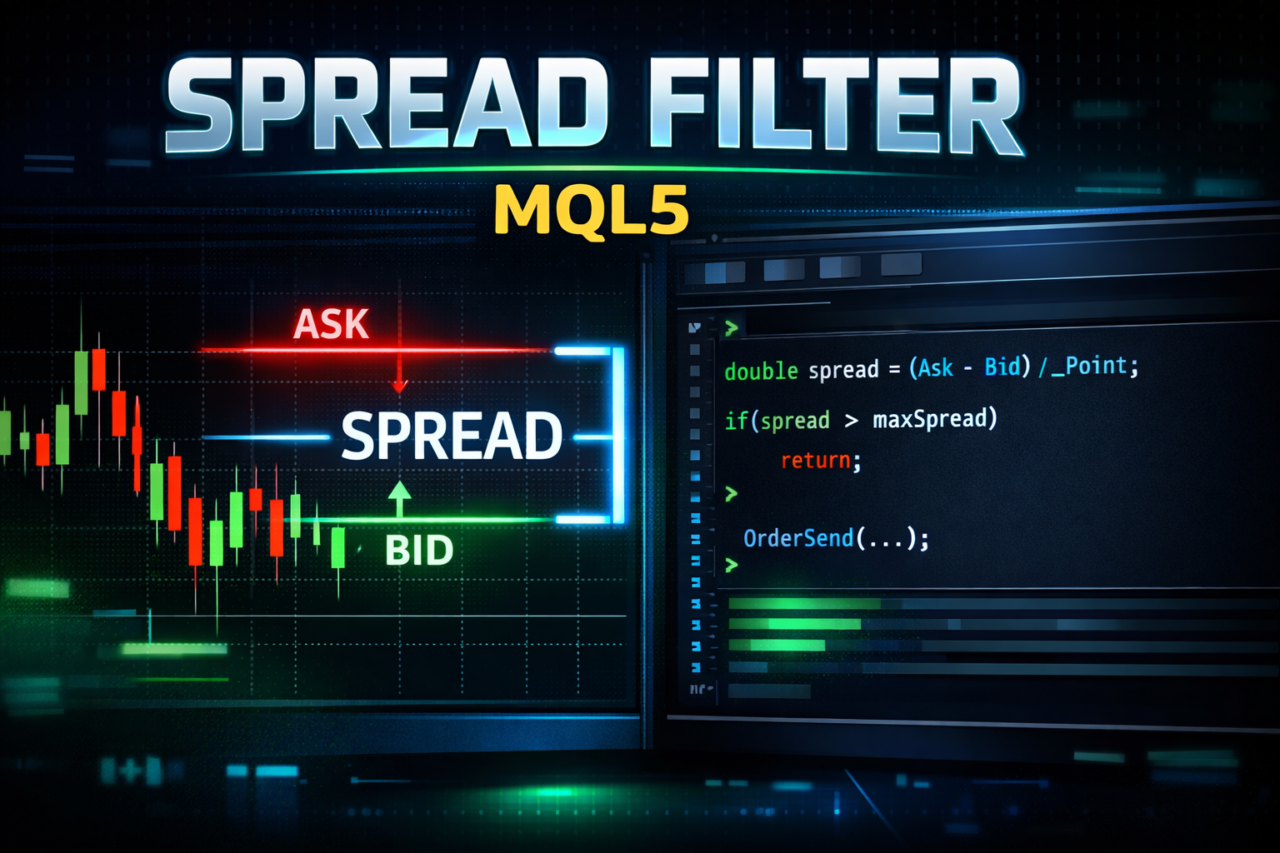
1. What Is an MQL5 Spread Filter?
Bottom line:
A spread filter is a condition that allows an order only when the current spread is at or below a set value. It is one of the most basic ways to control trading costs.
Definition:
The spread is the difference between the Bid price and the Ask price. It is a real cost that exists from the moment a trade is opened.
1.1 Definition of a Spread Filter
A spread filter is a conditional branch in an EA (Expert Advisor) that prevents entries under unfavorable market conditions.
In practical terms, the logic works like this:
- Small spread -> allow entry
- Wide spread -> block entry
This mechanism helps you avoid unnecessary costs and stabilize the expected value, or average profit, of your trades.
1.2 Why a Spread Filter Is Needed
The spread is not just a number. It is the initial loss of the trade itself.
For example:
- 2.0-pip spread -> -2.0 pips immediately after entry
- 0.5-pip spread -> -0.5 pips immediately after entry
In other words, if you enter while the spread is wide,
the same strategy can suffer a much worse win rate and profit margin.
Spreads often widen sharply in these situations:
- Economic news releases
- Right after the market opens, such as at the start of the week
- Low-liquidity periods, such as early morning or late night
For this reason, a spread filter becomes
an important control mechanism that automates the decision not to trade.
1.3 Related Terms for Beginners
To make the concept easier to understand, here are the related terms in simple form.
- spread
-> The difference between the buy price and sell price. It is a trading cost. - slippage
-> The difference between the requested order price and the actual execution price. - execution
-> The process in which an order is filled in the market. - order condition
-> A condition used to execute an entry, including filters.
1.4 Where a Spread Filter Fits in EA Design
Inside an EA, a spread filter is placed in this part of the flow:
Signal generation -> Filter (spread, etc.) -> Order execution
This filter layer is very important. Common examples include:
- Spread filter
- Time filter, such as trading hour restrictions
- Volatility filter, such as ATR
In short, a spread filter is
part of the preprocessing that affects the quality of an EA.
1.5 Common Misunderstandings and Mistakes
Here are the points where beginners often get stuck.
- Assuming the spread can be ignored
-> In live trading, it is one of the most important cost factors. - Assuming it is fine because the backtest looks good
-> Many testers use a fixed spread, which can differ from live conditions. - Thinking a filter always reduces profit
-> In practice, removing unnecessary trades can improve expected value.
1.6 Relationship With Other Methods
A spread filter is a form of pre-entry cost control.
- Spread filter -> controls cost before entry
- Slippage control -> handles price deviation during execution
Because these two have different roles, using them together is the standard approach.
2. How to Implement a Spread Filter in MQL5
Bottom line:
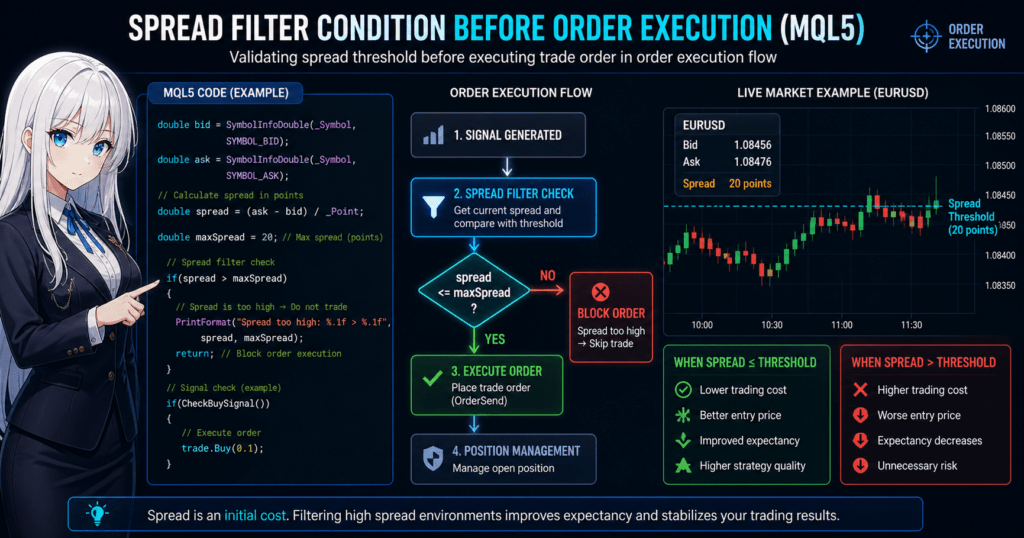
In MQL5, you can implement a spread filter by getting the current spread, comparing it with a threshold, and controlling execution before sending the order.
Definition:
Getting the spread means retrieving the current difference between Ask and Bid as a numeric value and using it in a conditional branch.
2.1 Overall Implementation Steps
You can implement it in four steps:
- 1. Get the current Bid / Ask
- 2. Calculate the spread
- 3. Compare it with the allowed spread threshold
- 4. Execute the order only if the condition is met
This structure is common to all EAs.
2.2 Basic Code for Getting the Spread
double bid = SymbolInfoDouble(_Symbol, SYMBOL_BID);
double ask = SymbolInfoDouble(_Symbol, SYMBOL_ASK);

// Spread in points
double spread = (ask - bid) / _Point;
Explanation: Key Points
_Symbol-> The current currency pair_Point-> The minimum price unit, such as 0.00001(ask - bid)-> The spread itself
Many brokers handle this in points, so
it is more practical to manage the filter by points rather than converting everything to pips.
2.3 Implementing the Filter Condition
double maxSpread = 20; // Allowed spread in points

if(spread > maxSpread)
{
    // Spread is too wide -> do not enter
    return;
}
Key Points
- Use
return;to stop the process and prevent unnecessary orders. - The threshold must be optimized for each strategy.
2.4 Practical EA Integration Example
void OnTick()
{
    double bid = SymbolInfoDouble(_Symbol, SYMBOL_BID);
    double ask = SymbolInfoDouble(_Symbol, SYMBOL_ASK);
    double spread = (ask - bid) / _Point;

    double maxSpread = 20;

    // Spread check
    if(spread > maxSpread)
        return;

    // Check the signal here, for example
    if(CheckBuySignal())
    {
        // Order processing
        trade.Buy(0.1);
    }
}
Practical Points
- Checking immediately before the order is important
-> The spread can change after the signal appears. - Evaluate it on every
OnTick()call to reflect the latest market state.
2.5 Common Mistakes and Fixes
1. Mistakes With Spread Units
- Bad: confusing pips and points
- Fix:
-> Calculate consistently with(_Point).
2. Using a Threshold That Is Too Fixed
- Bad: always using the same value, such as 20
- Problem: the best value differs by currency pair and time of day.
Fix:
- Set values by currency pair.
- Switch values by time period.
3. Gap Between Backtesting and Live Trading
- Bad: results look good in the tester but break in live trading.
- Cause: fixed spread assumptions.
Fix:
- Test with variable spreads.
- Validate with live account logs.
2.6 Why This Implementation Works
Because the spread is an entry cost,
the structure is as follows:
Net profit/loss = Strategy profit - Spread - Slippage
In other words:
- Wide spread
-> Higher initial loss
-> Worse breakeven point
Therefore,
removing these entries before execution can improve expected value.
2.7 Differences From Other Methods
- Spread filter
-> Cost control before entry - Slippage control
-> Control of price deviation during execution - Limit order
-> Attempts execution at a favorable price
Because each one has a different role, using them together is the standard approach.
3. How a Spread Filter Works and Why It Helps
Bottom line:
A spread filter improves expected value by controlling the initial cost. It optimizes the profit and loss structure itself, not simply the win rate.
Definition:
Expected value is the average profit per trade. It is determined by
(win rate x average profit) – (loss rate x average loss) – costs.
3.1 How the Spread Affects Trading
The spread is a hidden loss, but in practice it is a cost that is already locked in from the start.
Example:
- 1.0-pip spread -> starts at -1.0 pips
- 3.0-pip spread -> starts at -3.0 pips
This difference may look simple, but in live trading it has these effects:
- The distance to take profit (TP) becomes longer.
- The distance to stop loss (SL) becomes shorter.
- The impact is larger for short-term strategies.
This can be especially severe for scalping.
3.2 Understanding It Through Expected Value
The spread directly affects the expected value formula.
Expected value = Win rate x Average profit - Loss rate x Average loss - Spread
The important points are:
- The spread is always subtracted.
- It is one of the few elements you can control.
In other words:
It is a lever you can improve without changing the strategy itself.
3.3 How the Filter Improves Expected Value
When you add a spread filter, the following change occurs:
Before, Without the Filter
- Entries are taken on every signal.
- High-spread periods are included.
- Unnecessary losses increase.
After, With the Filter
- Entries are taken only under better conditions.
- High-cost environments are excluded.
- The number of trades decreases, but trade quality improves.
Result:
- Improved PF, or profit factor
- Reduced DD, or drawdown
- Better reproducibility
3.4 Why Profit Can Improve Even When Trade Count Drops
This is a common beginner misunderstanding.
Intuition:
- Fewer trades -> less profit
Reality:
- Removing unfavorable trades
-> higher average profit
In short:
Profit = Frequency x Quality
A spread filter is a method for improving quality.
3.5 Why Spreads Widen: Market Structure
Spreads are not random. They change based on market structure.
Main causes:
- Lower liquidity, meaning fewer orders
- Higher volatility, meaning sharper price movement
- Dealer risk management, meaning broker-side adjustment
Specific examples:
- During news -> spreads widen sharply
- Early morning -> lower liquidity widens spreads
For this reason,
the spread can be used as a risk signal.
3.6 Difference From Slippage
These two are often confused, so separate them clearly.
| Item | Spread | Slippage |
|---|---|---|
| When it occurs | Before entry | During execution |
| Nature | Fixed cost | Uncertain cost |
| Control method | Filter | Allowed deviation setting |
Bottom line:
Spread is prevention. Slippage is response.
3.7 Practical Use Cases
A spread filter is especially useful for:
- Scalping, or short-term trading
- Avoiding trades around economic releases
- Stabilizing an EA
On the other hand:
- Swing trading, or longer-term trading
-> the impact is relatively smaller.
Note that the importance changes depending on the strategy.
3.8 Common Misunderstandings
- “The spread depends on the broker, so I cannot control it.”
-> That is exactly why you need to control when you trade. - “The spread is constant.”
-> In practice, it changes. This is called a variable spread. - “It reduces profit.”
-> The main purpose is to reduce unnecessary losses.
4. Spread Filter Compared With Other Methods
Bottom line:
A spread filter focuses on removing entry cost before the trade. It has a different role from slippage control and time filters. Using them together is the expected design.
Definition:
The compared methods are groups of conditions, or filters, that control trade accuracy, safety, and cost.
4.1 Comparison of Major Filter Methods
The table below compares representative control methods used in practice.
| Method | Purpose | Timing | Main effect | Recommendation |
|---|---|---|---|---|
| Spread filter | Cost reduction | Before entry | Avoids unnecessary losses | 4/5 |
| Slippage control | Execution accuracy | During execution | Prevents unexpected losses | 4/5 |
| Time filter | Risk avoidance | Before entry | Avoids unstable periods | 4/5 |
| Volatility filter, such as ATR | Market state judgment | Before entry | Avoids abnormal markets | 3/5 |
| Limit order | Favorable price execution | At order placement | Reduces cost | 3/5 |
4.2 Spread vs. Slippage
These are the two most commonly confused concepts.
Spread Filter
- Fixed cost that always occurs
- Can be judged before entry
- Relatively easy to avoid
Slippage Control
- Uncertain cost that depends on conditions
- Occurs during execution
- Difficult to avoid completely
Practical conclusion:
- Spread -> remove it in advance
- Slippage -> control it within an allowed range
4.3 Spread vs. Time Filter
Characteristics of a Time Filter
- Excludes specific times, such as early morning or economic releases
- Simple and lightweight
Problems
- It does not check the actual spread condition.
- There may be cases where spreads are wide even during normally safe hours.
Advantage of a spread filter:
- It is based on the actual market state and execution environment.
- It allows more accurate judgment.
In practice:
Time filter + Spread filter
is the standard combination.
4.4 Spread vs. Volatility Filter
Volatility, Such as ATR
- Measures the size of price movement.
- Useful for judging trend or range conditions.
Difference
- Spread -> cost indicator
- Volatility -> market state indicator
In other words:
- Spread -> “Should we trade?”
- Volatility -> “Which strategy should we use?”
4.5 Spread vs. Limit Order
Limit Order
- Executes only at a specified price.
- Can effectively avoid paying an unfavorable spread.
Problems
- Risk of no execution, which creates opportunity loss
- Risk of missing a trend move
Advantage of a spread filter:
- It keeps execution opportunities available.
- It controls only the condition.
4.6 Recommended Practical Configuration
Design it as a combination rather than relying on a single method.
Basic Structure
Signal
|
Time filter
|
Spread filter
|
Slippage control
|
Order execution
Reasons
- Layered risk control
- Reduced dependence on one condition
- Better reproducibility
4.7 Common Design Mistakes
- Trying to solve everything with only a spread filter
- Ignoring slippage
- Using filters in the wrong order
Especially important:
A design that does not check the spread immediately before the order is risky.
4.8 Which Filter Should You Prioritize?
Here is a strategy-based view:
- Scalping -> spread is the top priority.
- Day trading -> spread plus time filter.
- Swing trading -> time and volatility are more important.
Key decision factors:
- Trading frequency
- Profit target size
- Required execution accuracy
5. Best Spread Filter Values and Practical Use Cases
Bottom line:
The best spread value is not fixed. It must be adjusted by currency pair, time of day, and strategy. A single universal setting is inefficient.
Definition:
The best value means the spread threshold that maximizes expected value, or profit minus cost.
5.1 Recommended Spread Guidelines
General guidelines in points:
| Currency pair | Recommended maximum spread |
|---|---|
| EURUSD | 10-20 |
| USDJPY | 10-20 |
| GBPJPY | 20-40 |
| XAUUSD, gold | 30-100 |
Note
- Values can differ greatly by broker and account type.
- ECN accounts are usually lower, while standard accounts are usually higher.
Bottom line:
Always collect logs in your own trading environment.
5.2 Best Settings by Strategy
Scalping, Very Short-Term Trading
- Recommended: strict, around 10-15
- Reason: cost has the largest impact.
The filter is essential.
Day Trading
- Recommended: moderate, around 15-30
- Reason: the profit target is larger, so some spread can be tolerated.
Swing Trading
- Recommended: looser, 30 or higher
- Reason: the spread has a relatively smaller impact.
5.3 Optimization by Time of Day
Spreads can change greatly depending on the time of day.
Risky Periods
- Early morning, when liquidity is low
- During economic releases
- At the start of the week
More Stable Periods
- London session
- New York session
Practical handling:
if(isHighRiskTime())
{
    maxSpread = 10;
}
else
{
    maxSpread = 20;
}
Key point:
Change the threshold dynamically by time period.
5.4 Adjustment by Currency Pair
Each currency pair has different characteristics.
Examples:
- EURUSD -> stable with a low spread
- GBPJPY -> higher volatility with a wider spread
Implementation example:
double maxSpread;

if(_Symbol == "EURUSD")
    maxSpread = 15;
else if(_Symbol == "GBPJPY")
    maxSpread = 30;
In practice, using an array or configuration file is recommended.
5.5 Dynamic Spread Filter, Advanced
This is a more advanced method.
Method
- Get the historical average spread.
- Compare it with the current value.
if(currentSpread > averageSpread * 1.5)
    return;
Advantages
- Adapts to market conditions.
- More accurate than a fixed value.
Disadvantages
- More complex implementation.
- Higher calculation cost.
5.6 Practical Use Cases
A spread filter is especially effective for:
- Stabilizing an EA, which is the most important use
- Scalping strategies
- Avoiding trades around economic releases
On the other hand:
- Long-term investing -> the effect is limited.
5.7 Common Mistakes and Improvements
1. Setting It Too Strictly
- Problem: fewer entry opportunities
- Fix: validate the best value with logs.
2. Setting It Too Loosely
- Problem: more unnecessary losses
- Fix: evaluate by PF and DD.
3. Trusting a Fixed Value Too Much
- Problem: it cannot adapt to market changes.
- Fix: use dynamic adjustment.
5.8 Basic Optimization Policy
Choose the best value based on:
- Maximizing PF, or profit factor
- Minimizing DD, or drawdown
- Balancing the number of trades
Do not optimize only for raw profit.
Evaluate by risk-adjusted return.
5.9 Practical Summary
- The spread is not fixed.
- The best value differs by strategy.
- Dynamic adjustment is the strongest approach.
6. Common Spread Filter Mistakes and Notes
Bottom line:
Adding a spread filter is not enough by itself. If you get the units, timing, or setting method wrong, it can work against you.
Definition:
A failure means a state where the filter is implemented but expected value does not improve, or becomes worse.
6.1 Unit Mistakes: Points vs. Pips
Problem
In MQL5, spreads are usually handled in points,
but beginners often confuse points with pips.
Example:
- 1 pip = 10 points for a 5-digit currency quote
Common mistake:
double maxSpread = 2; // Intended as pips, but actually 2 points
This means the filter will trigger almost all the time.
Fix
double maxSpread = 20; // Equivalent to about 2.0 pips for a 5-digit quote
Bottom line:
In MQL5, keep everything based on points.
6.2 Wrong Check Timing
Problem
This happens when the spread is checked only at signal generation.
Bad example:
if(CheckSignal())
{
    // Check only once here
}
Why It Is a Problem
- The spread can change after the signal occurs.
- The condition may no longer be valid at order execution.
Correct Design
// Check immediately before the order
if(spread > maxSpread)
    return;
Bottom line:
Always evaluate it immediately before the order.
6.3 Trusting a Fixed Value Too Much
Problem
Using the same spread value all the time:
double maxSpread = 20;
Why It Is a Problem
- Each currency pair has different characteristics.
- Spreads change greatly by time of day.
- Market conditions change.
Fix
- Set values by currency pair.
- Switch values by time period.
- Introduce a dynamic filter.
Bottom line:
A fixed value is fine for simple implementation, but it is often not enough for live trading.
6.4 Overreliance on Backtesting
Problem
This happens when decisions are made only from tester results.
Background
- Many testers use fixed spreads.
- Live trading uses variable spreads.
Impact
- Expected value can collapse in live trading.
- DD, or drawdown, can increase.
Fix
- Use variable-spread data.
- Validate with live account logs.
Bottom line:
Backtesting alone is not enough.
6.5 Judging Only by Spread
Problem
Entry decisions are made only from the spread.
What Gets Missed
- Slippage, or execution deviation
- Liquidity
- Volatility
Fix
Use a combined design:
Spread + Slippage + Time filter
Bottom line:
A single filter is fragile.
6.6 Filter Is Too Strict
Problem
- Entry opportunities drop sharply.
- Expected value can decrease.
Typical Example
- maxSpread = 5, which is overly strict
Fix
- Check the number of trades.
- Evaluate the balance with PF.
Bottom line:
The balance with opportunity loss is important.
6.7 Filter Is Too Loose
Problem
- Unnecessary trades increase.
- DD becomes worse.
Fix
- Analyze logs.
- Compare performance during high-spread periods.
Bottom line:
If the filter has no effect, the threshold may be too loose.
6.8 Not Taking Logs
Problem
- You cannot optimize the threshold.
- You cannot analyze the cause of poor results.
Fix
Print("Spread:", spread);
Recommended log items:
- Spread
- Whether entry was allowed
- Actual profit and loss
6.9 Practical Checklist
- Use points consistently.
- Check immediately before the order.
- Do not depend on a fixed value.
- Do not overtrust backtests.
- Use it together with other filters.
7. Frequently Asked Questions
Bottom line:
A spread filter is a simple conditional branch, but in live trading, its settings, units, and combined design can strongly affect results. This section answers the common questions.
Definition:
This FAQ summarizes concrete questions and answers that beginner to intermediate users often face during implementation and operation.
7.1 Is a Spread Filter Required?
A. It is not strictly required, but it is recommended for almost every EA.
In scalping especially, the spread directly reduces profit, so an EA without this filter may suffer a much worse expected value.
7.2 Should I Use Pips or Points for the Spread Unit?
A. In MQL5, using points consistently is the practical choice.
Because MQL5 works internally with points, using points helps prevent conversion mistakes.
7.3 What Is the Best Spread Value?
A. There is no fixed correct answer. It changes by currency pair, time of day, and strategy.
As rough guidelines:
- EURUSD: 10-20 points
- GBPJPY: 20-40 points
However, always collect logs in your own environment and optimize the value.
7.4 Is Backtesting Alone Enough?
A. No, it is not enough.
Many testers use fixed spreads, so they cannot fully reproduce the variable spreads of live trading.
Always confirm results with forward testing or live account logs.
7.5 Does a Wide Spread Always Cause a Loss?
A. Not always, but it puts the trade at a disadvantage.
The spread is an initial cost, so the wider it is, the farther the breakeven point becomes.
This is especially damaging for short-term trading.
7.6 Is a Spread Filter Enough by Itself?
A. No. Combining filters is the standard approach.
Recommended structure:
- Spread filter
- Slippage control
- Time filter
This can greatly improve stability.
7.7 Will a Stricter Filter Increase Profit?
A. Not always.
If the filter is too strict, entry opportunities decrease and profit may fall instead.
You need to judge the balance among PF, DD, and the number of trades.
7.8 Where Can I Check the Spread?
A. In MQL5, you can get it with the following code.
double spread = (SymbolInfoDouble(_Symbol, SYMBOL_ASK)
               - SymbolInfoDouble(_Symbol, SYMBOL_BID)) / _Point;
You can also check it in MT5 Market Watch.
7.9 How Can I Confirm the Effect of a Spread Filter?
A. The most reliable method is to compare results with the filter on and off.
- Backtest with the filter ON and OFF.
- Compare results in forward testing.
- Analyze profit and loss during high-spread periods.
Bottom line:
Make the decision based on data.