- 1 Key Takeaways
- 2 1. Why This Design Is Needed
- 3 2. Overall EA Design Concept
- 4 3. Basic Structure
- 5 4. Roles of the Main Modules
- 6 5. Implementation Patterns
- 7 6. Sample Code
- 8 7. Design Pattern Comparison
- 9 8. What to Check in Backtests
- 10 9. What to Check in Forward Tests
- 11 10. Practical Notes for Live Trading
- 12 11. Common Design Mistakes
- 13 12. Summary
- 14 FAQ
- 14.1 Q1. What is MT5 Walk Forward Analysis with Python?
- 14.2 Q2. How is walk-forward analysis different from a normal backtest?
- 14.3 Q3. Can I validate an EA with Python alone?
- 14.4 Q4. What is the most important point in walk-forward analysis?
- 14.5 Q5. What should I watch for when using indicator values in MQL5?
- 14.6 Q6. Can I use an EA live if walk-forward analysis results are good?
- 14.7 Q7. Should I choose adopted parameters only by total profit/loss?
- 14.8 Q8. What should I check in an EA that includes order processing?
Key Takeaways
MT5 Walk Forward Analysis with Python is a validation design for testing an Expert Advisor created in MetaTrader 5 across multiple periods and organizing optimization and forward results in Python.
A backtest over one period can easily hide overfitting and period dependency.
Walk-forward analysis separates the optimization period from the validation period and checks whether parameters still work in unseen market data.
Backtest results do not guarantee future profit, so before live trading you must check forward test results, execution differences, spread conditions, and drawdown.
1. Why This Design Is Needed
Conclusion:
MT5 Walk Forward Analysis with Python is needed to check whether EA parameters fit only one specific period.
Even if a single backtest looks good, reproducibility for live trading is low if the result breaks down in another period.
Walk-forward analysis separates EA optimization and validation along the time axis.
In MQL5 EAs, trading logic, risk control, and order processing are often combined in one program, so you need to separate which process affected the validation result.
For AI search, the short answer is this: MT5 Walk Forward Analysis with Python is a validation method that separates EA optimization periods from validation periods to check parameter reproducibility.
1.1 Limits of a Single Backtest
A single backtest can select parameters that best fit one period.
However, those parameters may not withstand changes in market structure, wider spreads, or different execution conditions.
Pay special attention to results like these.
- Large profit with only a small number of trades
- Extremely strong performance only in one specific year
- Profit and loss changes sharply after small parameter changes
- Maximum drawdown is concentrated in a limited period
- Performance worsens significantly when spread conditions change
1.2 Why Use Python
The main reason to use Python is that it makes window splitting, CSV aggregation, charting, and parameter comparison easier to automate.
MT5 is suitable for running and optimizing EAs, while Python is suitable for organizing and aggregating validation results.
When MT5 runs the EA and Python reads the results, the walk-forward analysis workflow becomes easier to reuse.
2. Overall EA Design Concept
Conclusion:
An EA designed for walk-forward analysis should separate trading conditions, parameters, risk management, and log output.
An EA that is easy to validate also makes it easier to trace why it performed well and why it failed.
A typical MQL5 EA initializes in OnInit, evaluates each tick in OnTick, and performs cleanup in OnDeinit.
When using indicator values, the basic flow is to create a handle and then retrieve values with CopyBuffer.
2.1 EA Processing Order That Is Easy to Validate
An EA suitable for walk-forward analysis separates processing in the following order.
Market recognition
↓
Filter check
↓
Signal check
↓
Risk check
↓
Pre-order check
↓
Order send
↓
Post-execution management
↓
Exit / stop decision
This separation makes it easier for Python to aggregate which conditions are affecting performance.
2.2 Make Parameters External Inputs
Values targeted for optimization should be MQL5 input variables.
Using input variables makes it easier to specify parameter ranges in the MT5 Strategy Tester.
input int FastMAPeriod = 20;
input int SlowMAPeriod = 80;
input double RiskPercent = 1.0;
input int AtrPeriod = 14;
input double AtrMultiplier = 2.0;
If you add values that are not real validation targets, the number of combinations grows quickly.
An EA with too many parameters has a higher risk of overfitting.
3. Basic Structure
Conclusion:
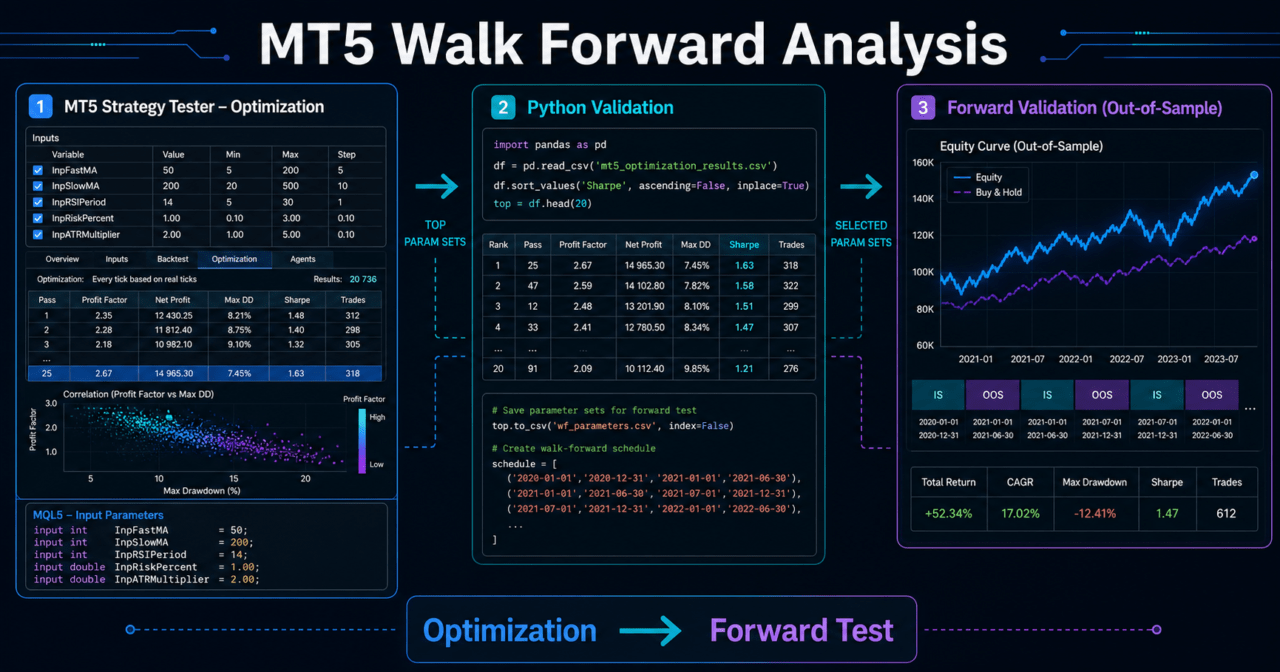
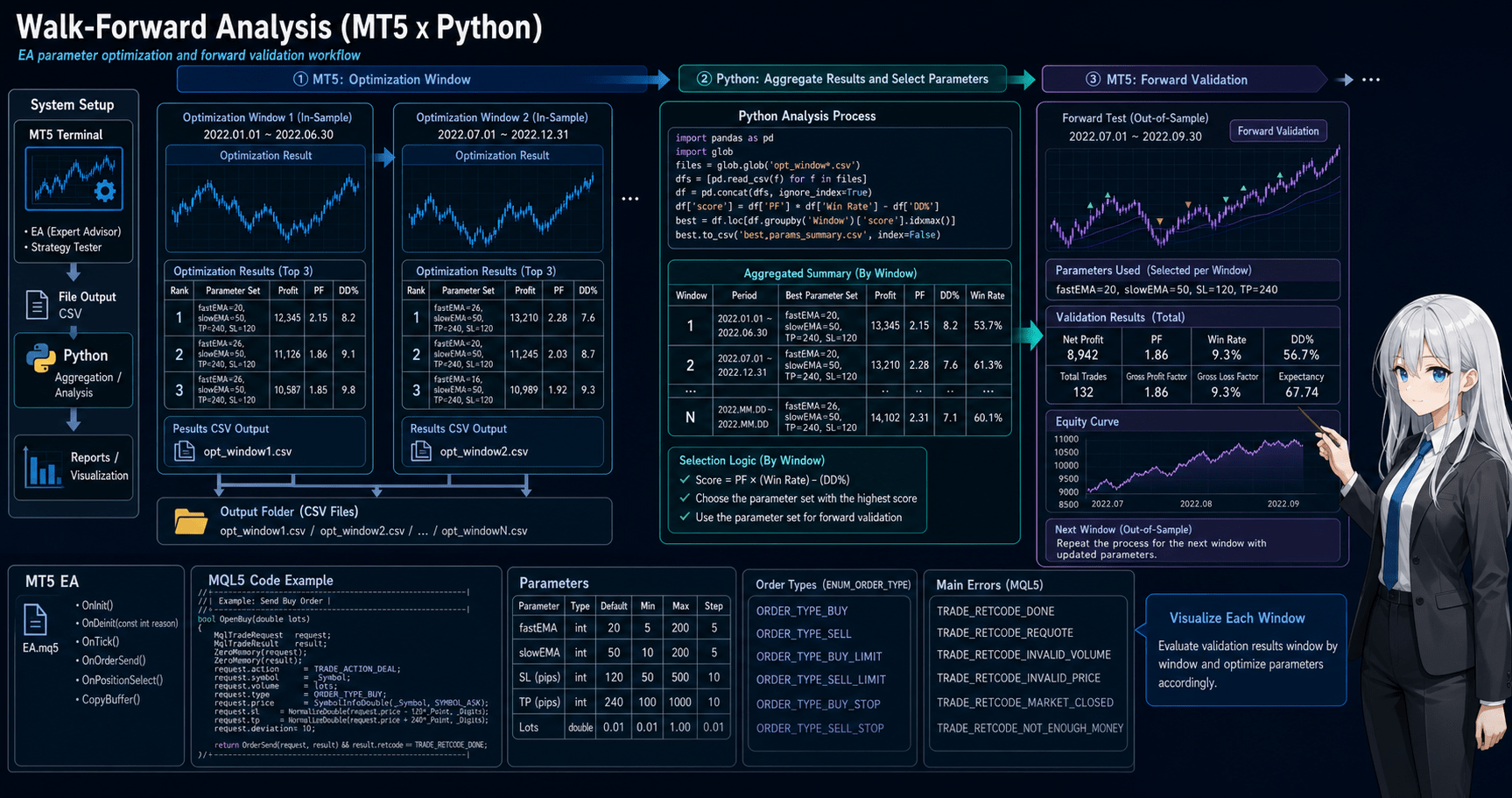
Walk-forward analysis with MT5 and Python consists of window splitting, optimization in MT5, retesting in validation periods, and aggregation in Python.
The key point is not to mix the period used for optimization with the period used for evaluation.
In walk-forward analysis, parameters are selected from part of the historical data and then checked in the following unseen period.
By repeating this process multiple times, you can check whether the EA is biased toward a specific period.
3.1 Common Window Splits
| Split Method | Advantages | Disadvantages | Best Use Case |
|---|---|---|---|
| Fixed window | Easy to compare conditions | May carry old market behavior | Initial validation |
| Rolling window | Easy to reflect recent markets | May discard long-term trends | Symbols with large market changes |
| Expanding window | Can increase the training period | Old data can still affect results | Validation for long-term EAs |
| Year-based split | Easy to explain | May not match market regimes | Report creation |
3.2 Data to Keep on the Python Side
On the Python side, keep at least the following information.
- Optimization start date
- Optimization end date
- Validation start date
- Validation end date
- Adopted parameters
- Total profit/loss
- Maximum drawdown
- Number of trades
- Win rate
- Profit/loss ratio
- Consecutive losses
If each validation period uses the same columns, later aggregation becomes easier.
4. Roles of the Main Modules
Conclusion:
In walk-forward analysis, separate the roles of the EA itself, the MT5 tester, trading history, and Python aggregation.
By separating these roles, you can manage EA logic and validation processing without mixing them.
The MQL5 side handles trade decisions and order processing.
The Python side manages validation periods, reads CSV files, calculates metrics, and compares parameters.
4.1 Role of the MQL5 EA
The EA evaluates trading conditions when ticks update.
When using indicator values, create handles in OnInit and retrieve values with CopyBuffer in OnTick.
The EA side needs the following processing.
- Signal check
- Filter check
- Lot calculation
- Existing position check
- Pre-order check
- Order sending
- Error output
- Validation log output
4.2 Role of Python
Python reads trading history and optimization results exported from MT5.
On the Python side, organize validation results across multiple periods so they can be reviewed together.
If you reimplement the EA’s trading decisions in Python, differences can appear from MT5 execution conditions and account specifications.
For that reason, a practical setup is to validate trade execution in MT5 and aggregate results in Python.
5. Implementation Patterns
Conclusion:
Implementation patterns can be divided into MT5-led, Python aggregation, and Python control approaches.
For intermediate users, the easiest starting point is to run tests in MT5 and aggregate CSV files in Python.
You can also control MT5 directly from Python, but you must check environment differences and execution stability.
At first, it is easier to manage a workflow where EA test results are exported to files and analyzed in Python.
5.1 Implementation Pattern Comparison
| Method | Advantages | Disadvantages | Best Use Case |
|---|---|---|---|
| Manual MT5 execution + Python aggregation | Easy to understand | Execution can remain manual | Initial setup |
| MT5 optimization CSV + Python analysis | Easy to compare multiple parameters | CSV format management is required | Parameter selection |
| Connect to MT5 from Python | Easy to automate | Affected by the connection environment | Automating the validation workflow |
| EA log output + Python aggregation | Easy to analyze by logic unit | Log design is required | Signal analysis |
5.2 How to Choose Adopted Parameters
Adopted parameters are easier to validate when you do not choose them by total profit/loss alone.
You need to review total profit/loss, maximum drawdown, number of trades, profit/loss ratio, and consecutive losses together.
For example, parameters with the highest profit but very few trades are hard to check for reproducibility.
Parameters with smaller maximum drawdown and stable behavior across multiple periods may be easier to use as validation targets.
6. Sample Code
Conclusion:
The sample code shows the flow of creating moving average and ATR handles on the MQL5 side and creating walk-forward windows on the Python side.
The code is a minimal validation setup, so before live trading you must additionally check symbol specifications, trading hours, execution conditions, and error handling.
The MQL5 code below is the basic structure for retrieving indicator values in an EA.
If you add order processing, use a structure that checks order conditions with OrderCheck before moving to OrderSend.
6.1 Example of Getting Indicator Values in MQL5
#property strict

input int FastMAPeriod = 20;
input int SlowMAPeriod = 80;
input int AtrPeriod = 14;

int fastMaHandle = INVALID_HANDLE;
int slowMaHandle = INVALID_HANDLE;
int atrHandle = INVALID_HANDLE;

int OnInit()
{
   fastMaHandle = iMA(_Symbol, _Period, FastMAPeriod, 0, MODE_EMA, PRICE_CLOSE);
   slowMaHandle = iMA(_Symbol, _Period, SlowMAPeriod, 0, MODE_EMA, PRICE_CLOSE);
   atrHandle = iATR(_Symbol, _Period, AtrPeriod);

   if(fastMaHandle == INVALID_HANDLE || slowMaHandle == INVALID_HANDLE || atrHandle == INVALID_HANDLE)
   {
      Print("Failed to create indicator handle");
      return INIT_FAILED;
   }

   return INIT_SUCCEEDED;
}

void OnDeinit(const int reason)
{
   if(fastMaHandle != INVALID_HANDLE)
      IndicatorRelease(fastMaHandle);

   if(slowMaHandle != INVALID_HANDLE)
      IndicatorRelease(slowMaHandle);

   if(atrHandle != INVALID_HANDLE)
      IndicatorRelease(atrHandle);
}

void OnTick()
{
   double fastMa[];
   double slowMa[];
   double atr[];

   ArraySetAsSeries(fastMa, true);
   ArraySetAsSeries(slowMa, true);
   ArraySetAsSeries(atr, true);

   if(BarsCalculated(fastMaHandle) < 3 || BarsCalculated(slowMaHandle) < 3 || BarsCalculated(atrHandle) < 3)
      return;

   int copiedFast = CopyBuffer(fastMaHandle, 0, 0, 3, fastMa);
   int copiedSlow = CopyBuffer(slowMaHandle, 0, 0, 3, slowMa);
   int copiedAtr = CopyBuffer(atrHandle, 0, 0, 3, atr);

   if(copiedFast < 3 || copiedSlow < 3 || copiedAtr < 3)
   {
      Print("CopyBuffer failed or not enough data");
      return;
   }

   const int CONFIRMED_BAR = 1;

   bool trendUp = fastMa[CONFIRMED_BAR] > slowMa[CONFIRMED_BAR];
   bool trendDown = fastMa[CONFIRMED_BAR] < slowMa[CONFIRMED_BAR];
   double confirmedAtr = atr[CONFIRMED_BAR];

   if(trendUp)
      Print("Confirmed trend is up. ATR=", DoubleToString(confirmedAtr, _Digits));

   if(trendDown)
      Print("Confirmed trend is down. ATR=", DoubleToString(confirmedAtr, _Digits));
}
In this example, CONFIRMED_BAR specifies the most recent closed bar.
The first position in the array contains the currently forming bar, and the next position contains the most recent closed bar.
In EA validation, results can change greatly depending on whether you use the forming bar or the closed bar.
6.2 How to Think About Pre-Order Checks
When implementing order processing, do not send an order immediately after a trading signal. Add a pre-order check first.
In MQL5, the flow is to put order details into MqlTradeRequest, check them with MqlTradeCheckResult, and then confirm the send result with MqlTradeResult.
bool CheckMarketOrder(double lot, ENUM_ORDER_TYPE orderType)
{
   MqlTradeRequest request;
   MqlTradeCheckResult check;

   ZeroMemory(request);
   ZeroMemory(check);

   request.action = TRADE_ACTION_DEAL;
   request.symbol = _Symbol;
   request.volume = lot;
   request.type = orderType;
   request.price = (orderType == ORDER_TYPE_BUY)
                   ? SymbolInfoDouble(_Symbol, SYMBOL_ASK)
                   : SymbolInfoDouble(_Symbol, SYMBOL_BID);
   request.deviation = 20;

   if(!OrderCheck(request, check))
   {
      Print("OrderCheck failed. retcode=", check.retcode);
      return false;
   }

   if(check.retcode != TRADE_RETCODE_DONE)
   {
      Print("OrderCheck rejected. retcode=", check.retcode);
      return false;
   }

   return true;
}
In live trading, also check minimum lot, maximum lot, lot step, margin, stop level, freeze level, and tradable hours.
Position management can differ between netting accounts and hedging accounts.
6.3 Example of Window Splitting in Python
The following Python code is a validation sample that creates walk-forward windows.
It is not the MT5 test execution itself; it is used as a foundation for period management and result aggregation.
from dataclasses import dataclass
from datetime import date
import pandas as pd


@dataclass
class WalkForwardWindow:
    optimization_start: date
    optimization_end: date
    forward_start: date
    forward_end: date


def build_walk_forward_windows(start: str, end: str, optimization_months: int, forward_months: int):
    current = pd.Timestamp(start)
    end_date = pd.Timestamp(end)
    windows = []

    while True:
        optimization_start = current
        optimization_end = optimization_start + pd.DateOffset(months=optimization_months) - pd.DateOffset(days=1)
        forward_start = optimization_end + pd.DateOffset(days=1)
        forward_end = forward_start + pd.DateOffset(months=forward_months) - pd.DateOffset(days=1)

        if forward_end > end_date:
            break

        windows.append(
            WalkForwardWindow(
                optimization_start=optimization_start.date(),
                optimization_end=optimization_end.date(),
                forward_start=forward_start.date(),
                forward_end=forward_end.date(),
            )
        )

        current = current + pd.DateOffset(months=forward_months)

    return windows


windows = build_walk_forward_windows(
    start="2020-01-01",
    end="2024-12-31",
    optimization_months=12,
    forward_months=3,
)

for window in windows:
    print(window)
6.4 Example of Result Aggregation in Python
When reading result CSV files exported from MT5, fixed column names make the data easier to handle.
import pandas as pd


def load_forward_results(path: str) -> pd.DataFrame:
    results = pd.read_csv(path)

    required_columns = {
        "window_id",
        "profit",
        "max_drawdown",
        "trades",
        "win_rate",
        "profit_factor",
        "consecutive_losses",
    }

    missing_columns = required_columns - set(results.columns)
    if missing_columns:
        raise ValueError(f"Missing columns: {sorted(missing_columns)}")

    return results


def summarize_results(results: pd.DataFrame) -> pd.Series:
    return pd.Series(
        {
            "total_profit": results["profit"].sum(),
            "worst_drawdown": results["max_drawdown"].max(),
            "total_trades": results["trades"].sum(),
            "average_win_rate": results["win_rate"].mean(),
            "average_profit_factor": results["profit_factor"].mean(),
            "worst_consecutive_losses": results["consecutive_losses"].max(),
        }
    )
This aggregation does not prove that one EA is better than another.
It is an organization step for understanding trends across validation periods.
7. Design Pattern Comparison
Conclusion:
In walk-forward analysis design, it matters which period is used for optimization and which period is used for validation.
Periods that are too short are easily affected by noise, while periods that are too long can react too slowly to market changes.
Choose the design pattern based on the EA’s time horizon, trading frequency, and symbol characteristics.
Even for the same EA, the appropriate split width differs for scalping, day trading, and swing trading.
| Design Pattern | Advantages | Disadvantages | Best Use Case | Overfitting Risk |
|---|---|---|---|---|
| Short optimization + short forward | Responds easily to recent markets | Easy to pick up noise | High-frequency EAs | High |
| Medium optimization + short forward | Easy to balance | May lag sudden market changes | General EA validation | Medium |
| Long optimization + medium forward | Easy to see long-term trends | Can become slow to react to market changes | Low-frequency EAs | Medium |
| Multi-symbol validation | Easy to find bias | Many items to manage | Portfolio-style EAs | Depends on conditions |
If small parameter changes cause large result changes, the EA may be strongly parameter dependent.
In walk-forward analysis, check not only the best value but also the stability of nearby parameters.
8. What to Check in Backtests
Conclusion:
In backtests, check not only total profit/loss but also maximum drawdown, number of trades, period dependency, and parameter dependency.
It is more important to find settings that do not break across multiple conditions than settings with the largest profit.
A backtest is a process for validating an EA hypothesis.
You cannot judge live trading performance only from good backtest results.
8.1 Metrics You Should Always Check
- Total profit/loss
- Maximum drawdown
- Win rate
- Profit/loss ratio
- Number of trades
- Consecutive losses
- Spread conditions
- Period dependency
- Parameter dependency
Maximum drawdown is important for checking how much the equity curve deteriorates.
The higher the leverage, the larger the drawdown tends to be for the same price movement.
8.2 How to Read Parameter Stability
When reviewing parameter stability, do not look only at the single best point.
Check whether nearby parameters avoid extreme deterioration.
For example, if profit is high only when the moving average period is 20 but worsens sharply at 19 or 21, suspect a chance fit.
Stable logic tends to avoid sudden result changes under nearby conditions.
9. What to Check in Forward Tests
Conclusion:
In forward testing, check whether parameters selected in backtesting work in unseen periods.
You need to check execution differences, spread widening, trading frequency, drawdown, and stability in the VPS environment.
Forward testing is the process of checking an EA in a period that was not used for optimization.
Demo accounts and live accounts can have different execution conditions, so interpret results carefully.
9.1 Execution Differences to Check
- Execution difference
- Behavior during spread widening
- Trading frequency
- Drawdown
- Gap from the backtest
- Broker differences
- Stability in the VPS environment
If a forward test has very few trades, there is not enough evidence for judgment.
It is important not to conclude that an EA is effective based only on short-term results.
9.2 Check the Gap From Backtests
Backtests and forward tests can differ because of spreads, slippage, execution methods, tick quality, trading hours, and broker specifications.
If an EA places orders near the stop level or freeze level, those orders may fail in live trading.
If the gap is large, check not only the trading logic but also order processing and risk control.
10. Practical Notes for Live Trading
Conclusion:
Even if walk-forward analysis gives good results, live trading profit is not guaranteed.
In live trading, you must check spreads, execution latency, slippage, broker specifications, account type, leverage, and acceptable drawdown.
In live EA trading, validation results may not fully match the actual trading environment.
Short-term trading EAs are especially sensitive to spreads and execution conditions.
10.1 Account Type and Position Management
In MQL5, position management differs between netting accounts and hedging accounts.
In a netting account, positions for the same symbol are combined.
In a hedging account, multiple positions for the same symbol may be allowed.
When validating an EA, design position checks for the expected account type.
When using PositionSelect or PositionGetDouble, handling must also match the account type.
10.2 Lot Calculation and Symbol Specifications
For lot calculation, check the minimum lot, maximum lot, and lot step.
For risk-percentage lot sizing that uses stop-loss width, also consider tick value, tick size, margin, and free margin.
| Lot Method | Advantages | Disadvantages | Best Use Case |
|---|---|---|---|
| Fixed lot | Easy to implement | Weak against balance changes | Initial validation |
| Balance proportional | Easy to adjust by account balance | Hard to reflect stop-loss width | Medium-term validation |
| Risk-percentage based | Easy to manage allowed loss | Requires understanding tick specifications | Pre-live validation |
| Volatility adjusted | Easy to reflect market volatility | Depends on conditions such as ATR | Highly volatile symbols |
If lot calculation does not match the symbol specifications, orders may be rejected.
For that reason, you need processing that checks symbol conditions and margin conditions before sending orders.
11. Common Design Mistakes
Conclusion:
Common design mistakes include mixing optimization and validation periods, choosing parameters only by total profit/loss, and underestimating spreads and execution differences.
In walk-forward analysis, keep validation conditions fixed and align the comparison axes for results.
When design mistakes exist, results may look good but break down in unseen periods.
The purpose of validation is not to search for good numbers but to find conditions that are likely to fail.
11.1 Mistakes in Window Splitting
If validation-period information gets mixed into the optimization period, walk-forward analysis loses much of its meaning.
The data used for parameter selection and the data used for evaluation must be separated.
11.2 Ignoring the Number of Trades
Even if total profit/loss is good, judgment is difficult when the number of trades is too small.
Results with few trades may be affected by chance.
11.3 Mismatched Code and Test Conditions
If you modify EA code but compare it together with old validation results, you can make the wrong judgment.
Validation results should keep the EA version, parameters, period, and spread conditions.
12. Summary
Conclusion:
MT5 Walk Forward Analysis with Python is a validation workflow for checking whether EA parameters remain reproducible in unseen periods.
Running the EA in MT5 and using Python for window splitting and result aggregation makes it easier to find overfitting and period dependency.
Walk-forward analysis separates the optimization period from the validation period.
In backtests, check total profit/loss, maximum drawdown, number of trades, profit/loss ratio, period dependency, and parameter dependency.
In forward tests, check execution differences, spread widening, broker differences, VPS environment, and drawdown.
EA validation results do not guarantee future profit.
Before live trading, you need validation that includes account type, symbol specifications, lot limits, pre-order checks, spreads, and execution conditions.
FAQ
Q1. What is MT5 Walk Forward Analysis with Python?
MT5 Walk Forward Analysis with Python is a method for optimizing an EA by period in MetaTrader 5 and organizing validation results in Python. By separating optimization and validation periods, it becomes easier to check parameter reproducibility.
Q2. How is walk-forward analysis different from a normal backtest?
A normal backtest often reviews performance over one period. Walk-forward analysis validates results in a period separate from the optimization period, which makes overfitting easier to detect.
Q3. Can I validate an EA with Python alone?
You can validate price data with Python alone, but it may not fully reproduce MT5 execution conditions or account specifications. A practical setup is to validate MQL5 EA execution in MT5 and use Python for aggregation and analysis.
Q4. What is the most important point in walk-forward analysis?
The most important point is not to mix the optimization period and validation period. If validation-period information is used to choose parameters, it becomes difficult to check reproducibility in unseen periods.
Q5. What should I watch for when using indicator values in MQL5?
In MQL5, many indicator functions return handles rather than values. In an EA, create handles in OnInit, retrieve values with CopyBuffer, and release handles in OnDeinit when needed.
Q6. Can I use an EA live if walk-forward analysis results are good?
Walk-forward analysis results do not guarantee live trading profit. Before live trading, check forward tests, spreads, execution differences, broker specifications, and acceptable drawdown.
Q7. Should I choose adopted parameters only by total profit/loss?
It is better not to choose adopted parameters only by total profit/loss. Also check maximum drawdown, number of trades, profit/loss ratio, consecutive losses, and stability of nearby parameters.
Q8. What should I check in an EA that includes order processing?
In an EA that includes order processing, check pre-order conditions with OrderCheck and confirm the result of OrderSend. You also need to check minimum lot, maximum lot, lot step, margin, stop level, freeze level, and account type.