- 1 1. What Is ArrayResize in MQL5?
- 2 2. Basic Use of ArrayResize: Implementing Array Size Changes
- 3 3. The Third Argument of ArrayResize, reserve_size, and Performance Optimization
- 4 4. Relationship Between ArrayResize and ArraySize: Safe Array Management
- 5 5. Practical ArrayResize Code: Common Patterns in EA Development
- 6 6. Common Errors When Using ArrayResize and How to Fix Them
- 6.1 6.1 Cause of the “array out of range” error
- 6.2 6.2 Error caused by using an array before allocating its size
- 6.3 6.3 Errors caused by loop condition mistakes
- 6.4 6.4 Error from using ArrayResize with a static array
- 6.5 6.5 Cases where ArrayResize fails
- 6.6 6.6 Memory problems caused by reserve_size
- 6.7 6.7 Basic rules to prevent errors
- 7 7. Frequently Asked Questions About MQL5 ArrayResize
- 7.1 7.1 What is ArrayResize?
- 7.2 7.2 Can ArrayResize be used with static arrays?
- 7.3 7.3 What happens when you make an array smaller with ArrayResize?
- 7.4 7.4 What is the return value of ArrayResize?
- 7.5 7.5 What is reserve_size?
- 7.6 7.6 What is the difference between ArrayResize and ArraySize?
- 7.7 7.7 What causes the “array out of range” error?
- 7.8 7.8 How do you add an element to an array?
1. What Is ArrayResize in MQL5?
1.1 The role of ArrayResize
ArrayResize is a function used to change the size, or number of elements, of an array in MQL5.
In MQL5, the amount of data often changes while a program is running, so the language provides a way to resize arrays dynamically.
An array is a data structure that stores values of the same type in a continuous sequence.
For example, arrays are used to store price data, indicator values, trade history, and similar data as a group.
MQL5 has two main types of arrays.
| Type | Characteristics |
|---|---|
| Static array | Fixed size; it cannot be changed while the program is running |
| Dynamic array | Its size can be changed |
ArrayResize can be used only with dynamic arrays.
For example, consider the following code.
double data[];
This array is a dynamic array whose size has not been defined yet.
At this point, no elements have been allocated, so you specify the size with ArrayResize as follows.
ArrayResize(data,10);
This makes the data array an array with 10 elements.
data[0]
data[1]
data[2]
...
data[9]
In this way, ArrayResize is used to:
- allocate memory for an array
- expand an array size
- shrink an array size
It is used especially often in EAs, or automated trading programs, and indicators for tasks such as:
- storing calculated indicator results
- storing data from CopyBuffer
- saving Tick data
- managing trade history in arrays
In short, ArrayResize is a basic function for array management in MQL5.
1.2 When array resizing is needed in MQL5
MQL5 programs often include processes where the number of data items changes during execution.
Because of that, array sizes often need to be changed dynamically.
Here are some common examples.
1. Getting indicator data
When you get technical indicator values, it is common to store them in an array.
Example: getting moving average values
double ma[];

ArrayResize(ma,100);
CopyBuffer(handle,0,0,100,ma);
In this case, the process is:
- get 100 bars of indicator data
- store the data in the array
2. Saving Tick data
In an EA, you may save data on each Tick, or price update.
double ticks[];

ArrayResize(ticks,count+1);
ticks[count] = SymbolInfoDouble(_Symbol,SYMBOL_BID);
As shown here, the array must be expanded each time the amount of data increases.
3. Saving trade history
When an EA analyzes trading results statistically, trade history may be stored in arrays.
Examples:
- profit history
- entry prices
- close prices
double profits[];

ArrayResize(profits,total_trades);
A common beginner stumbling point
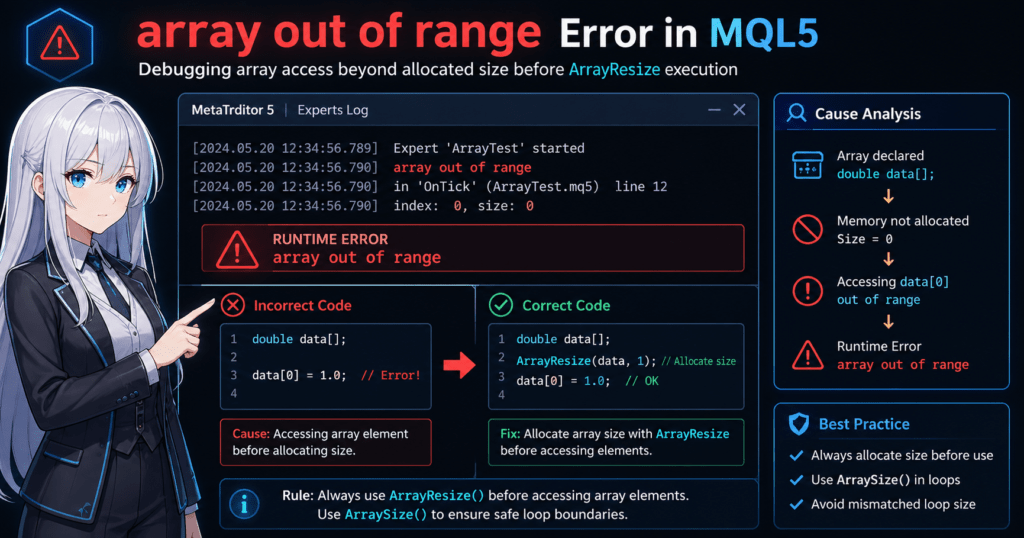
One of the common errors in MQL5 is:
array out of range
This occurs when you access an index that is larger than the allocated array size.
Example:
double data[];

data[0] = 1.0;
This code causes an error.
The reason is that the array size has not been allocated with ArrayResize.
The correct code is:
double data[];

ArrayResize(data,1);
data[0] = 1.0;
The key point is:
You must call ArrayResize before putting data into an array.
1.3 Basic syntax of ArrayResize
The basic syntax of ArrayResize is:
int ArrayResize(
   void& array[],
   int new_size,
   int reserve_size=0
);
Each argument has the following meaning.
| Argument | Description |
|---|---|
| array | The array to resize |
| new_size | The new array size |
| reserve_size | Additional memory reservation; optional |
Basic usage example
double prices[];

ArrayResize(prices,10);
This means:
- the size of the prices array is 10
- the indexes are 0 through 9
Return value: important
ArrayResize is a function that returns a value.
| Return value | Meaning |
|---|---|
| New array size | Success |
| -1 | Failure |
When writing safe code, it is recommended to check the return value.
if(ArrayResize(prices,10) < 0)
{
   Print("Array resize failed");
}
Common beginner mistakes
1. Using ArrayResize with a static array
double data[10];

ArrayResize(data,20);  // Error
A static array cannot be resized.
2. Accessing an array before allocating its size
double arr[];

arr[0] = 1.0;  // Error
You must use:
ArrayResize(arr,1);
3. Losing data when shrinking the size
ArrayResize(arr,5);
In this case, elements such as:
arr[5]
arr[6]
arr[7]
are removed.
2. Basic Use of ArrayResize: Implementing Array Size Changes
2.1 Basic ArrayResize code
ArrayResize is a function used to change the number of elements in a dynamic array.
In MQL5, memory is not allocated just because you declare an array, so you must set the size with ArrayResize before using it.
The basic usage is:
double data[];

ArrayResize(data,5);
This code means:
| Item | Description |
|---|---|
| data[] | Dynamic array |
| ArrayResize(data,5) | Creates an array with 5 elements |
The array indexes then become:
data[0]
data[1]
data[2]
data[3]
data[4]
After that, you can store values in the array.
double data[];

ArrayResize(data,5);

data[0] = 1.0;
data[1] = 2.0;
data[2] = 3.0;
data[3] = 4.0;
data[4] = 5.0;
2.2 How to expand an array size
ArrayResize can also expand an existing array by increasing the number of elements.
For example, look at this code.
double data[];

ArrayResize(data,3);

data[0] = 10;
data[1] = 20;
data[2] = 30;

ArrayResize(data,5);
In this case, the result is:
data[0] = 10
data[1] = 20
data[2] = 30
data[3] = 0
data[4] = 0
The important points are:
- existing data is preserved
- new elements are set to their initial value, usually 0
For numeric arrays, new elements are usually initialized to 0.
2.3 How to shrink an array size
ArrayResize can also make an array smaller by reducing its size.
double data[];

ArrayResize(data,5);

data[0] = 10;
data[1] = 20;
data[2] = 30;
data[3] = 40;
data[4] = 50;

ArrayResize(data,3);
In this case, the array becomes:
data[0] = 10
data[1] = 20
data[2] = 30
The following data is deleted:
data[3]
data[4]
In other words:
When you shrink an array with ArrayResize, the removed data cannot be restored.
Because of that, be careful when handling important data.
2.4 Practical example with loop processing
ArrayResize is very often used together with loops.
For example, you may store a fixed amount of data in an array.
double prices[];

ArrayResize(prices,10);

for(int i=0;i<10;i++)
{
   prices[i] = i * 1.5;
}
This code does the following:
- sets the array size to 10
- assigns values in a loop
Result:
prices[0] = 0
prices[1] = 1.5
prices[2] = 3.0
prices[3] = 4.5
...
By allocating the array size first, the loop can run safely.
2.5 Common beginner mistakes
Here are common points where beginners get stuck when using ArrayResize.
Mistake 1: Assigning a value without allocating the array size
The following code causes an error.
double data[];

data[0] = 10;
Reason:
array out of range
This error occurs.
Correct code:
double data[];

ArrayResize(data,1);
data[0] = 10;
Mistake 2: The loop size and array size do not match
double data[];

ArrayResize(data,5);

for(int i=0;i<10;i++)
{
   data[i] = i;
}
In this case, the code tries to access:
data[5]
data[6]
data[7]
data[8]
data[9]
so an error occurs.
Safe code:
for(int i=0;i<ArraySize(data);i++)
{
   data[i] = i;
}
ArraySize() is a function that gets the number of elements in an array.
Mistake 3: Using ArrayResize with a static array
The following code is an error.
double data[10];

ArrayResize(data,20);
Reason:
A static array cannot be resized.
2.6 Basic rules when using ArrayResize
Here are the basic rules for using it safely.
1. Always call ArrayResize before using an array
ArrayResize(array,size);
2. Use ArraySize in loops
for(int i=0;i<ArraySize(array);i++)
3. It cannot be used with static arrays
double data[];
A declaration like this is required.
3. The Third Argument of ArrayResize, reserve_size, and Performance Optimization
3.1 What is reserve_size?
ArrayResize has an optional third argument called reserve_size.
This is a parameter used to reserve additional memory in advance when the array is expanded.
The basic syntax is:
int ArrayResize(
   void& array[],
   int new_size,
   int reserve_size = 0
);
The arguments can be summarized as follows.
| Argument | Description |
|---|---|
| array | The array to resize |
| new_size | The new array size |
| reserve_size | Additional memory to reserve; optional |
Normal usage:
double data[];

ArrayResize(data,100);
Using reserve_size:
double data[];

ArrayResize(data,100,1000);
With this code:
- actual array size: 100
- internally reserved memory: about 1100 elements
In other words, reserve_size is:
a mechanism for reserving memory in advance for future array expansion.
3.2 Why reserve_size is needed
When you change an array size frequently, memory reallocation occurs.
Memory reallocation involves the following steps.
- allocate new memory
- copy existing data
- release old memory
This process has a relatively high CPU cost, so if it happens frequently, it may affect EA performance.
Consider the following code.
double ticks[];

for(int i=0;i<10000;i++)
{
   ArrayResize(ticks,i+1);
   ticks[i] = i;
}
In this code, there may be:
- 10000 calls to ArrayResize
- 10000 memory reallocations
As a result, you may see:
- slower processing speed
- higher memory load
3.3 Optimization example using reserve_size
The previous code can be improved with reserve_size as follows.
double ticks[];

ArrayResize(ticks,1,10000);

for(int i=0;i<10000;i++)
{
   ArrayResize(ticks,i+1);
   ticks[i] = i;
}
With this code:
- memory for 10000 elements is reserved at the beginning
- memory reallocation is less likely during later expansions
As a result, it can help:
- reduce the number of memory reallocations
- improve EA processing speed
Using reserve_size is especially recommended in the following cases.
| Case | Reason |
|---|---|
| Saving Tick data | The number of data items continues to grow |
| Collecting logs | The array is expanded frequently |
| Saving trade history | The number of data items can often be estimated |
| Backtest data | Large amounts of data are handled |
3.4 Notes when using reserve_size
reserve_size is useful, but if used incorrectly, it can cause wasted memory consumption.
For example:
double data[];

ArrayResize(data,10,1000000);
In this case:
- actual data: 10 elements
- reserved memory: 1,000,000 elements
This consumes a large amount of memory.
Be especially careful on VPS environments or low-spec machines.
3.5 Common beginner mistakes
1. Misunderstanding reserve_size
A common beginner misunderstanding is:
reserve_size = array size
In reality:
reserve_size = additional reserved memory
2. Specifying reserve_size every time
Code like the following is not very useful.
ArrayResize(data,100,1000);
ArrayResize(data,200,1000);
ArrayResize(data,300,1000);
reserve_size often matters most during the initial allocation, and specifying it every time may have only a small effect.
3. Reserving memory without limits
An extreme reserve_size may lead to:
- wasted memory
- VPS crashes
Behavior can also differ depending on the environment, so it is important to reserve only the amount you actually need.
3.6 Safe pattern often used in practice
Here is a common pattern used in EA development.
double data[];

int capacity = 1000;

ArrayResize(data,0,capacity);

for(int i=0;i<capacity;i++)
{
   ArrayResize(data,i+1);
   data[i] = i;
}
This approach:
- reserves enough memory at the beginning
- expands the array size as needed
As a result, you can expect:
- fewer memory reallocations
- more stable processing speed
4. Relationship Between ArrayResize and ArraySize: Safe Array Management
4.1 What is ArraySize?
ArraySize is a function used to get the current number of elements in an array.
In MQL5, instead of managing array sizes manually, you use this function to check the number of elements safely.
Basic syntax:
int ArraySize(array);
The return value is the number of elements in the array, as an int.
Look at the following code.
double prices[];

ArrayResize(prices,5);

int size = ArraySize(prices);

Print(size);
In this case, the output is:
5
In short:
ArrayResizechanges the array sizeArraySizegets the array size
These two functions are often used together in programs that handle arrays.
4.2 Use ArraySize in loops
When processing arrays, the safest method is looping with ArraySize.
Example:
double prices[];

ArrayResize(prices,5);

for(int i=0;i<ArraySize(prices);i++)
{
   prices[i] = i * 10;
}
This code produces the following values.
| Index | Value |
|---|---|
| prices[0] | 0 |
| prices[1] | 10 |
| prices[2] | 20 |
| prices[3] | 30 |
| prices[4] | 40 |
The important condition is:
i < ArraySize(prices)
With this style:
- the code stays safe even if the array size changes
- errors are less likely to occur
4.3 Fixed-value loops are dangerous
A common beginner mistake is using a fixed-value loop.
Example:
double prices[];

ArrayResize(prices,5);

for(int i=0;i<10;i++)
{
   prices[i] = i;
}
This code tries to access the following indexes:
prices[5]
prices[6]
prices[7]
prices[8]
prices[9]
However, the array size is 5, so this error occurs:
array out of range
This is one of the most common errors in MQL5.
4.4 Safe array processing pattern
In EA development, the following pattern is often used.
double data[];

ArrayResize(data,100);

int size = ArraySize(data);

for(int i=0;i<size;i++)
{
   data[i] = i;
}
Benefits of this method:
- it handles array size changes well
- it is easy to read
- errors are less likely
Especially in large EAs, the array size is often stored in a variable.
4.5 Array expansion and ArraySize
When an array is expanded with ArrayResize, the return value of ArraySize also changes.
Example:
double data[];

ArrayResize(data,3);

Print(ArraySize(data));
Output:
3
Then:
ArrayResize(data,10);

Print(ArraySize(data));
Output:
10
In other words:
The result of ArrayResize is reflected in ArraySize.
4.6 Pattern for adding elements one by one
In an EA, you may add data to an array over time.
Example:
double ticks[];

for(int i=0;i<5;i++)
{
   int size = ArraySize(ticks);

   ArrayResize(ticks,size+1);

   ticks[size] = i;
}
Process flow:
- get the current size
- expand the size by 1
- assign a value to the new element
Result:
ticks[0] = 0
ticks[1] = 1
ticks[2] = 2
ticks[3] = 3
ticks[4] = 4
This method is often used for:
- saving Tick data
- collecting logs
- trade history
4.7 Beginner stumbling points
1. Not using ArraySize
Fixed-value loops can cause errors.
Safe style:
for(int i=0;i<ArraySize(array);i++)
2. Starting indexes from 1
MQL5 arrays are zero-based.
Example:
array[0]
array[1]
array[2]
Therefore, code like this can cause an error:
for(int i=1;i<=ArraySize(array);i++)
3. Forgetting to check the size after ArrayResize
ArrayResize can fail.
Safe code:
if(ArrayResize(data,10) < 0)
{
   Print("Resize failed");
}
The result may differ depending on the environment and memory conditions.
5. Practical ArrayResize Code: Common Patterns in EA Development
5.1 Basic pattern for adding data to an array
In EAs and indicators, it is common to add new data to an array.
For example, you may save Tick prices or calculation results in order.
The basic pattern is:
double data[];

for(int i=0;i<5;i++)
{
   int size = ArraySize(data);

   ArrayResize(data,size+1);

   data[size] = i * 10;
}
The process flow is:
| Step | Process |
|---|---|
| 1 | Get the current array size |
| 2 | Increase the size by 1 |
| 3 | Store a value in the new element |
Result:
data[0] = 0
data[1] = 10
data[2] = 20
data[3] = 30
data[4] = 40
This method is often used for:
- saving Tick data
- saving trade history
- logging calculation results
However, there is one important note.
Frequent ArrayResize calls can increase processing load.
For that reason, using reserve_size together with ArrayResize is recommended for large amounts of data.
5.2 Example of saving Tick data
In an EA, Tick prices may be saved in an array.
Example:
double ticks[];

void OnTick()
{
   int size = ArraySize(ticks);

   ArrayResize(ticks,size+1);

   ticks[size] = SymbolInfoDouble(_Symbol,SYMBOL_BID);
}
This code works as follows:
- gets the current array size
- expands the size by 1
- saves the latest Bid price
This lets you save Tick data in time order.
Example array state:
ticks[0] = 150.25
ticks[1] = 150.27
ticks[2] = 150.24
ticks[3] = 150.30
However, in an EA that runs for a long time:
- the array may become very large
- memory usage may increase
In practice, developers may use measures such as:
- deleting old data after a fixed size is exceeded
- using the array as a ring buffer
5.3 Example of saving indicator data
In MQL5, it is common to handle indicator values with arrays.
Example: getting moving average data
double ma[];

int handle;

handle = iMA(_Symbol,PERIOD_CURRENT,20,0,MODE_SMA,PRICE_CLOSE);

ArrayResize(ma,100);

CopyBuffer(handle,0,0,100,ma);
Process details:
| Process | Description |
|---|---|
| iMA | Create a moving average indicator |
| ArrayResize | Allocate the array size |
| CopyBuffer | Get indicator data |
Example array image:
ma[0] = latest MA
ma[1] = previous bar
ma[2] = two bars ago
The important point is:
ArrayResize is needed before using CopyBuffer.
If the array size has not been allocated, the following error may occur:
array out of range
5.4 Example of saving trade history
In an EA, trading results may also be managed with arrays.
Example:
double profits[];

void AddProfit(double p)
{
   int size = ArraySize(profits);

   ArrayResize(profits,size+1);

   profits[size] = p;
}
Call example:
AddProfit(10.5);
AddProfit(-5.2);
AddProfit(20.3);
Result:
profits[0] = 10.5
profits[1] = -5.2
profits[2] = 20.3
This data can be used for:
- win rate calculation
- average profit
- drawdown analysis
5.5 Common beginner mistakes
1. Overusing ArrayResize inside a loop
The following code can hurt performance.
for(int i=0;i<10000;i++)
{
   ArrayResize(data,i+1);
}
In this case, a large number of memory reallocations can occur.
Improved method:
ArrayResize(data,10000);
2. Not checking the array size
The following code is risky.
data[10] = 5;
If the array size is less than 10:
array out of range
will occur.
Safe code:
if(ArraySize(data) > 10)
{
   data[10] = 5;
}
3. Forgetting array initialization
A dynamic array initially has:
size = 0
Therefore:
data[0]
cannot be accessed.
You must use:
ArrayResize(data,1);
5.6 Safe template often used in practice
The following pattern is safe in EA development.
double data[];

void AddValue(double v)
{
   int size = ArraySize(data);

   if(ArrayResize(data,size+1) < 0)
   {
      Print("Array resize failed");
      return;
   }

   data[size] = v;
}
This code includes:
- array size checking
- Resize error checking
- safe assignment
6. Common Errors When Using ArrayResize and How to Fix Them
6.1 Cause of the “array out of range” error
When handling arrays in MQL5, the most common error is array out of range.
This occurs when you access an index outside the array’s valid range.
For example, look at this code.
double data[];

ArrayResize(data,5);

data[5] = 10;
In this code, the array size is 5.
The valid array indexes are:
data[0]
data[1]
data[2]
data[3]
data[4]
However:
data[5]
does not exist, so the following error occurs:
array out of range
This error is one of the most common bugs in EA and indicator development.
6.2 Error caused by using an array before allocating its size
A common beginner mistake is accessing an array before calling ArrayResize.
Incorrect code:
double data[];

data[0] = 1.0;
In this case, the array size is 0.
That means there are no valid indexes.
size = 0
So an error occurs.
Correct code:
double data[];

ArrayResize(data,1);

data[0] = 1.0;
As shown here, you must always call ArrayResize before using the array.
6.3 Errors caused by loop condition mistakes
Errors also often occur in loops.
Example:
double data[];

ArrayResize(data,10);

for(int i=0;i<=10;i++)
{
   data[i] = i;
}
In this code, when:
i = 10
the code accesses:
data[10]
However, the array only exists from:
data[0] to data[9]
Correct styles are:
for(int i=0;i<10;i++)
or:
for(int i=0;i<ArraySize(data);i++)
The second style is especially resilient to array size changes.
6.4 Error from using ArrayResize with a static array
ArrayResize is only for dynamic arrays.
The following code causes an error.
double data[10];

ArrayResize(data,20);
Reason:
A static array has a size fixed at compile time.
To use ArrayResize, declare the array as follows.
double data[];
6.5 Cases where ArrayResize fails
ArrayResize fails if memory allocation fails.
Its return values are:
| Return value | Meaning |
|---|---|
| Array size | Success |
| -1 | Failure |
Safe code example:
if(ArrayResize(data,100) < 0)
{
   Print("ArrayResize failed");
}
Memory allocation failure is not common in normal environments, but it may happen in cases such as:
- low VPS memory
- extremely large arrays
- EAs running for a long time
For that reason, checking the return value is recommended.
6.6 Memory problems caused by reserve_size
If reserve_size is extremely large, a memory shortage may occur.
Example:
ArrayResize(data,10,100000000);
This code reserves a very large amount of memory.
As a result, issues such as the following may occur:
- memory shortage
- EA stops
- higher VPS load
It is important to limit reserve_size to the necessary range.
6.7 Basic rules to prevent errors
Here are the basic rules for preventing ArrayResize-related bugs.
1. Always call ArrayResize before using an array
ArrayResize(array,size);
2. Use ArraySize for loop conditions
for(int i=0;i<ArraySize(array);i++)
3. Array indexes start from 0
array[0]
4. Check the return value of ArrayResize
if(ArrayResize(array,size) < 0)
5. Keep reserve_size to the minimum necessary amount
Avoid extreme memory reservation.
By following these rules, you can avoid most MQL5 array bugs.
7. Frequently Asked Questions About MQL5 ArrayResize
7.1 What is ArrayResize?
ArrayResize is a function that changes the size of a dynamic array in MQL5.
It can increase or decrease the number of array elements while the program is running.
Main uses:
- storing indicator data
- saving Tick data
- managing trade history
- storing calculation results
A dynamic array is declared as follows.
double data[];
Then you set the array size with ArrayResize.
ArrayResize(data,10);
7.2 Can ArrayResize be used with static arrays?
No.
ArrayResize is a function only for dynamic arrays.
The following is a static array.
double data[10];
In this case, the size is fixed at compile time and cannot be changed.
To use ArrayResize, declare the array as follows.
double data[];
7.3 What happens when you make an array smaller with ArrayResize?
When you shrink an array, the data in removed elements is lost.
Example:
ArrayResize(data,5);
Array state:
data[0]
data[1]
data[2]
data[3]
data[4]
Then:
ArrayResize(data,3);
Result:
data[0]
data[1]
data[2]
data[3] and data[4] are deleted.
7.4 What is the return value of ArrayResize?
ArrayResize returns the new array size.
Return values:
| Value | Meaning |
|---|---|
| New size | Success |
| -1 | Failure |
Safe code example:
if(ArrayResize(data,100) < 0)
{
   Print("Resize failed");
}
Failures are uncommon in normal environments, but they can occur because of insufficient memory.
7.5 What is reserve_size?
reserve_size is a parameter used to reserve additional memory in advance.
Syntax:
ArrayResize(array,new_size,reserve_size);
Example:
ArrayResize(data,100,1000);
In this case:
- actual array size -> 100
- internal memory reservation -> about 1100
Purpose:
- reduce memory reallocations
- improve performance
It is especially useful for:
- saving Tick data
- processing large amounts of data
7.6 What is the difference between ArrayResize and ArraySize?
They have different roles.
| Function | Role |
|---|---|
| ArrayResize | Changes the array size |
| ArraySize | Gets the array size |
Example:
ArrayResize(data,10);

int size = ArraySize(data);
Result:
size = 10
ArraySize is often used in loop processing.
7.7 What causes the “array out of range” error?
This occurs when you access an index outside the array range.
Example:
double data[];

ArrayResize(data,5);

data[5] = 10;
Array range:
data[0] to data[4]
However, the code accesses:
data[5]
so an error occurs.
Safe style:
for(int i=0;i<ArraySize(data);i++)
7.8 How do you add an element to an array?
The following method is common.
double data[];

int size = ArraySize(data);

ArrayResize(data,size+1);

data[size] = value;
Process steps:
- get the current size
- increase the size by 1
- assign a value to the new element
This method is often used to save:
- Tick logs
- trade history
- calculation data