- 1 Conclusion
- 2 1. What Is the MT5 Python API?
- 3 2. What to Understand Before You Start
- 4 3. Installation and Connection
- 5 4. Overview of Commonly Used Functions
- 6 5. How to Retrieve Candlestick Data
- 7 6. How to Check Symbol Information and Current Prices
- 8 7. How to Check Positions and Orders
- 9 8. Order Validation and Submission
- 10 9. How to Think About Error Handling
- 11 10. Safer Design Patterns
- 12 11. Backtesting and Forward Testing
- 13 12. Common Failures
- 14 13. Live Trading Considerations
- 15 14. Summary
- 16 FAQ
- 16.1 What is the MT5 Python API?
- 16.2 What do I need to install to use the MT5 Python API?
- 16.3 What should I check if initialize() fails?
- 16.4 Which function retrieves candlestick data?
- 16.5 What should I know about time handling in the MT5 Python API?
- 16.6 Does a successful order_check() guarantee execution?
- 16.7 What is the difference between netting and hedging accounts?
- 16.8 What should I check before starting automated trading with the MT5 Python API?
Conclusion
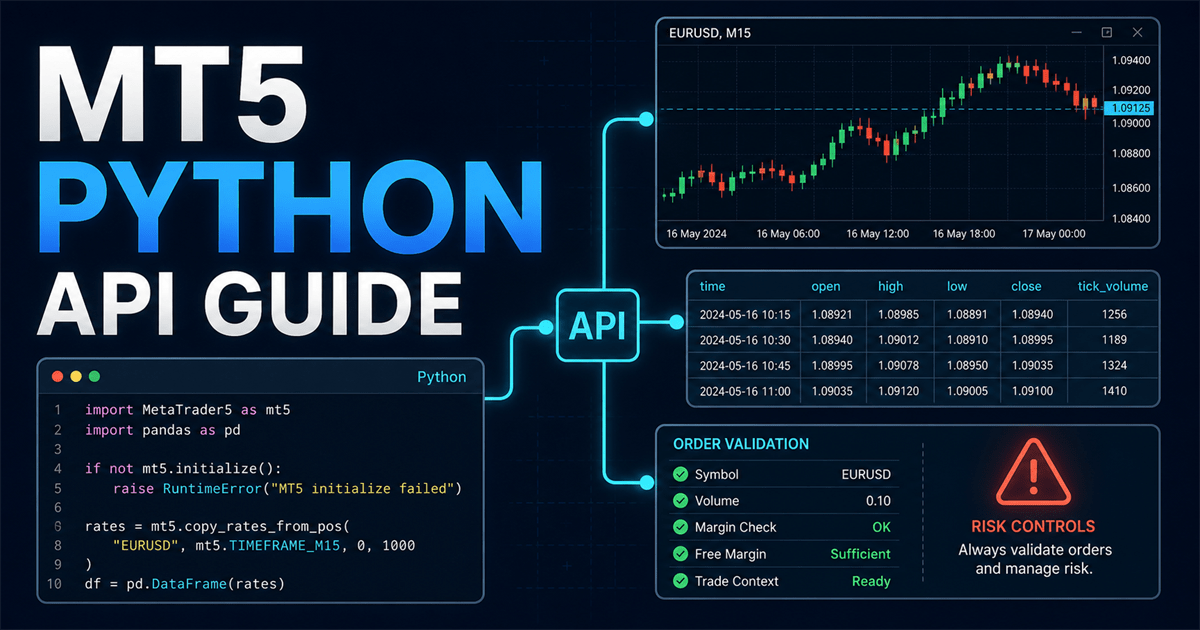
The MT5 Python API is an interface for connecting a Python script to a MetaTrader 5 terminal, retrieving price data, checking account details and positions, validating orders, and sending orders.
For beginners, the easiest way to understand the overall workflow is to learn initialize(), last_error(), copy_rates_from(), positions_get(), order_check(), order_send(), and shutdown() in that order.
Keep analysis-only processing separate from order submission. Before sending orders in a live environment, test the workflow with a demo account and verify broker specifications, lot sizes, margin requirements, spreads, and filling policies.
1. What Is the MT5 Python API?
Conclusion: The MT5 Python API is an API for connecting Python to a MetaTrader 5 terminal and working with market data and trading information. It connects Python-based analysis with the MT5 trading environment.
With the MT5 Python API, Python can work with candlestick bars, ticks, account details, orders, positions, and trading history. The retrieved data can be used for aggregation, visualization, statistical analysis, and machine learning datasets.
A Python script does not connect directly to a trading server on its own. The basic flow is to connect the Python script to a MetaTrader 5 terminal and handle the required information through that terminal.
What You Can Do with the MT5 Python API
- Connect to and disconnect from an MT5 terminal
- Retrieve account and terminal information
- Retrieve symbol information, Bid, and Ask prices
- Retrieve candlestick bar and tick data
- Check current orders and positions
- Check margin requirements for an order
- Send order requests
- Retrieve order and deal history
2. What to Understand Before You Start
Conclusion: First, understand that the MT5 Python API is not the same as an MQL5 program. The Python API lets an external script operate the terminal. It does not directly use EA event functions.
An MQL5 EA usually runs with event functions such as OnInit(), OnTick(), and OnDeinit(). A Python script instead defines its own sequence for connection, data retrieval, decision-making, waiting, and shutdown.
| Approach | Advantages | Disadvantages | Suitable Use Cases |
|---|---|---|---|
| Python script | Easy to use with analysis libraries | Continuous monitoring and reconnection must be designed explicitly | Data analysis, validation tools, and integration with external processing |
| MQL5 EA | Easy to run in response to ticks and trading events | Python analysis assets may be difficult to use directly | Automated trading completed inside MT5 and low-latency monitoring |
| Separate Python and MQL5 responsibilities | Makes analysis and execution responsibilities easier to separate | Requires a design for integration and failure handling | Systems with complex analysis logic |
Beginners should start by creating an analysis-only script. Adding order submission later makes it easier to distinguish connection failures from invalid order conditions.
3. Installation and Connection
Conclusion: Install the MetaTrader5 package in Python and connect to the MT5 terminal with initialize(). If the connection fails, check the details returned by last_error().
Install the package with the following command.
pip install MetaTrader5Use the following command to update it.
pip install --upgrade MetaTrader5The following is a minimal connection test.
import MetaTrader5 as mt5


def main() -> None:
    if not mt5.initialize():
        raise RuntimeError(f"initialize() failed: {mt5.last_error()}")

    try:
        print("terminal:", mt5.terminal_info())
        print("version:", mt5.version())
        print("account:", mt5.account_info())
    finally:
        mt5.shutdown()


if __name__ == "__main__":
    main()
initialize() can search for a terminal to connect to when called without arguments. If you use multiple MT5 terminals, specify the path to the target executable to make the connection destination easier to manage.
if not mt5.initialize(r"C:\Path\To\terminal64.exe"):
    raise RuntimeError(f"initialize() failed: {mt5.last_error()}")
Writing an account number, password, and server name directly in code increases the risk of credential leakage. If credentials are required, manage them with environment variables or a configuration file with restricted permissions.
4. Overview of Commonly Used Functions
Conclusion: The MT5 Python API is easier to understand when divided into five groups: connection, information retrieval, price data retrieval, trading management, and history retrieval. You do not need to memorize every function at the beginning.
| Category | Main Functions | Purpose |
|---|---|---|
| Connection | initialize(), login(), shutdown() | Connect to the terminal, log in to an account, and disconnect |
| Errors and environment | last_error(), terminal_info(), account_info() | Check errors and terminal and account status |
| Symbols | symbols_get(), symbol_info(), symbol_info_tick(), symbol_select() | Check symbol lists, specifications, Bid, Ask, and visibility |
| Price data | copy_rates_from(), copy_rates_range(), copy_ticks_from() | Retrieve candlestick bars and ticks |
| Orders and positions | orders_get(), positions_get(), order_check(), order_send() | Check orders and positions, validate orders, and send orders |
| History | history_orders_get(), history_deals_get() | Retrieve order and deal history |
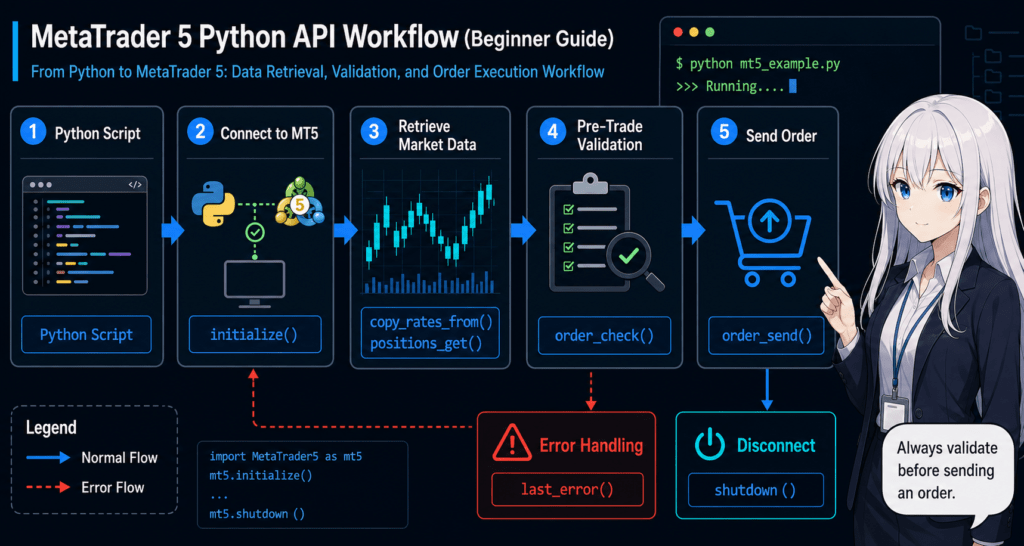
An analysis-only script may only need to connect, verify the symbol, retrieve price data, and disconnect. Put order submission in a separate module to reduce the risk of unintended execution.
5. How to Retrieve Candlestick Data
Conclusion: Use copy_rates_from() to retrieve candlestick data. Confirm that the return value is not None and that the required number of records was retrieved.
copy_rates_from() retrieves bars for a specified symbol, timeframe, start time, and number of records. The result includes time, open, high, low, close, tick volume, spread, and real volume.
from datetime import datetime, timezone

import MetaTrader5 as mt5
import pandas as pd


def get_rates(symbol: str, count: int = 300) -> pd.DataFrame:
    start = datetime(2025, 1, 1, tzinfo=timezone.utc)
    rates = mt5.copy_rates_from(symbol, mt5.TIMEFRAME_H1, start, count)

    if rates is None:
        raise RuntimeError(f"copy_rates_from() failed: {mt5.last_error()}")

    if len(rates) < count:
        print(f"warning: requested={count}, received={len(rates)}")

    frame = pd.DataFrame(rates)
    frame["time"] = pd.to_datetime(frame["time"], unit="s", utc=True)
    return frame


if not mt5.initialize():
    raise RuntimeError(f"initialize() failed: {mt5.last_error()}")

try:
    print(get_rates("EURUSD").tail())
finally:
    mt5.shutdown()
MT5 bar and tick times are handled as UTC. When creating a Python datetime, specify UTC to reduce the risk of retrieving an incorrect time range.
If the required amount of historical data cannot be retrieved, also check the historical range loaded in the MT5 terminal. Ignoring missing records can make calculations such as moving averages and feature values unstable.
6. How to Check Symbol Information and Current Prices
Conclusion: Before analyzing or submitting an order, use symbol_info() and symbol_info_tick() to check symbol specifications and current prices. If the symbol is hidden, symbol_select() may be able to add it to Market Watch.
import MetaTrader5 as mt5


def get_symbol_snapshot(symbol: str):
    info = mt5.symbol_info(symbol)
    if info is None:
        raise RuntimeError(f"symbol_info() failed: {symbol}, {mt5.last_error()}")

    if not info.visible and not mt5.symbol_select(symbol, True):
        raise RuntimeError(f"symbol_select() failed: {symbol}, {mt5.last_error()}")

    tick = mt5.symbol_info_tick(symbol)
    if tick is None:
        raise RuntimeError(f"symbol_info_tick() failed: {symbol}, {mt5.last_error()}")

    return info, tick
Symbol names may differ between brokers. For example, in an environment that uses suffixes, the fixed string EURUSD may not work as-is.
7. How to Check Positions and Orders
Conclusion: Use positions_get() for open positions and orders_get() for pending orders. A None result may indicate a retrieval error and must be handled separately from an empty result.
import MetaTrader5 as mt5


def show_positions(symbol: str) -> None:
    positions = mt5.positions_get(symbol=symbol)

    if positions is None:
        raise RuntimeError(f"positions_get() failed: {mt5.last_error()}")

    if not positions:
        print(f"no open positions: {symbol}")
        return

    for position in positions:
        print(
            position.ticket,
            position.symbol,
            position.volume,
            position.price_open,
            position.profit,
        )
MT5 handles positions differently for netting and hedging accounts. With a netting account, positions for the same symbol are consolidated. With a hedging account, multiple positions can exist for the same symbol, so manage the ticket of the position to close explicitly.
8. Order Validation and Submission
Conclusion: Before calling order_send(), run order_check(). A successful order_check() does not guarantee execution, so always check the returned retcode after submission.
At a minimum, validate the following conditions before submitting an order.
- Automated trading is permitted
- The symbol is tradable
- The symbol name matches the environment
- The volume matches the minimum lot, maximum lot, and lot step
- Margin is sufficient
- The spread is within the acceptable range
- Stop-loss and take-profit levels do not violate the stop level
- The filling policy and
type_fillingmatch the symbol specifications - Existing positions and the account type have been considered
The following validation sample creates an order request and calls order_check(). It does not call order_send(), so this code alone does not submit an order.
import MetaTrader5 as mt5


def validate_buy_request(symbol: str, volume: float):
    info = mt5.symbol_info(symbol)
    if info is None:
        raise RuntimeError(f"symbol_info() failed: {symbol}, {mt5.last_error()}")

    if not info.visible and not mt5.symbol_select(symbol, True):
        raise RuntimeError(f"symbol_select() failed: {symbol}, {mt5.last_error()}")

    tick = mt5.symbol_info_tick(symbol)
    if tick is None:
        raise RuntimeError(f"symbol_info_tick() failed: {symbol}, {mt5.last_error()}")

    if volume < info.volume_min or volume > info.volume_max:
        raise ValueError("volume is outside symbol limits")

    steps = round((volume - info.volume_min) / info.volume_step)
    normalized_volume = info.volume_min + steps * info.volume_step
    if abs(normalized_volume - volume) > 1e-9:
        raise ValueError("volume does not match volume_step")

    request = {
        "action": mt5.TRADE_ACTION_DEAL,
        "symbol": symbol,
        "volume": volume,
        "type": mt5.ORDER_TYPE_BUY,
        "price": tick.ask,
        "deviation": 10,
        "magic": 20250601,
        "comment": "python validation sample",
        "type_time": mt5.ORDER_TIME_GTC,
        "type_filling": mt5.ORDER_FILLING_RETURN,
    }

    check = mt5.order_check(request)
    if check is None:
        raise RuntimeError(f"order_check() failed: {mt5.last_error()}")

    return request, check
For actual submission, pass only validated requests to order_send(), then record the returned value and retcode.
def send_checked_request(request: dict):
    check = mt5.order_check(request)
    if check is None:
        raise RuntimeError(f"order_check() failed: {mt5.last_error()}")

    if check.retcode != 0:
        raise RuntimeError(f"order_check() rejected: {check}")

    result = mt5.order_send(request)
    if result is None:
        raise RuntimeError(f"order_send() failed: {mt5.last_error()}")

    if result.retcode != mt5.TRADE_RETCODE_DONE:
        raise RuntimeError(f"order_send() rejected: {result}")

    return result
This submission function is a minimal validation example. In a live system, add symbol-specific filling policies, a spread limit, stop-loss and take-profit levels, trading hours, existing-position checks, log storage, and resubmission conditions. Adjust type_filling to match the symbol specifications.
9. How to Think About Error Handling
Conclusion: In the MT5 Python API, check library-function failures separately from rejected orders. When a function returns None or False, inspect last_error(). After submitting an order, inspect the result object’s retcode.
A common troubleshooting sequence is as follows.
- Confirm that
initialize()succeeded - Display
terminal_info()andaccount_info() - Confirm the symbol name with
symbol_info() - Display the symbol with
symbol_select() - Confirm that
symbol_info_tick()returns a value - Inspect the return value from
order_check() - Inspect the return value and
retcodefromorder_send() - Save the input values and error details to a log when a failure occurs
Use last_error() to inspect library-function failures. After order_send() returns a result object, inspect the retcode to confirm the trading result.
10. Safer Design Patterns
Conclusion: To improve safety, separate analysis, decision-making, risk checks, order validation, order submission, position management, and logging. When all processing is packed into one function, troubleshooting failures becomes difficult.
The following structure is recommended.
| Module | Purpose | Main Checks |
|---|---|---|
| Connection management | Connect to, reconnect to, and disconnect from MT5 | Connection destination, timeouts, and shutdown handling |
| Data retrieval | Retrieve bars, ticks, and symbol specifications | UTC, missing data, and record counts |
| Signal decision | Create candidates from analysis results | Closed bars and overfitting |
| Risk checks | Check lot sizes, stop-loss distance, and acceptable loss | Minimum lot, maximum lot, and lot step |
| Order validation | Validate requests | Margin, spread, and stop level |
| Order submission | Send only validated requests | retcode, resubmission conditions, and logs |
| Position management | Manage open positions and closing targets | Netting accounts, hedging accounts, and tickets |
Use configuration to separate analysis-only mode from order-enabled mode. In live operations, keeping order submission disabled by default makes the system easier to manage.
11. Backtesting and Forward Testing
Conclusion: A Python trading strategy requires not only data-based validation but also forward testing with a demo account. Backtest results do not guarantee future profits.
Items to Check in a Backtest
- Total profit and loss
- Maximum drawdown
- Win rate
- Profit factor
- Number of trades
- Consecutive losses
- Spread assumptions
- Period dependency
- Parameter dependency
- Missing data and time misalignment
Items to Check in a Forward Test
- Differences from backtest results
- Behavior when spreads widen
- Execution delay and slippage
- Handling of rejected orders
- Trading frequency
- Drawdown
- Differences in broker conditions
- Differences in execution conditions between demo and live accounts
- Stability on a VPS or other continuous execution environment
- Reconnection after disconnection and prevention of duplicate orders
Higher leverage can increase both profit and loss and can increase drawdown for the same price movement. Validate lot-size calculations and stop conditions separately from trading signals.
12. Common Failures
Conclusion: Common issues for beginners include overlooked connection destinations, symbol names, times, retrieved record counts, lot sizes, filling policies, and account types. Do not handle every error as one case. Check each processing stage separately.
Cannot Connect to MT5
Check the return value from initialize() and inspect last_error(). If multiple terminals exist, specify the path to the target executable.
Cannot Retrieve Candlestick Data
Check the symbol name, timeframe, UTC handling, and the historical range loaded in the terminal. Handle None separately from an insufficient number of retrieved records.
Order Validation Is Rejected
Check the lot size, margin, stop level, trading hours, symbol, and filling policy. Available conditions differ by broker specification.
An Order Is Not Executed as Expected After Submission
Do not judge success only by whether order_send() returned. Save the result’s retcode, execution price, and comment. Spreads, slippage, and execution delays can change the result.
The Wrong Position Is Closed
Confirm the difference between netting and hedging accounts, and specify a position ticket when required. Managing positions only by symbol can target the wrong position in an environment with multiple positions.
13. Live Trading Considerations
Conclusion: When using the MT5 Python API for automated trading, a successful connection does not mean the system is ready for stable operation. Before live use, conduct forward testing with a demo account and define shutdown and recovery conditions.
Consider the following risks in live operations.
- Performance may deteriorate when spreads widen
- Execution delays and slippage may occur
- Behavior may change depending on broker symbol specifications
- Execution conditions may differ between demo and live accounts
- Disconnection and reconnection may cause duplicate orders
- Strategies with strong parameter dependency tend to break down during forward testing
- Overfitting may reduce reproducibility
Save order IDs, position tickets, request details, responses, errors, and timestamps in logs. Design the system so that it can restore its state after a shutdown, making incident investigation easier.
14. Summary
Conclusion: The MT5 Python API is easier to learn in the following order: connect, retrieve data, check state, validate orders, send orders, and shut down. Start with an analysis-only script, then add order handling step by step with a demo account.
The key points are to distinguish between last_error() and retcode, use UTC consistently, run order_check() before submitting an order, and consider differences between account types and broker specifications.
Related function references:
FAQ
What is the MT5 Python API?
The MT5 Python API is an interface for connecting a Python script to a MetaTrader 5 terminal and working with price data, account information, orders, positions, and history.
What do I need to install to use the MT5 Python API?
Install the MetaTrader5 package in your Python environment. You can also use pandas when you need to handle data in a tabular format.
What should I check if initialize() fails?
Check the details returned by last_error(), the MT5 terminal status, the target executable, and the account settings. If multiple terminals are installed, specify the target path to simplify troubleshooting.
Which function retrieves candlestick data?
Use copy_rates_from() when you want to specify a start time and a number of records. Confirm that the result is not None and that all required records were retrieved.
What should I know about time handling in the MT5 Python API?
Bar and tick times are handled as UTC. Using timezone-aware datetime values in Python helps avoid retrieving the wrong time range.
Does a successful order_check() guarantee execution?
No. order_check() validates the order, but it does not guarantee execution. After submitting an order, check the result from order_send() and its retcode.
What is the difference between netting and hedging accounts?
With a netting account, positions for the same symbol are consolidated. With a hedging account, multiple positions can exist for the same symbol, so managing the ticket of the position to close is important.
What should I check before starting automated trading with the MT5 Python API?
Start in analysis-only mode, then conduct forward testing with a demo account. Check spreads, execution differences, lot-size limits, margin, reconnection behavior, and duplicate-order prevention.