- 1 Key Takeaway
- 2 1. Why This Design Is Necessary
- 3 2. Overall EA Design Philosophy
- 4 3. Basic Structure
- 5 4. Roles of the Main Modules
- 6 5. Implementation Pattern
- 7 6. Sample Code
- 8 7. Design Pattern Comparison
- 9 8. Items to Check in Backtesting
- 10 9. Items to Check in Forward Testing
- 11 10. Notes for Live Operation
- 12 11. Common Design Mistakes
- 13 12. Summary
- 14 FAQ
- 14.1 What is MQL5 algorithmic trading EA design?
- 14.2 How do you get indicator values in MQL5?
- 14.3 What should be written in OnTick?
- 14.4 Is OrderCheck necessary before OrderSend?
- 14.5 Does EA design change between netting and hedging accounts?
- 14.6 What should be emphasized in backtesting?
- 14.7 What should be checked in forward testing?
- 14.8 What should you check before running an EA live?
Key Takeaway
When designing an algorithmic trading EA in MQL5 for MetaTrader 5, you need to separate state management, risk management, pre-order checks, and validation procedures, not just entry and exit conditions.
An EA becomes easier to maintain when it processes market recognition, filter checks, signal checks, lot calculation, order submission, and post-execution management in order.
In MQL5, the core design is not to use indicator values directly, but to create indicator handles and retrieve values with CopyBuffer.
Backtest results do not guarantee future profits, so before live operation you must check forward testing results, spread conditions, execution differences, and broker specifications.
1. Why This Design Is Necessary
[Conclusion]
In an MQL5 algorithmic trading EA, if you put the trading logic into one large conditional branch, validation, correction, and root-cause analysis during live operation become difficult.
EA design becomes easier to track when decision-making, order handling, management, and stop conditions are separated.
An MQL5 EA processes each new tick through OnTick.
In a simple EA, you can write entry conditions and order processing directly inside OnTick.
However, an EA intended for live operation must account for spread widening, insufficient margin, rejected executions, open position status, and differences between account types.
[Definition]
EA design in MQL5 means structuring the EA so that trading signals are not connected directly to order processing, but are separated from state management, risk checks, pre-order checks, and post-execution management.
1.1 Why Conditional Branches Alone Are Weak in Live Operation
If you build an EA only from trading conditions, the following problems are likely to occur.
- Duplicate entries while a position is already open
- Orders sent even when spreads widen
- Orders created above the allowed lot limit
- Unclear retry conditions after execution failure
- The EA works in backtests but behaves differently on a live account
In an MQL5 EA, it is important to design not only for whether an order succeeds, but also for pre-order validation, post-execution state updates, and consistency with trade history.
1.2 What to Decide Before Designing an EA
Before implementing an EA, decide at least the following items.
- Which market conditions the EA will trade in
- Which conditions allow entries
- Which conditions stop entries
- How to define the acceptable risk per trade
- How to handle existing positions
- Whether to retry after an order failure
- Whether to stop after the maximum drawdown is reached
An algorithmic trading EA needs a structure that determines whether trading is allowed before evaluating trading signals.
2. Overall EA Design Philosophy
[Conclusion]
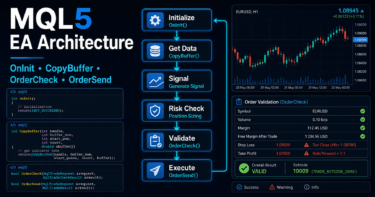
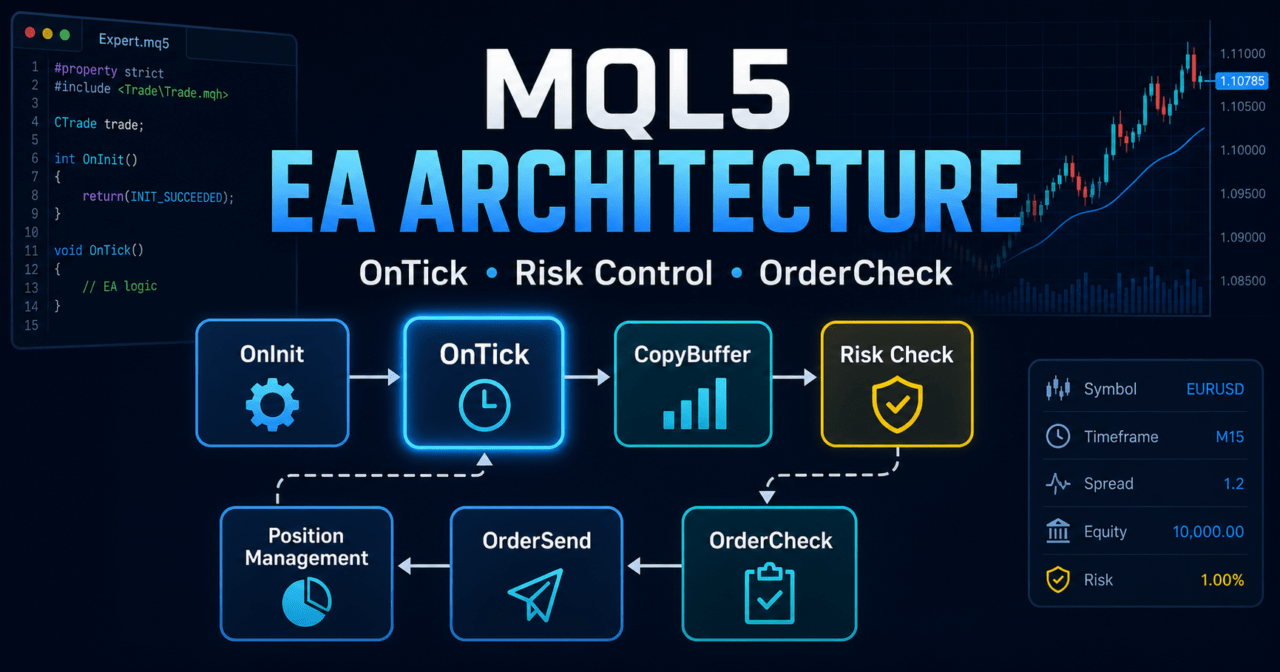
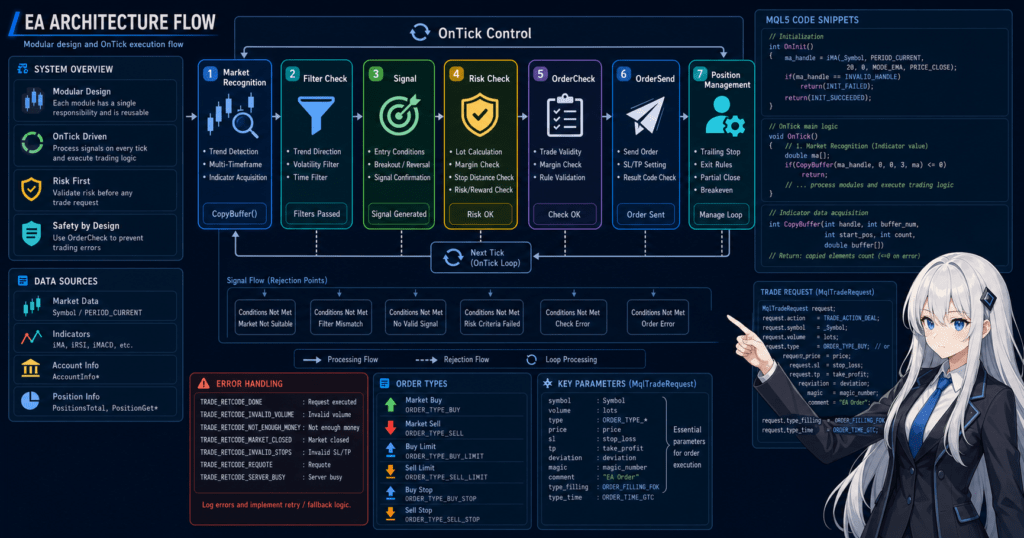
An MQL5 EA is easier to organize when it is designed as a pipeline that processes each stage from market recognition to order submission.
By keeping each stage independent, it becomes easier to analyze the causes behind backtest results and make corrections during forward testing.
Think of the entire EA in the following flow.
Market recognition
↓
Filter check
↓
Signal check
↓
Risk check
↓
Pre-order check
↓
Order submission
↓
Post-execution management
↓
Exit and stop-condition check
With this flow, logs can show more clearly which stage rejected a trade.
It also lets you validate signal accuracy separately from risk management problems.
2.1 Roles of OnInit, OnTick, and OnDeinit
In an MQL5 EA, the main processes are separated into event functions.
| Function | Main Role | How It Is Used in EA Design |
|---|---|---|
OnInit | Initialization processing | Create indicator handles, check settings, prepare the initial state |
OnTick | Processing when a tick is received | Signal checks, risk checks, order processing, position management |
OnDeinit | Cleanup processing at shutdown | Release handles, write shutdown logs, save state |
OnTradeTransaction | Detailed processing for orders, executions, and position changes | Track execution results and synchronize order state |
OnTimer | Timer processing | Low-frequency monitoring, multi-symbol checks, periodic logs |
In an MQL5 EA, OnTick is the central function.
However, if initialization and cleanup are also packed into OnTick, the state can easily become unstable.
2.2 Put State Management at the Center
The EA state includes not only the current market condition, but also what the EA itself is currently doing.
For example, you can define states like these.
- Trading allowed
- Waiting for a new order
- Position open
- Waiting for exit
- Stopped after consecutive losses
- Stopped after drawdown
- Outside trading hours
When state management is included, it becomes easier to prevent the EA from sending unlimited orders even if the same signal occurs repeatedly.
3. Basic Structure
[Conclusion]
An MQL5 algorithmic trading EA should separate initialization, data retrieval, judgment, pre-order validation, order submission, and management processing.
Especially when using indicators, create the handle in OnInit and retrieve values with CopyBuffer in OnTick.
In MQL5, indicator functions such as iMA and iATR often return an indicator handle rather than the indicator value itself.
The EA uses that handle to retrieve the required buffer values with CopyBuffer.
3.1 Thinking About the Minimum Structure
The minimum EA structure is as follows.
#property strict

int OnInit()
{
   return INIT_SUCCEEDED;
}

void OnDeinit(const int reason)
{
}

void OnTick()
{
}
When live operation is a goal, add the following items to this minimum structure.
- Parameter validation
- Indicator handle creation
- Handling when data retrieval fails
- Lot calculation
- Position checks
- Pre-order
OrderCheck - Order result logging
- Stop-condition management
3.2 Basic Structure for Using Indicator Values
An EA that uses a moving average has a structure like this.
#property strict

int ma_handle = INVALID_HANDLE;

int OnInit()
{
   ma_handle = iMA(_Symbol, _Period, 20, 0, MODE_SMA, PRICE_CLOSE);

   if(ma_handle == INVALID_HANDLE)
   {
      Print("Failed to create moving average handle");
      return INIT_FAILED;
   }

   return INIT_SUCCEEDED;
}

void OnDeinit(const int reason)
{
   if(ma_handle != INVALID_HANDLE)
   {
      IndicatorRelease(ma_handle);
      ma_handle = INVALID_HANDLE;
   }
}

void OnTick()
{
   double ma_values[];
   ArraySetAsSeries(ma_values, true);

   int copied = CopyBuffer(ma_handle, 0, 0, 3, ma_values);
   if(copied < 3)
   {
      Print("CopyBuffer failed or not enough data");
      return;
   }

   double current_ma = ma_values[0];
   double closed_ma  = ma_values[1];

   Print("Current MA: ", current_ma, " Closed MA: ", closed_ma);
}
In this code, ma_values[0] is the latest bar, and ma_values[1] is the most recent closed bar.
For trading decisions, you should also consider using closed bars because conditions based on the current unfinished bar can change on each tick.
4. Roles of the Main Modules
[Conclusion]
An EA should design signal checks, filter checks, lot calculation, order processing, position management, and risk control as separate roles.
Separating these roles reduces the chance that changing one piece of logic will affect other processes.
The main modules can be divided as follows.
| Module | Role | Main Items to Check |
|---|---|---|
| Market recognition | Checks trend, range, and volatility | Moving average, ATR, ADX, higher timeframe |
| Filter check | Keeps only market conditions that are suitable for trading | Spread, time of day, volatility |
| Signal check | Determines the entry direction | Cross, breakout, reversal conditions |
| Lot calculation | Determines position size based on acceptable risk | Minimum lot, maximum lot, lot step |
| Pre-order check | Confirms whether the order is valid | Margin, stop level, trade permission |
| Order submission | Sends the trade request | MqlTradeRequest, MqlTradeResult |
| Post-execution management | Synchronizes the result and EA state | Execution price, errors, position state |
| Risk control | Manages trade stop conditions | Drawdown, consecutive losses, daily loss |
In MQL5 EA design, it is important to place a layer before order submission that determines whether trading is currently allowed.
4.1 Separate Signal Checks and Filter Checks
A signal check creates a buy or sell candidate.
A filter check confirms whether that candidate should be accepted.
For example, one design uses a moving average crossover as the signal and ATR or spread as the filter.
- Signal check: the short-term moving average crosses above the long-term moving average
- Filter check: the spread is within the allowed range
- Risk check: the lot size is within the acceptable loss
- Pre-order check: there are no issues with margin or stop level
When signals and filters are separated, it becomes easier to analyze why the number of trades decreased or why performance changed.
4.2 Items to Check in Lot Calculation
In lot calculation, check not only a simple fixed lot, but also the symbol specifications and account status.
- Minimum lot
- Maximum lot
- Lot step
- Margin
- Acceptable risk
- Stop-loss width
- Account balance
- Equity
- Tick value
- Tick size
If the lot size does not match the symbol specifications, the order may be rejected.
Even when calculating lots based on acceptable risk, the final value must be rounded to the minimum lot, maximum lot, and lot step.
5. Implementation Pattern
[Conclusion]
In MQL5 EA implementation, the code becomes easier to understand when processing is separated by function and OnTick acts as the overall controller.
For order processing, use OrderCheck before OrderSend to validate the request.
As an implementation pattern, separate functions instead of writing everything inside OnTick.
OnTick
├─ Update data
├─ Check positions
├─ Check whether trading is allowed
├─ Check signal
├─ Calculate lot
├─ Pre-order check
└─ Submit order
With this structure, processing can exit early when a condition is not met.
5.1 Use OnTick as the Controller
Use OnTick as the entry point that calls each module.
void OnTick()
{
   if(!UpdateMarketData())
      return;

   if(!IsTradingAllowedNow())
      return;

   if(HasOpenPosition())
   {
      ManageOpenPosition();
      return;
   }

   int signal = GetEntrySignal();
   if(signal == 0)
      return;

   double lot = CalculateRiskBasedLot();
   if(lot <= 0.0)
      return;

   SendCheckedMarketOrder(signal, lot);
}
This example is a design skeleton.
In a real EA, each function should check symbol specifications, account status, spread, trading hours, and error details.
5.2 Add a Pre-Order Check
When sending an order in MQL5, create the order details in MqlTradeRequest, validate them with OrderCheck, and then execute OrderSend.
bool SendCheckedMarketOrder(const int signal, const double lot)
{
   MqlTradeRequest request;
   MqlTradeCheckResult check;
   MqlTradeResult result;

   ZeroMemory(request);
   ZeroMemory(check);
   ZeroMemory(result);

   request.action = TRADE_ACTION_DEAL;
   request.symbol = _Symbol;
   request.volume = lot;
   request.type = (signal > 0) ? ORDER_TYPE_BUY : ORDER_TYPE_SELL;
   request.price = (signal > 0)
                   ? SymbolInfoDouble(_Symbol, SYMBOL_ASK)
                   : SymbolInfoDouble(_Symbol, SYMBOL_BID);
   request.deviation = 20;
   request.type_filling = ORDER_FILLING_FOK;

   if(request.price <= 0.0)
   {
      Print("Invalid order price");
      return false;
   }

   if(!OrderCheck(request, check))
   {
      Print("OrderCheck failed. retcode=", check.retcode);
      return false;
   }

   if(check.retcode != TRADE_RETCODE_DONE)
   {
      Print("OrderCheck rejected. retcode=", check.retcode);
      return false;
   }

   if(!OrderSend(request, result))
   {
      Print("OrderSend failed. retcode=", result.retcode);
      return false;
   }

   if(result.retcode != TRADE_RETCODE_DONE &&
      result.retcode != TRADE_RETCODE_PLACED)
   {
      Print("OrderSend not completed. retcode=", result.retcode);
      return false;
   }

   Print("Order sent. ticket=", result.order);
   return true;
}
This code is a validation sample.
In live operation, you must check the execution method for each symbol, stop level, freeze level, trading hours, and the differences between netting and hedging accounts.
6. Sample Code
[Conclusion]
An MQL5 EA sample becomes clearer when it includes not only signal checks, but also data retrieval failure, existing positions, lot limits, and pre-order checks.
The following code is a simplified design example that uses the direction of a moving average.
This sample shows the skeleton of EA design.
It does not instruct operation on any specific symbol or timeframe.
Parameters must be adjusted according to the symbol, timeframe, broker conditions, and validation purpose.
#property strict

input int    InpMAPeriod      = 50;
input double InpRiskLot       = 0.10;
input int    InpMaxSpreadPts  = 30;

int ma_handle = INVALID_HANDLE;

int OnInit()
{
   if(InpMAPeriod <= 1)
   {
      Print("Invalid MA period");
      return INIT_PARAMETERS_INCORRECT;
   }

   ma_handle = iMA(_Symbol, _Period, InpMAPeriod, 0, MODE_EMA, PRICE_CLOSE);
   if(ma_handle == INVALID_HANDLE)
   {
      Print("Failed to create MA handle");
      return INIT_FAILED;
   }

   return INIT_SUCCEEDED;
}

void OnDeinit(const int reason)
{
   if(ma_handle != INVALID_HANDLE)
   {
      IndicatorRelease(ma_handle);
      ma_handle = INVALID_HANDLE;
   }
}

void OnTick()
{
   if(!IsSpreadAcceptable())
      return;

   if(HasOpenPosition())
      return;

   int signal = GetMASignal();
   if(signal == 0)
      return;

   double lot = NormalizeLot(InpRiskLot);
   if(lot <= 0.0)
      return;

   SendCheckedMarketOrder(signal, lot);
}

bool IsSpreadAcceptable()
{
   long spread = SymbolInfoInteger(_Symbol, SYMBOL_SPREAD);
   if(spread <= 0 || spread > InpMaxSpreadPts)
   {
      Print("Spread filter blocked trading. spread=", spread);
      return false;
   }
   return true;
}

bool HasOpenPosition()
{
   return PositionSelect(_Symbol);
}

int GetMASignal()
{
   double ma_values[];
   double close_values[];

   ArraySetAsSeries(ma_values, true);
   ArraySetAsSeries(close_values, true);

   if(BarsCalculated(ma_handle) < 3)
   {
      Print("MA is not ready");
      return 0;
   }

   int copied_ma = CopyBuffer(ma_handle, 0, 0, 3, ma_values);
   int copied_close = CopyClose(_Symbol, _Period, 0, 3, close_values);

   if(copied_ma < 3 || copied_close < 3)
   {
      Print("Not enough data for signal");
      return 0;
   }

   double closed_close = close_values[1];
   double closed_ma = ma_values[1];

   if(closed_close > closed_ma)
      return 1;

   if(closed_close < closed_ma)
      return -1;

   return 0;
}

double NormalizeLot(const double requested_lot)
{
   double min_lot = SymbolInfoDouble(_Symbol, SYMBOL_VOLUME_MIN);
   double max_lot = SymbolInfoDouble(_Symbol, SYMBOL_VOLUME_MAX);
   double step    = SymbolInfoDouble(_Symbol, SYMBOL_VOLUME_STEP);

   if(min_lot <= 0.0 || max_lot <= 0.0 || step <= 0.0)
   {
      Print("Invalid volume specification");
      return 0.0;
   }

   double lot = MathMax(min_lot, MathMin(max_lot, requested_lot));
   lot = MathFloor(lot / step) * step;
   lot = NormalizeDouble(lot, 2);

   if(lot < min_lot)
   {
      Print("Lot is below minimum after normalization");
      return 0.0;
   }

   return lot;
}

bool SendCheckedMarketOrder(const int signal, const double lot)
{
   MqlTradeRequest request;
   MqlTradeCheckResult check;
   MqlTradeResult result;

   ZeroMemory(request);
   ZeroMemory(check);
   ZeroMemory(result);

   request.action = TRADE_ACTION_DEAL;
   request.symbol = _Symbol;
   request.volume = lot;
   request.type = (signal > 0) ? ORDER_TYPE_BUY : ORDER_TYPE_SELL;
   request.price = (signal > 0)
                   ? SymbolInfoDouble(_Symbol, SYMBOL_ASK)
                   : SymbolInfoDouble(_Symbol, SYMBOL_BID);
   request.deviation = 20;
   request.type_filling = ORDER_FILLING_FOK;

   if(request.price <= 0.0)
   {
      Print("Invalid market price");
      return false;
   }

   if(!OrderCheck(request, check))
   {
      Print("OrderCheck call failed. retcode=", check.retcode);
      return false;
   }

   if(check.retcode != TRADE_RETCODE_DONE)
   {
      Print("OrderCheck rejected request. retcode=", check.retcode);
      return false;
   }

   if(!OrderSend(request, result))
   {
      Print("OrderSend call failed. retcode=", result.retcode);
      return false;
   }

   if(result.retcode != TRADE_RETCODE_DONE &&
      result.retcode != TRADE_RETCODE_PLACED)
   {
      Print("OrderSend rejected. retcode=", result.retcode);
      return false;
   }

   Print("Order accepted. order=", result.order, " deal=", result.deal);
   return true;
}
In this sample, the number of values retrieved by CopyBuffer is checked, and BarsCalculated is used to confirm whether indicator calculation is ready.
The code also uses OrderCheck before order submission and rounds the lot size to match the symbol specifications.
7. Design Pattern Comparison
[Conclusion]
MQL5 EA design includes simple conditional branching, modular design, state-managed design, and multi-symbol management.
When live operation is the goal, state-managed design or modular design is easier to validate.
| Method | Advantages | Disadvantages | Best Use Case | Implementation Difficulty | Live Operation Notes |
|---|---|---|---|---|---|
| Conditional branching | Easy to implement | Root-cause analysis becomes difficult as processing grows | Learning, simple validation | Low | Watch for duplicate orders and insufficient exception handling |
| Modular design | Easy to maintain | Requires function design | Mid-sized EAs, validation EAs | Medium | Make state sharing between functions clear |
| State-managed design | Easy to control behavior | Design can become complex | EAs intended for live operation | Medium to high | Keep state transition logs |
| Multi-symbol management | Useful for portfolio validation | Data retrieval and order management are complex | Multi-currency EAs | High | Check specification differences for each symbol |
| Risk-control-centered design | Easy to include drawdown management | May reduce trading opportunities | EAs focused on money management | Medium | Watch for over-optimization of stop conditions |
Choose the design pattern based on the EA’s purpose and validation stage.
If the design is too complex from the beginning, it becomes harder to know which condition affected performance.
7.1 Modular Design Is Easier During the Learning Stage
For intermediate users learning EA design, modular design is easier to handle.
If signals, filters, order processing, and risk management are separated into functions, they are easier to replace during validation.
7.2 Add State Management When Live Operation Is the Goal
In live operation, clearly define which state the EA is currently in.
For example, distinguish whether the EA is stopped due to drawdown, outside trading hours, or holding a position.
An EA that does not distinguish states may send unintended orders in response to the same signal.
8. Items to Check in Backtesting
[Conclusion]
In backtesting, check not only total profit and loss, but also maximum drawdown, number of trades, consecutive losses, spread conditions, and parameter dependency.
An EA whose performance strongly depends on a specific period or setting is more likely to break down during forward testing.
Backtesting is the process of checking whether the EA structure behaves as expected.
It is not a process that confirms expected profits.
8.1 Metrics You Should Always Review
Check the following items.
- Total profit and loss
- Maximum drawdown
- Win rate
- Risk-reward ratio
- Number of trades
- Number of consecutive losses
- Average holding time
- Spread conditions
- Period dependency
- Parameter dependency
Even if the win rate is high, an EA with a poor risk-reward ratio can lose performance after a large loss.
If the number of trades is too small, statistical reproducibility becomes difficult to judge.
8.2 How to Avoid Over-Optimization
Over-optimization is a state where settings are fitted too closely to past data and become less likely to work in future markets.
If parameters are adjusted too finely, only the backtest performance may improve.
Be careful when you see the following patterns.
- Performance is extremely good only during a specific period
- A small parameter change causes performance to collapse
- Performance is extremely good despite a low number of trades
- Performance suddenly worsens when the spread is widened
- Stop-loss or take-profit settings do not match the symbol’s price movement
In backtesting, check not only the best numbers, but also stability when conditions are changed slightly.
9. Items to Check in Forward Testing
[Conclusion]
In forward testing, check execution differences, spread widening, trading frequency, and stability in a VPS environment, which are harder to see in backtests.
Backtest and forward test results do not always match exactly.
Forward testing checks EA behavior in the current live market, not in past data.
Before live operation, you need to check behavior on a demo account or under small conditions.
9.1 Items to Review in Forward Testing
Check the following items.
- Execution difference
- Behavior when spreads widen
- Trading frequency
- Drawdown
- Difference from the backtest
- Broker differences
- Stability in a VPS environment
- Frequency of order rejection
- Readability of logs
Execution conditions may be simplified in backtests.
In a real-time environment, slippage, execution delay, trading-hour restrictions, and broker-specific execution methods can affect results.
9.2 Differences Between Demo and Live Accounts
Execution conditions can differ between demo and live accounts.
In particular, differences in spreads, execution speed, order rejection, and liquidity can affect EA performance.
In forward testing, check not only profit and loss, but also whether the EA stops as expected and skips orders as expected.
10. Notes for Live Operation
[Conclusion]
When operating an MQL5 EA live, consider spreads, execution, leverage, drawdown, broker specifications, and account type differences.
Even if a backtest shows good results, the same results are not guaranteed in live operation.
In live operation, separate whether the EA works technically from whether it can withstand operating conditions.
In algorithmic trading, losses may increase due to unexpected market movement or changes in execution conditions.
10.1 Spreads and Execution Conditions
When spreads widen, the unrealized loss immediately after entry becomes larger.
For short-term trading EAs, spread widening can strongly affect performance.
Execution delay and slippage also need to be checked.
Especially during economic news releases or periods of low market liquidity, orders may not execute at the expected price.
10.2 Netting Accounts and Hedging Accounts
In MQL5, the approach to position management changes depending on the account type.
- Netting account: positions on the same symbol are generally consolidated
- Hedging account: multiple positions can be held on the same symbol
A position management EA must account for this difference.
Whether PositionSelect is enough or ticket-level management is required depends on the account type and the EA’s purpose.
10.3 Leverage and Drawdown
The higher the leverage, the easier it is for profit and loss changes to become large from the same price movement.
When lot size is increased, maximum drawdown and capital reduction during consecutive losses also become larger.
It is effective to design stop conditions into the EA using daily loss, maximum drawdown, number of consecutive losses, and margin level.
However, stop conditions can also cause over-optimization if they are fitted too closely to past data.
11. Common Design Mistakes
[Conclusion]
Common MQL5 EA design mistakes include connecting signals directly to order processing, skipping pre-order checks, and ignoring lot limits.
For an EA intended for live operation, decide what to record after a failure and which state the EA should return to.
11.1 Ignoring CopyBuffer Failure
CopyBuffer does not always return the expected number of values.
The retrieved count may be insufficient because of missing data, handle creation failure, or incomplete indicator calculation.
If you access an array without checking the retrieved count, it can cause incorrect signals or runtime errors.
11.2 Judging Only by the Latest Bar
The value of the latest bar changes on each tick.
If you judge only by the latest bar, a signal may appear and disappear within the same candle.
Whether to use a closed bar or the latest bar depends on the EA’s purpose.
However, during validation, you must clearly define which one is being used.
11.3 Checking Only the Result of OrderSend
Even if the OrderSend call succeeds, the trade may not have completed as intended.
Check the retcode in MqlTradeResult and determine whether the order was filled, placed, or rejected.
Before sending the order, use OrderCheck to confirm margin and trading conditions.
11.4 Not Enough Logging
An EA with insufficient logs makes root-cause analysis difficult in backtests and forward tests.
At minimum, record the following items.
- Why a signal occurred
- Why a filter rejected a trade
- Lot calculation result
OrderCheckresultOrderSendresult- Position state
- Why a stop condition was triggered
Too many logs can also become hard to read.
A practical design is to output detailed logs during implementation and narrow them down to important events after the EA stabilizes.
12. Summary
[Conclusion]
When building an algorithmic trading EA in MQL5 for MetaTrader 5, design not only the trading conditions, but also state management, pre-order checks, risk control, and validation procedures.
When the EA is modularized, it becomes easier to isolate problems in backtesting and forward testing.
The basic structure of MQL5 EA design is to initialize in OnInit, make decisions and manage behavior in OnTick, and clean up in OnDeinit.
Indicator values are retrieved with handles and CopyBuffer, and the retrieved count and use of closed bars should be clearly defined.
For order processing, use MqlTradeRequest, MqlTradeCheckResult, and MqlTradeResult, and check the results of both OrderCheck and OrderSend.
In live operation, you must consider spreads, execution differences, lot limits, account type, broker specifications, and drawdown risk.
Backtesting is useful for checking the EA structure, but it does not guarantee future profits.
Before live operation, forward testing is required to check reproducibility and stability.
FAQ
What is MQL5 algorithmic trading EA design?
MQL5 algorithmic trading EA design means separating trading conditions, risk management, pre-order checks, position management, and stop conditions. It is important to manage the overall EA state, not just simple entry conditions.
How do you get indicator values in MQL5?
In MQL5, many indicator functions create a handle, and buffer values are retrieved with CopyBuffer. Because the number of retrieved values may be insufficient, check the return value before using the data.
What should be written in OnTick?
OnTick should contain controller logic that calls data updates, trading permission checks, signal checks, risk checks, order processing, and position management. Separating detailed processing into functions makes the EA easier to maintain.
Is OrderCheck necessary before OrderSend?
Before sending an order, using OrderCheck to confirm margin and trading conditions is an effective design. If you rely only on OrderSend, it becomes harder to identify why an order was rejected.
Does EA design change between netting and hedging accounts?
Yes. Netting and hedging accounts manage positions on the same symbol differently. In a netting account, positions are more likely to be consolidated, while a hedging account may require management of multiple positions.
What should be emphasized in backtesting?
In backtesting, check not only total profit and loss, but also maximum drawdown, number of trades, consecutive losses, risk-reward ratio, spread conditions, and parameter dependency. An EA whose results strongly depend on limited conditions is more likely to fail during forward testing.
What should be checked in forward testing?
In forward testing, check execution differences, spread widening, trading frequency, drawdown, differences from the backtest, and VPS stability. Conditions can differ between backtests and live operation.
What should you check before running an EA live?
Before live operation, check spreads, execution conditions, broker specifications, account type, leverage, and drawdown tolerance. Backtest results do not guarantee future profits, so forward testing is needed to confirm actual behavior.