- 1 1. What Are MQL5 Symbol Trading Hours?
- 2 2. How to Retrieve Symbol Trading Hours in MQL5
- 3 3. How Symbol Trading Hours Work Internally
- 4 4. Symbol Trading Hours vs. Other Methods
- 5 5. Common Mistakes and Practical Warnings
- 5.1 5.1 Confusing Server Time and Local Time
- 5.2 5.2 Checking Only One Session
- 5.3 5.3 Comparing With the Date Included
- 5.4 5.4 Ignoring Weekends and Holidays
- 5.5 5.5 Ignoring Spread and Liquidity
- 5.6 5.6 Not Checking Immediately Before OrderSend
- 5.7 5.7 Ignoring Exceptions: DST and Broker Differences
- 5.8 5.8 Practical Checklist
- 6 6. Practical Use Cases by Strategy Type
- 7 7. FAQ
- 7.1 7.1 Are Symbol Trading Hours Required?
- 7.2 7.2 Are They Unnecessary Because FX Trades 24 Hours?
- 7.3 7.3 Is a Fixed Time Filter Enough?
- 7.4 7.4 Why Does SymbolInfoSessionTrade Return false?
- 7.5 7.5 Why Compare With %86400?
- 7.6 7.6 Which Is More Important, Trading Hours or Spread Filters?
- 7.7 7.7 Do I Need to Check on Every OnTick?
- 7.8 7.8 Is It Needed in Backtesting?
- 7.9 7.9 Can It Be Used for CFDs and Indices?
- 7.10 7.10 Does It Make Trading Completely Safe?
- 8 8. Summary: Best Practical Implementation
1. What Are MQL5 Symbol Trading Hours?
[Conclusion]
In MQL5, symbol trading hours are the mechanism used to retrieve and check the actual tradable time ranges for each symbol from your program. They are essential for preventing EA order mistakes and avoiding errors when the market is closed.
[Definition]
Symbol trading hours are the trading sessions, or tradable time ranges, assigned to a symbol in MQL5. They are mainly retrieved with the SymbolInfoSessionTrade() function.
1.1 Why You Need to Retrieve Trading Hours
[Conclusion]
An EA that ignores trading hours can cause order errors, wider slippage, and abnormal spreads when the market is closed.
[Definition]
Trading hours are the time ranges defined by the broker during which orders can be executed.
When developing automated trading systems, or EAs, in MQL5, controlling when not to trade is just as important as deciding when to trade.
Problems often occur in situations such as:
- When the market is closed, including weekends and holidays
- Immediately after a session change, when liquidity is low
- During rollover, when spreads can widen sharply
- Symbols with restricted hours, such as CFDs and indices
If these conditions are ignored, the following risks can appear:
TRADE_RETCODE_MARKET_CLOSEDerror- Unfavorable execution caused by abnormal spreads
- Wider slippage
- Order rejection and retry loops
1.2 Basic Structure of Symbol Trading Hours
[Conclusion]
In MQL5, each symbol’s trading hours are managed by day of week and session.
[Definition]
A session is a tradable time range within a day, such as a Tokyo session or London session.
MQL5 trading hours are managed with the following structure:
- Day of week, 0 to 6, Sunday to Saturday
- Session index, from 0 to multiple sessions
- Start time, from
- End time, to
In other words, trading hours are not always a simple one-day, one-time-range model.
A single day can contain multiple trading sessions.
Example:
| Day | Session | Start | End |
|---|---|---|---|
| Monday | 0 | 09:00 | 11:30 |
| Monday | 1 | 13:00 | 17:00 |
Because of this structure, you should not rely on a simple time comparison.
You need to check each session individually.
1.3 Main Function Used
[Conclusion]
Use SymbolInfoSessionTrade() to retrieve symbol trading hours.
[Definition]SymbolInfoSessionTrade() retrieves the trading hours for a specified symbol, day of week, and session.
Basic function signature:
bool SymbolInfoSessionTrade(
   string           symbol,       // Symbol
   ENUM_DAY_OF_WEEK day_of_week,  // Day of week
   uint             session_index,// Session index
   datetime&        from,         // Start time
   datetime&        to            // End time
);
Key points of this function:
- true: retrieval succeeded
- false: the session does not exist
from/to: tradable time range for that day
1.4 Common Misunderstandings and Failures
[Conclusion]
The most common mistake is checking against fixed hours. Trading hours differ by symbol.
Common beginner mistakes include:
- Controlling trades with fixed hours, such as 9:00 to 17:00
- Confusing server time with local time
- Ignoring day-of-week differences
- Ignoring the possibility of multiple sessions
The especially important points are:
- FX and CFDs can have different trading hours.
- Specifications differ by broker.
- Holidays and exception hours may be managed separately.
1.5 Practical Use Cases
[Conclusion]
Symbol trading hours should be built into entry control and risk-avoidance logic.
Main use cases:
- Pre-entry checks, confirming that the market is open
- Avoiding abnormal spreads by excluding low-liquidity periods
- Stopping trades around economic releases
- Avoiding rollover, including swap time ranges
- Stabilizing execution quality
The especially important points are:
- Always check before OrderSend.
- Wrap the check in a reusable function instead of embedding it directly in OnTick.
- Combine it with spread and volatility checks.
2. How to Retrieve Symbol Trading Hours in MQL5
[Conclusion]
The basic implementation is to call SymbolInfoSessionTrade() in a loop and determine whether the current time is inside a trading session.
[Definition]
Trading-hours judgment means checking whether the current server time is included in the tradable session for the symbol.
2.1 Overall Implementation Flow
[Conclusion]
You can implement it in the following four steps. Once turned into a function, it can be reused across the EA.
Steps
- Get the current server time with
TimeCurrent() - Get the day of week with
TimeDayOfWeek() - Loop through sessions with
SymbolInfoSessionTrade() - Check whether the current time is inside the range
2.2 Minimal Code You Can Copy
[Conclusion]
The following function can determine whether the current time is inside trading hours.
bool IsTradingTime(string symbol)
{
   datetime now = TimeCurrent();
   int day = TimeDayOfWeek(now);

   datetime from, to;

   // The maximum number of sessions is usually small, from 0 to a few sessions
   for(int i = 0; i < 10; i++)
   {
      if(!SymbolInfoSessionTrade(symbol, (ENUM_DAY_OF_WEEK)day, i, from, to))
         break;

      // Compare only the time portion
      datetime now_time = now % 86400;
      datetime from_time = from % 86400;
      datetime to_time = to % 86400;

      if(now_time >= from_time && now_time <= to_time)
         return true;
   }

   return false;
}
2.3 Important Implementation Point
[Conclusion]
The most important point is to compare only the time, not the date.
Reason
The from and to values returned by SymbolInfoSessionTrade() are
time-based values that do not include a date.
Therefore, you need to convert values into the time in seconds and compare them with:
now % 86400
Note: What Is 86400?
- 1 day = 86400 seconds
%is the modulo, or remainder, operator- This extracts only the time portion after removing the date
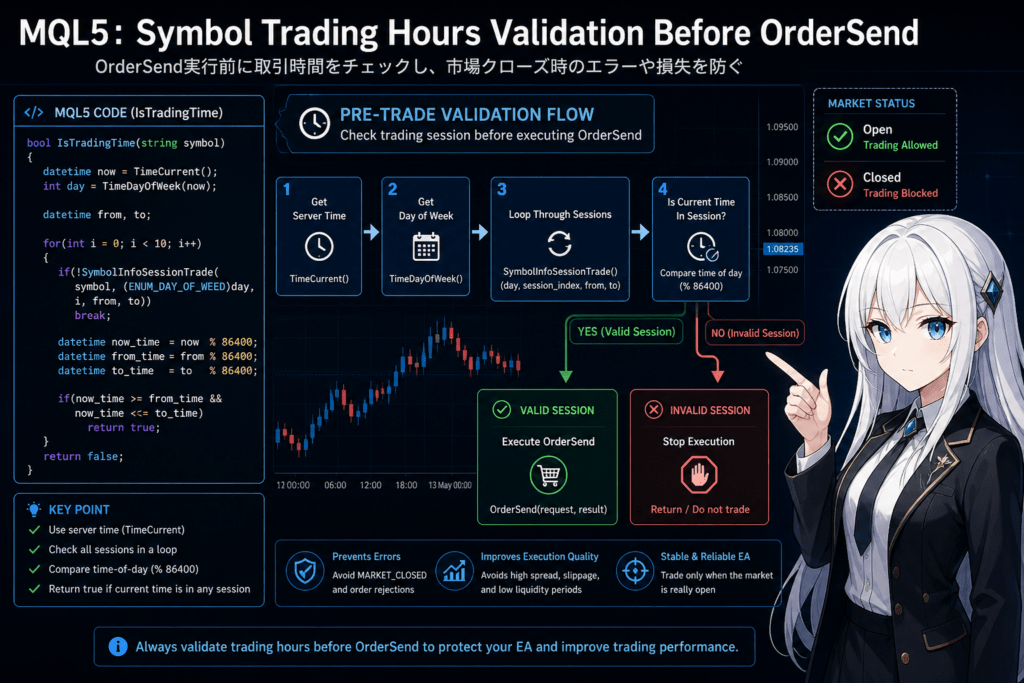
2.4 EA Integration Example: Check Before OrderSend
[Conclusion]
Checking before placing an order helps prevent errors and losses.
if(!IsTradingTime(_Symbol))
{
   Print("Trading stopped because the market is closed");
   return;
}

// Normal entry process
OrderSend(request, result);
2.5 Common Failures and Fixes
[Conclusion]
Time-check bugs are hard to see and can lead to long-term losses, so treat them carefully.
Failure 1: Using Local Time
TimeLocal(); // Not OK
This can drift from server time.
Execution timing becomes incorrect.
Fix
TimeCurrent(); // Required
Failure 2: Checking Only One Session
SymbolInfoSessionTrade(..., 0, ...)
This misses multiple sessions.
Fix
for(int i=0; i<10; i++)
Failure 3: Comparing With the Date Included
if(now >= from && now <= to) // Not OK
The judgment will always be shifted.
Fix
now % 86400
Failure 4: Ignoring Weekends and Holidays
- There are no sessions on Saturdays and Sundays
- CFDs can have market holidays
Fix
- If no session can be retrieved, return false
2.6 Practical Extensions for Better Accuracy
[Conclusion]
In real trading systems, combine trading-hours checks with market-condition filters.
Recommended Combinations
- Spread limit, using
SymbolInfoDouble(..., SYMBOL_SPREAD) - Volatility filter, such as ATR
- Slippage tolerance control
- Execution-condition checks
Example: Simple Filter
double spread = SymbolInfoInteger(_Symbol, SYMBOL_SPREAD);

if(spread > 30)
{
   Print("Stopped because the spread is abnormal");
   return;
}
2.7 Difference From Alternatives
[Conclusion]
Symbol trading hours are more accurate than fixed time-based filters.
Fixed Time Filter
- Advantage: easy to implement
- Disadvantage: cannot handle broker differences
Symbol Trading Hours
- Advantage: handles symbol and broker dependency
- Disadvantage: slightly more complex to implement
3. How Symbol Trading Hours Work Internally
[Conclusion]
Symbol trading hours refer to the broker-side trading session definition. The EA does not decide the hours by itself; the design depends on server specifications.
[Definition]
A trading session is the time range set by the broker for each symbol during which order acceptance and execution are valid.
3.1 Why Trading Hours Differ by Symbol
[Conclusion]
Trading hours differ because liquidity, exchanges, and clearing times differ across FX, stocks, indices, and CFDs.
The main reasons are:
- FX: generally 24 hours, but rollover still exists
- Stock CFDs: depend on exchange hours, such as NYSE and NASDAQ
- Index CFDs: have maintenance periods
- Commodities: often tradable only during specific hours
In short, the market’s own specifications are reflected directly.
If the EA uses fixed hours, mismatches will occur.
Important Practical Points
- Even the same EURUSD symbol can differ slightly by broker
- Differences exist among brokers such as XM, ICMarkets, and Exness
- Daylight saving time, or DST, can shift the hours
3.2 Time Standard in MQL5
[Conclusion]
MQL5 time is based on server time, not local time.
[Definition]
Server time is the time standard used by the broker’s MT5 server, usually GMT+2, GMT+3, or a similar offset.
Differences Among Main Time Functions
TimeCurrent(): server time, the most important choiceTimeLocal(): local PC time, not recommended for this checkTimeTradeServer(): server time, almost the same purpose
Why Use Server Time?
- Execution is based on the server
- Spreads and price updates are based on the server
- Local time can be wrong or shifted
Common Misunderstandings
- Judging by Japan time
- Assuming the VPS time zone controls the result
Both are incorrect.
3.3 The Core of Session Structure
[Conclusion]
Trading hours are not one continuous range. They are built from multiple split sessions.
Why Sessions Are Split
- Maintenance periods, when the server is stopped
- Clearing processes, including rollover
- Exchange lunch breaks for stock-related instruments
Concrete Example
- 00:00 to 23:55, FX
- 23:55 to 00:05, maintenance
In this case:
- Session 1: 00:00 to 23:55
- Session 2: none, because there is a gap
Impact on Implementation
- Assuming one session per day is risky
- You must check sessions in a loop
3.4 Relationship With Execution, Spread, and Slippage
[Conclusion]
Outside trading hours, execution quality declines or stops, and spreads and slippage can become abnormal.
Correlation
- Outside trading hours: execution unavailable or rejected
- Session boundary: spreads widen
- Lower liquidity: slippage increases
Practical Importance
Symbol trading hours are not just a time-retrieval feature.
They work as a filter for trade quality.
3.5 Why Fixed Time Filters Are Not Enough
[Conclusion]
Fixed hours cannot handle broker differences, symbol differences, or DST.
Problems With Fixed Hours
- They shift during daylight saving time
- They ignore differences among symbols
- They cannot accurately handle CFDs and indices
Advantages of Symbol Trading Hours
- Uses the broker definition directly
- Automatically reflects time adjustments, including DST
- Allows accurate control by symbol
3.6 Common Design Mistakes
[Conclusion]
If you implement this without understanding the structure, you can end up with an EA that runs but loses.
Typical Patterns
- Making unnecessary trades at night
- Increasing losses around rollover
- Entering when spreads are widened
The Core Problem
- The EA watches time, not market conditions
- Execution conditions are underestimated
3.7 Practical Design Philosophy
[Conclusion]
Symbol trading hours are a minimum filter. They are not sufficient by themselves.
Basic Practical Design
- 1. Trading-hours check, required
- 2. Spread control
- 3. Volatility control
- 4. Strategy logic
Priority
- Is execution possible?
- Are conditions unfavorable?
- Are entry conditions met?
If you do not follow this order,
even correct strategy logic can still lose.
4. Symbol Trading Hours vs. Other Methods
[Conclusion]
Symbol trading hours provide broker-defined, accurate trading-hours checks. Their role differs from fixed time filters and news filters. They should be combined, not used alone.
[Definition]
The main methods compared here are:
- Fixed time filter: turns trading on or off at specified times
- News filter: stops trading based on an economic calendar
- Symbol trading hours: retrieves the actual tradable time for each symbol
4.1 Method Comparison
[Conclusion]
Symbol trading hours are strongest for accuracy, fixed time filters for flexibility, and news filters for risk avoidance.
| Method | Accuracy | Flexibility | Implementation Difficulty | Main Use |
|---|---|---|---|---|
| symbol-trading-hours | Excellent | Limited | Medium | Market-open judgment |
| Fixed time filter | Limited | Excellent | Low | Strategy time control |
| News filter | Good | Good | High | Economic-event risk avoidance |
4.2 Strengths and Weaknesses of Symbol Trading Hours
[Conclusion]
Symbol trading hours are accurate, but they are not enough by themselves.
Strengths
- Fully follows broker specifications
- Handles differences between symbols
- Automatically reflects DST
- Confirms that execution is possible
Weaknesses
- Does not account for economic news
- Does not detect abnormal spreads
- Does not guarantee the edge of the strategy logic
4.3 Difference From Fixed Time Filters
[Conclusion]
Fixed time filters are based on strategy convenience. Symbol trading hours are based on market availability.
Characteristics of Fixed Time Filters
if(hour >= 9 && hour <= 17)
- Advantage: simple and fast
- Disadvantage: can drift because it depends on broker conditions
Core Difference
- Fixed time filter: the EA decides the time
- Symbol trading hours: the market definition decides the time
Practical Judgment
- Short-term strategy: fixed time filters can also be useful
- Stability-first design: symbol trading hours are required
4.4 Difference From News Filters
[Conclusion]
News filters avoid price-movement risk. Symbol trading hours judge whether trading is possible.
Role of News Filters
- Avoiding events such as NFP and CPI
- Handling sudden volatility changes
- Avoiding rapid spread expansion
Limits
- They do not guarantee that trading is possible
- They do not account for broker specifications
4.5 Best Practical Configuration
[Conclusion]
Combining all three balances risk control and trading opportunity.
Recommended Structure
if(!IsTradingTime(_Symbol)) return;

if(IsHighImpactNews()) return;

if(IsSpreadTooWide()) return;

// Entry conditions
Meaning of This Structure
- 1. Is execution possible?
- 2. Is the environment abnormal?
- 3. Is the strategy condition met?
4.6 Common Wrong Choices
[Conclusion]
It is risky to assume that one filter is enough.
Bad Patterns
- Fixed time only: breaks on holidays and DST
- News only: ignores market closures
- Symbol trading hours only: can still trade during abnormal spreads
4.7 Design Criteria
[Conclusion]
The correct approach is to assign each filter a role based on its purpose.
Decision Framework
- Is the market open? Use symbol trading hours
- Is it a risky time? Use news filters
- Does the time match the strategy? Use fixed time filters
Priority
- Market condition, required
- Risk avoidance, important
- Strategy optimization, optional
5. Common Mistakes and Practical Warnings
[Conclusion]
Many symbol trading hours implementation mistakes do not throw obvious errors. Instead, they quietly increase losses and damage long-term performance as invisible defects.
[Definition]
A failure here means a design mistake where the code runs, but execution quality and profitability become worse.
5.1 Confusing Server Time and Local Time
[Conclusion]
If you use TimeLocal(), your judgment can drift from actual trading hours.
Bad Example
datetime now = TimeLocal(); // Incorrect
Correct Implementation
datetime now = TimeCurrent(); // Correct
Why This Is a Problem
- Execution is based on server time
- The VPS time zone is irrelevant
- A few hours of drift can make the EA judge the market as always closed
5.2 Checking Only One Session
[Conclusion]
Because multiple sessions can exist, one retrieval is incomplete.
Bad Example
SymbolInfoSessionTrade(symbol, day, 0, from, to);
Correct Implementation
for(int i=0; i<10; i++)
Why It Matters
- CFDs and indices often have split sessions
- Lunch breaks and maintenance periods divide trading hours
- Some time ranges may be unavailable even on a trading day
5.3 Comparing With the Date Included
[Conclusion]
If you compare the values as-is, the judgment will always be shifted.
Bad Example
if(now >= from && now <= to)
Correct Method
now % 86400
Reason
from/toare time-only valuesnowcontains date plus time
So they cannot be compared directly
5.4 Ignoring Weekends and Holidays
[Conclusion]
If no session exists for the day, the function must return false.
Common Cases
- Saturday and Sunday: no sessions
- Holidays: some symbols stop trading
- CFDs: irregular market holidays can occur
Fix
if(!SymbolInfoSessionTrade(...))
   break;
If even session 0 cannot be retrieved, trading is not available.
5.5 Ignoring Spread and Liquidity
[Conclusion]
Tradable does not mean safe. You also need to check spread and slippage.
Problem Examples
- Entering immediately after rollover
- Spread above 50 points
- Execution delay
Fix
double spread = SymbolInfoInteger(_Symbol, SYMBOL_SPREAD);

if(spread > 30)
   return;
Why It Matters
- The market can be unstable even inside trading hours
- Low liquidity can cause unfavorable fills
5.6 Not Checking Immediately Before OrderSend
[Conclusion]
You need to check immediately before the order, not only at the start of OnTick.
Bad Design
- Checking only at the beginning of OnTick
Conditions can change a few seconds later
Correct Design
// Immediately before entry
if(!IsTradingTime(_Symbol)) return;

OrderSend(...);
Reason
- State changes at session boundaries
- Execution can become unavailable within seconds
5.7 Ignoring Exceptions: DST and Broker Differences
[Conclusion]
Specifications differ by broker, so your design must assume testing is required.
Typical Examples
- A one-hour shift during daylight saving time
- Different hours for the same symbol
- Unusual sessions on specific dates
Fix
- Verify with the Strategy Tester
- Confirm with log output
Print("from:", from, " to:", to);
5.8 Practical Checklist
[Conclusion]
If the following points are satisfied, most critical mistakes can be avoided.
Checklist
TimeCurrent()is used- Sessions are processed in a loop
- Only the time portion is compared
- The check runs immediately before
OrderSend - A spread filter is also used
- Broker differences have been tested
6. Practical Use Cases by Strategy Type
[Conclusion]
Symbol trading hours are a basic filter required for every EA. They are especially effective for short-term, high-frequency, and spread-sensitive strategies.
[Definition]
Practical use cases mean design guidance for which strategies should use this filter, when it should run, and how it should be integrated.
6.1 Scalping
[Conclusion]
For scalping, symbol trading hours are required. Leaving them out can seriously damage expected value.
Reason
- Profit of only a few pips is strongly affected by spread
- Low liquidity can immediately turn a trade negative
- Execution delay can be critical
Recommended Structure
if(!IsTradingTime(_Symbol)) return;

if(IsSpreadTooWide()) return;

if(!IsHighLiquidityTime()) return;

// Entry
Note
- Many systems limit trading to London and New York hours
- Skipping Tokyo hours is also common in some designs
6.2 Day Trading
[Conclusion]
For day trading, use this filter to select suitable time ranges.
How to Use It
- Allow only high-volatility time ranges
- Avoid rollover
- Stop trading around economic releases
Example
if(!IsTradingTime(_Symbol)) return;

if(IsRollOverTime()) return;
Point
- Symbol trading hours alone are not enough
- Use a news filter together with it
6.3 Swing Trading
[Conclusion]
For swing trading, importance is lower, but the filter can still improve entry quality.
How to Use It
- Avoid entries during unfavorable time ranges
- Exclude abnormal spread conditions
Characteristics
- The impact is limited because holding periods are longer
- However, entry quality is still affected
6.4 Grid and Averaging Strategies
[Conclusion]
This is one of the most important use cases. Without control, risk can expand rapidly.
Problems
- Adding positions even when trading is unavailable
- Entering during widened spreads
- Expanding floating losses around rollover
Recommended Design
if(!IsTradingTime(_Symbol)) return;

if(IsSpreadTooWide()) return;

if(IsVolatilityAbnormal()) return;
Important Point
- The impact is large because entry frequency is high
- Filter quality is tied directly to survival rate
6.5 News-Avoidance EAs
[Conclusion]
Combine symbol trading hours with a news filter for a two-layer defense.
Structure
if(!IsTradingTime(_Symbol)) return;

if(IsHighImpactNews()) return;
Meaning
- If the market is closed, trading is unavailable
- If the market is unstable, trading is avoided
6.6 Practical Priority
[Conclusion]
Every EA should generally be designed in the following order.
Priority
- Is trading possible? Use symbol trading hours
- Are conditions unfavorable? Check spread, slippage, and volatility
- Are strategy conditions met?
Bad Design
// Entry condition first
if(Signal())
{
   OrderSend();
}
Correct Design
if(!IsTradingTime(_Symbol)) return;

if(IsSpreadTooWide()) return;

if(Signal())
{
   OrderSend();
}
6.7 Practical Optimization Points
[Conclusion]
Symbol trading hours should be optimized as part of the strategy, not treated as a simple check.
Optimization Examples
- Change lot size by time range
- Switch logic by session
- Turn trading on or off based on execution quality
Applied Example
if(IsLondonSession())
   lot = 0.2;
else
   lot = 0.1;
6.8 Practical Summary
[Conclusion]
Symbol trading hours are not just a feature to add. They are a foundation of EA design.
Core Idea
- Control market conditions, not just clock time
- Protect execution quality
- Reduce unnecessary trades
7. FAQ
[Conclusion]
When used correctly, symbol trading hours directly help avoid errors and stabilize performance, but they are often misunderstood.
[Definition]
This FAQ gives short, reusable answers to common practical and implementation questions.
7.1 Are Symbol Trading Hours Required?
[Conclusion]
Yes. An EA may run without them, but long-term performance can worsen.
Reason
- Prevents market-closed errors
- Avoids abnormal spreads
- Stabilizes execution quality
7.2 Are They Unnecessary Because FX Trades 24 Hours?
[Conclusion]
No. FX is not completely tradable 24 hours a day.
Note
- Rollover periods exist
- Weekend closures exist
- Low-liquidity time ranges exist
7.3 Is a Fixed Time Filter Enough?
[Conclusion]
No. It cannot handle broker differences or DST accurately.
Difference
- Fixed time: manually defined
- Symbol trading hours: automatically retrieved
7.4 Why Does SymbolInfoSessionTrade Return false?
[Conclusion]
It returns false because that session does not exist, which is normal behavior.
Main Causes
- The session index exceeds the number of available sessions
- There are no trading hours on that day of the week
- It is a weekend or holiday
7.5 Why Compare With %86400?
[Conclusion]
Because you need to compare only the time portion.
Reason
from/toare time-only valuesnowcontains date plus time
So it cannot be compared directly
7.6 Which Is More Important, Trading Hours or Spread Filters?
[Conclusion]
Both are needed, but symbol trading hours come first.
Order
- Is trading possible? Time
- Are conditions good? Spread
7.7 Do I Need to Check on Every OnTick?
[Conclusion]
The final check must run immediately before placing the order.
Reason
- Market state changes in real time
- Conditions can change within seconds
7.8 Is It Needed in Backtesting?
[Conclusion]
Yes. Trading hours are also reproduced in the tester.
Note
- If it is not implemented correctly, the EA may overtrade
- Results can drift away from live trading behavior
7.9 Can It Be Used for CFDs and Indices?
[Conclusion]
Yes. For CFDs and indices, it is often even more important.
Reason
- Trading hours are often limited
- Split sessions are common
7.10 Does It Make Trading Completely Safe?
[Conclusion]
No. It is only a minimum safety layer.
Additional Elements Needed
- Spread control
- Slippage measures
- Volatility management
8. Summary: Best Practical Implementation
[Conclusion]
MQL5 symbol trading hours are not just a time-retrieval feature. They are foundation logic that affects EA profitability and stability. Always use them together with other filters.
[Definition]
The best practical implementation means evaluating tradability, market condition, and strategy conditions in the correct order.
8.1 Minimum Required Structure
[Conclusion]
If you satisfy the following three points, most critical mistakes can be avoided.
Required Structure
- Check tradability with symbol trading hours
- Control spread
- Check immediately before sending the order
Implementation Template
if(!IsTradingTime(_Symbol)) return;

double spread = SymbolInfoInteger(_Symbol, SYMBOL_SPREAD);
if(spread > 30) return;

// Entry conditions
if(Signal())
{
   OrderSend(request, result);
}
8.2 Recommended Practical Structure
[Conclusion]
In live operation, multilayer filters improve the balance between expected value and drawdown.
Recommended Structure
if(!IsTradingTime(_Symbol)) return;

if(IsHighImpactNews()) return;

if(IsSpreadTooWide()) return;

if(IsVolatilityAbnormal()) return;

if(Signal())
{
   OrderSend(request, result);
}
Meaning
- 1. Is execution possible?
- 2. Is the environment abnormal?
- 3. Is there an edge?
8.3 Common Misunderstandings Revisited
[Conclusion]
Time management is not the strategy itself. It is a prerequisite.
Misunderstandings
- Adding this makes the EA profitable: incorrect
- Time control alone is enough: incorrect
Correct Understanding
- Symbol trading hours: foundation
- Strategy logic: determines win or loss
8.4 The Most Important Practical Point
[Conclusion]
The most important goal is to reduce unnecessary trades.
Core Idea
- Reduce trade count
- Avoid unfavorable execution
- Exclude noisy market conditions
Result
- Lower drawdown
- Improved profit factor, or PF
- Better reproducibility
8.5 Final Design Checklist
[Conclusion]
If the following points are satisfied, the design is practical quality.
Checklist
SymbolInfoSessionTradeis used correctly- Sessions are processed in a loop
TimeCurrent()is used- Only the time portion is compared with
%86400 - The check runs immediately before
OrderSend - Spread control is included
- News and volatility are considered
8.6 Next Practical Actions
[Conclusion]
The important next step is to add this to an existing EA and verify it in the tester.
Recommended Actions
- Implement the
IsTradingTimefunction - Integrate it into the existing EA
- Compare backtests with the filter on and off
- Check drawdown and PF
Evaluation Metrics
- PF, profit factor
- DD, drawdown
- Number of trades
- Win rate
8.7 Final Summary
[Conclusion]
Symbol trading hours are
the first decision logic for whether the EA should trade at all.
In One Sentence
- A required filter before entry conditions
- A defense layer that protects execution quality
- A foundation that improves EA reproducibility
With this design as the base,
your EA can move from merely running to being ready for practical operation.