
- 1 1. What Is OrderCheck in MQL5?
- 2 2. Basic Syntax and Usage of OrderCheck
- 3 3. Practical OrderCheck Code Examples: Ready-to-Use Templates
- 4 4. Common Errors and Cause Analysis
- 5 5. Practical Usage from an EA Design Perspective
- 6 6. Cases Where You Should Use OrderCheck and Cases Where It May Be Unnecessary
- 7 7. Relationship Between OrderCheck and Related Functions
- 8 8. Summary: The Shortest Explanation for Beginners
- 9 FAQ
- 9.1 Q1. If OrderCheck returns true, will the order succeed?
- 9.2 Q2. Should I always use OrderCheck?
- 9.3 Q3. What is the difference between OrderCheck and OrderSend?
- 9.4 Q4. Which retcode should I check?
- 9.5 Q5. Why can OrderSend fail even after OrderCheck passes?
- 9.6 Q6. How should I handle INVALID_VOLUME?
- 9.7 Q7. Is it okay to call OrderCheck on every tick?
- 9.8 Q8. Should I resend the order when an error occurs?
1. What Is OrderCheck in MQL5?
1.1 The Role of OrderCheck: Pre-Order Validation
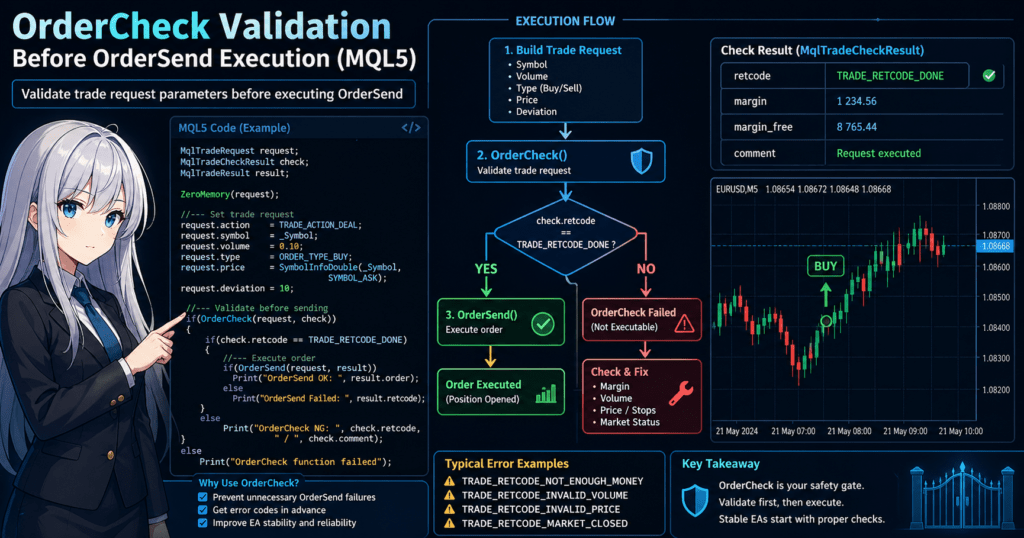
In MQL5, OrderCheck is a function used to verify whether an order can be executed before the order is sent.
Specifically, it checks conditions such as the following in advance.
- Whether there is enough margin
- Whether the lot size meets the broker’s requirements
- Whether the price is within a valid range
- Whether the market is tradable, including trading hours and symbol status
In this way, OrderCheck works as a safety check before placing an order.
This is especially important in automated trading, or EAs, because an order failure can directly lead to missed opportunities or broken logic. For that reason, pre-validation is almost essential in practical EA development.
1.2 Difference Between OrderCheck and OrderSend
The point that most often confuses beginners is the difference between OrderCheck and OrderSend.
| Function | Role |
|---|---|
| OrderCheck | Checks in advance whether the order is likely to be accepted |
| OrderSend | Actually sends the order |
The key point is that OrderCheck only checks the order. It does not execute any order.
The typical correct flow is as follows.
MqlTradeRequest request;
MqlTradeCheckResult check;
MqlTradeResult result;

// Set request (omitted)

if(OrderCheck(request, check))
{
    if(check.retcode == TRADE_RETCODE_DONE)
    {
        OrderSend(request, result);
    }
}
In this flow:
- No problem in OrderCheck → run OrderSend
- OrderCheck returns NG → fix the request or skip the trade
This is the basic branch.
1.3 Why OrderCheck Matters in Practice
The main reason to use OrderCheck is to avoid unnecessary OrderSend failures.
OrderSend may fail in cases such as these:
- Not enough margin, such as NOT_ENOUGH_MONEY
- Invalid lot size, such as INVALID_VOLUME
- Stop level violations
- Invalid prices caused by a sudden spread expansion
If these errors are handled only after calling OrderSend, the following problems occur.
- Logs become noisy
- The cause of the error becomes harder to identify
- The EA behavior becomes unstable
By using OrderCheck, you get these benefits:
- You can get the error code, or retcode, in advance
- You can branch safely inside your logic
- The EA is more stable even during VPS operation
OrderCheck becomes especially important in these situations:
- Variable lot sizing linked to risk management
- Multi-currency-pair operation
- High-frequency trading
- Always-on VPS operation
Common Pitfalls and Notes
Beginners often get stuck on the following points.
- Calling OrderSend directly without using OrderCheck
- Assuming that OrderCheck returning true means success
- In reality, you must check
retcode.
- In reality, you must check
- Not initializing the request structure enough
- If some fields are not set, the check may not work correctly.
- Assuming OrderCheck success guarantees execution
- The market changes, so execution can still fail at send time.
The most important point is this:
OrderCheck validates the order under the current conditions at that moment. It does not guarantee future execution.
2. Basic Syntax and Usage of OrderCheck
2.1 Basic Syntax
OrderCheck is a function that uses order information, or MqlTradeRequest, to validate in advance whether that order can be executed.
The basic syntax is as follows.
bool OrderCheck(
   const MqlTradeRequest& request,   // Order details
   MqlTradeCheckResult&  result      // Check result
);
request: The order details, such as what to trade, how much to trade, and where to traderesult: The check result, including whether the order can pass and why it may fail
The return value, bool, only shows whether the function itself ran successfully.
To know whether the order can actually pass, you must check result.retcode.
2.2 Structure of MqlTradeRequest
MqlTradeRequest is the structure that defines the order details.
The minimum required fields are as follows.
MqlTradeRequest request;
ZeroMemory(request);  // Initialization (important)

request.action   = TRADE_ACTION_DEAL;   // Market order
request.symbol   = _Symbol;             // Currency pair
request.volume   = 0.1;                 // Lot
request.type     = ORDER_TYPE_BUY;      // Buy or Sell
request.price    = SymbolInfoDouble(_Symbol, SYMBOL_ASK); // Price
request.deviation= 10;                  // Allowed slippage
Additional notes for beginners:
volume: Lot size, or trade volumeprice: Current price, ASK for BUY and BID for SELLdeviation: Allowed price deviation in points
2.3 How to Read MqlTradeCheckResult
The result of OrderCheck is stored in MqlTradeCheckResult.
The especially important fields are below.
MqlTradeCheckResult check;

Print("retcode=", check.retcode);
Print("margin=", check.margin);
Print("comment=", check.comment);
Important Fields
retcode- The most important field for judging success or failure
- Example:
TRADE_RETCODE_DONE, meaning success
margin- Required margin
comment- Error details as a string
Actual Usage Steps: The Shortest Way to Understand It
MqlTradeRequest request;
MqlTradeCheckResult check;

ZeroMemory(request);

// Set required fields
request.action = TRADE_ACTION_DEAL;
request.symbol = _Symbol;
request.volume = 0.1;
request.type   = ORDER_TYPE_BUY;
request.price  = SymbolInfoDouble(_Symbol, SYMBOL_ASK);

// Run check
if(OrderCheck(request, check))
{
    if(check.retcode == TRADE_RETCODE_DONE)
    {
        Print("Order allowed");
    }
    else
    {
        Print("Error: ", check.comment);
    }
}
Common Pitfalls and Notes
The following mistakes are common even in practical development.
1. Forgetting ZeroMemory
ZeroMemory(request);
Uninitialized values may remain and cause unexpected errors.
2. Not Checking retcode
if(OrderCheck(...)) // This alone is not enough
You must always check check.retcode.
3. Setting the Wrong Price
- Using BID for BUY
- Using ASK for SELL
This causes INVALID_PRICE.
4. Volume Violates Broker Conditions
- Below the minimum lot size
- Violates the lot step
This causes INVALID_VOLUME.
5. Missing Required Fields
actionis not setsymbolis not set
In this case, the check itself may not work correctly.
The most important point is this:
OrderCheck assumes that the request structure is correct.
If the structure is incomplete, that directly becomes the cause of the error.
3. Practical OrderCheck Code Examples: Ready-to-Use Templates
3.1 Check Example for a Market Buy Order
This section shows the most basic OrderCheck template for a market Buy order.
You can use this structure directly inside an EA.
MqlTradeRequest request;
MqlTradeCheckResult check;

// Initialization (required)
ZeroMemory(request);

// Set parameters
request.action   = TRADE_ACTION_DEAL;
request.symbol   = _Symbol;
request.volume   = 0.1;
request.type     = ORDER_TYPE_BUY;
request.price    = SymbolInfoDouble(_Symbol, SYMBOL_ASK);
request.deviation= 10;

// Run OrderCheck
if(OrderCheck(request, check))
{
    if(check.retcode == TRADE_RETCODE_DONE)
    {
        Print("OrderCheck OK: order allowed");
    }
    else
    {
        Print("OrderCheck NG: ", check.retcode, " / ", check.comment);
    }
}
else
{
    Print("OrderCheck function execution itself failed");
}
3.2 Practical Pattern Combined with OrderSend
In real development, the basic pattern is to use OrderCheck together with OrderSend, not by itself.
MqlTradeRequest request;
MqlTradeCheckResult check;
MqlTradeResult result;

ZeroMemory(request);

// Order settings
request.action = TRADE_ACTION_DEAL;
request.symbol = _Symbol;
request.volume = 0.1;
request.type   = ORDER_TYPE_BUY;
request.price  = SymbolInfoDouble(_Symbol, SYMBOL_ASK);
request.deviation = 10;

// Pre-check
if(OrderCheck(request, check))
{
    if(check.retcode == TRADE_RETCODE_DONE)
    {
        // Execute order
        if(OrderSend(request, result))
        {
            Print("Order succeeded: ", result.order);
        }
        else
        {
            Print("OrderSend failed: ", result.retcode);
        }
    }
    else
    {
        Print("OrderCheck error: ", check.comment);
    }
}
This structure lets you:
- Avoid unnecessary OrderSend calls
- Make logs clearer
- Improve EA stability
3.3 Convert It into a Reusable Function for Practical Use
In EA development, writing the same code every time is inefficient.
For that reason, turning OrderCheck into a reusable function is recommended.
bool CanTrade(double volume)
{
    MqlTradeRequest request;
    MqlTradeCheckResult check;

    ZeroMemory(request);

    request.action = TRADE_ACTION_DEAL;
    request.symbol = _Symbol;
    request.volume = volume;
    request.type   = ORDER_TYPE_BUY;
    request.price  = SymbolInfoDouble(_Symbol, SYMBOL_ASK);

    if(!OrderCheck(request, check))
        return false;

    if(check.retcode != TRADE_RETCODE_DONE)
    {
        Print("Cannot trade: ", check.comment);
        return false;
    }

    return true;
}
Usage example:
if(CanTrade(0.1))
{
    // Go to OrderSend
}
Common Pitfalls and Notes
1. OrderSend Can Fail Even When OrderCheck Is OK
- Cause: price movement, slippage, and timing
- Countermeasures:
- Set
deviationappropriately - Implement retry handling when appropriate
- Set
2. Fixed Volume Can Break the Logic
- The trade may suddenly become invalid because of insufficient margin
- Countermeasures:
- Calculate lots based on account balance
- Check margin with OrderCheck
3. Not Outputting Error Logs
Print("NG"); // Bad
Print("NG:", check.retcode, check.comment); // Required
4. Ignoring Condition Differences by Currency Pair
- Minimum lot
- Lot step
- Stop level
These should be obtained with SymbolInfo for each symbol.
5. Not Checking Logs During VPS Operation
- Leaving errors unattended can break the trading logic
Important practical point:
OrderCheck is used not only to know whether an order can pass, but also to log why it cannot pass.
4. Common Errors and Cause Analysis
4.1 NOT_ENOUGH_MONEY: Insufficient Margin
A frequent case with OrderCheck is that the order cannot be placed because the required margin is not enough.
This happens when the lot size is too large, the account balance is too low, or the margin requirements for the symbol are strict.
The basic way to check it is below.
MqlTradeRequest request;
MqlTradeCheckResult check;

ZeroMemory(request);

request.action = TRADE_ACTION_DEAL;
request.symbol = _Symbol;
request.volume = 1.0;
request.type   = ORDER_TYPE_BUY;
request.price  = SymbolInfoDouble(_Symbol, SYMBOL_ASK);

if(OrderCheck(request, check))
{
    Print("retcode=", check.retcode);
    Print("margin=", check.margin);
    Print("comment=", check.comment);
}
Check the following points.
check.margin: Required margin for that ordercheck.comment: Additional reason for failure- Whether the lot size is too large
The basic fix is to reduce the lot size.
This is common in fixed-lot EAs, so combining it with balance-based or risk-percentage-based lot calculation improves stability.
4.2 INVALID_VOLUME: Invalid Lot Size
INVALID_VOLUME occurs when the specified lot size does not match the broker’s trading conditions.
Typical examples include:
- Below the minimum lot size
- Above the maximum lot size
- Violation of the lot step
- Invalid decimal precision
For example, if a symbol has a minimum of 0.01 and a step of 0.01, specifying 0.015 may fail.
Here is an example of checking the conditions in advance.
double min_lot  = SymbolInfoDouble(_Symbol, SYMBOL_VOLUME_MIN);
double max_lot  = SymbolInfoDouble(_Symbol, SYMBOL_VOLUME_MAX);
double lot_step = SymbolInfoDouble(_Symbol, SYMBOL_VOLUME_STEP);

Print("min=", min_lot, " max=", max_lot, " step=", lot_step);
The fix is to round the lot size according to the trading conditions.
double NormalizeVolume(double volume)
{
    double min_lot  = SymbolInfoDouble(_Symbol, SYMBOL_VOLUME_MIN);
    double max_lot  = SymbolInfoDouble(_Symbol, SYMBOL_VOLUME_MAX);
    double lot_step = SymbolInfoDouble(_Symbol, SYMBOL_VOLUME_STEP);

    if(volume < min_lot) volume = min_lot;
    if(volume > max_lot) volume = max_lot;

    volume = MathFloor(volume / lot_step) * lot_step;
    return volume;
}
The easiest trap for beginners is a lot size that looks correct but does not match the step condition.
4.3 INVALID_PRICE: Invalid Price
INVALID_PRICE occurs when the specified order price is inappropriate.
For market orders, a common cause is entering BID for Buy or ASK for Sell.
The correct basic rule is:
- Buy:
SYMBOL_ASK - Sell:
SYMBOL_BID
double ask = SymbolInfoDouble(_Symbol, SYMBOL_ASK);
double bid = SymbolInfoDouble(_Symbol, SYMBOL_BID);

request.type  = ORDER_TYPE_BUY;
request.price = ask;
This error can also happen in these cases:
- The market moved sharply after the price was obtained
- The price position for a limit or stop order is inappropriate
- The number of digits was not considered
When setting a price, normalizing it according to _Digits may also be important.
request.price = NormalizeDouble(ask, _Digits);
However, price normalization alone does not solve everything. You should first confirm that the relationship between the order type and the price is correct.
4.4 MARKET_CLOSED: Market Closed
MARKET_CLOSED means that orders cannot be placed outside trading hours.
It can occur on weekends, holidays, outside the session for a specific symbol, or during a temporary broker-side suspension.
This error is usually an environmental failure, not a coding mistake.
The basic response is to skip the order instead of forcing a resend.
if(check.retcode == TRADE_RETCODE_MARKET_CLOSED)
{
    Print("Skipping order because the market is closed");
    return;
}
As a note, FX, CFDs, futures, and stock indexes may have different trading hours for each symbol.
This is especially important for multi-symbol EAs.
Common Pitfalls and Notes
1. Looking Only at the Return Value of OrderCheck
if(OrderCheck(request, check))
{
    // Do not judge success from this alone
}
true only means the function call succeeded. Order availability must be judged with check.retcode.
2. Making Assumptions Based Only on the Error Name
Even with the same INVALID_VOLUME, the cause may be one of the following:
- Below the minimum lot
- Violation of
lot_step - Above the maximum lot
You should always compare the symbol conditions with the input value.
3. Not Recording comment
If your log only keeps retcode, later analysis becomes difficult.
Print("retcode=", check.retcode, " comment=", check.comment);
4. Ignoring Broker Differences
Even with the same code, results can change depending on the account type and broker settings.
Lot conditions, margin conditions, and trading hours are especially likely to differ by environment.
5. Practical Usage from an EA Design Perspective
5.1 Add It to a Safe Order Flow
The purpose of using OrderCheck in practice is not simply to call the function.
The real goal is to stabilize the EA’s entire order flow.
The basic flow is:
- Evaluate the entry condition
- Calculate order volume, price, SL, and TP
- Run
OrderCheckfor pre-validation - If there is no problem, run
OrderSend - If it fails, leave a log and move to the next process
The code skeleton looks like this.
bool TryBuy(double volume)
{
    MqlTradeRequest request;
    MqlTradeCheckResult check;
    MqlTradeResult result;

    ZeroMemory(request);
    ZeroMemory(result);

    request.action    = TRADE_ACTION_DEAL;
    request.symbol    = _Symbol;
    request.volume    = volume;
    request.type      = ORDER_TYPE_BUY;
    request.price     = SymbolInfoDouble(_Symbol, SYMBOL_ASK);
    request.deviation = 10;

    if(!OrderCheck(request, check))
    {
        Print("OrderCheck execution failed");
        return false;
    }

    if(check.retcode != TRADE_RETCODE_DONE)
    {
        Print("Skipping order retcode=", check.retcode, " comment=", check.comment);
        return false;
    }

    if(!OrderSend(request, result))
    {
        Print("OrderSend failed retcode=", result.retcode);
        return false;
    }

    Print("Order succeeded order=", result.order);
    return true;
}
With this structure, condition evaluation and order execution are separated, which makes maintenance easier.
5.2 Connect It with Lot Calculation
OrderCheck is more valuable with variable lot operation than with fixed lots.
The reason is that even if you calculate a lot size, that value may not actually pass the trading conditions.
For example, these cases are common:
- The lot was calculated from a 2% balance risk
- The required margin was still insufficient
- The lot did not match the symbol’s minimum lot step
In practice, the safer order is:
- Calculate the theoretical lot first
- Adjust it by minimum lot, maximum lot, and lot step
- Run
OrderCheckfor the final confirmation
Example:
double CalcVolume()
{
    double raw_volume = 0.13; // Example
    double min_lot    = SymbolInfoDouble(_Symbol, SYMBOL_VOLUME_MIN);
    double max_lot    = SymbolInfoDouble(_Symbol, SYMBOL_VOLUME_MAX);
    double lot_step   = SymbolInfoDouble(_Symbol, SYMBOL_VOLUME_STEP);

    if(raw_volume < min_lot) raw_volume = min_lot;
    if(raw_volume > max_lot) raw_volume = max_lot;

    raw_volume = MathFloor(raw_volume / lot_step) * lot_step;
    return raw_volume;
}
Adding OrderCheck after this works as the final safety layer for the lot calculation logic.
5.3 Treat Errors as Branches, Not Simple Resends
One common beginner mistake is designing the EA to retry immediately when OrderCheck returns NG.
In practice, it is more reasonable to branch by cause.
For example:
NOT_ENOUGH_MONEY- Reduce the lot size or skip the signal
INVALID_VOLUME- Review the lot correction logic
MARKET_CLOSED- Wait until the next trading session
INVALID_PRICE- Fetch the latest price and rebuild the request
In other words, OrderCheck is not just a judgment function. It should be used as the entry point for abnormal-condition handling in an EA.
if(check.retcode == TRADE_RETCODE_NO_MONEY)
{
    Print("Skipping because of insufficient margin");
}
else if(check.retcode == TRADE_RETCODE_INVALID_VOLUME)
{
    Print("Reviewing because of invalid lot size");
}
else if(check.retcode == TRADE_RETCODE_MARKET_CLOSED)
{
    Print("Waiting because the market is closed");
}
When you separate the logic this way, it becomes easier to trace the cause during later log analysis.
5.4 Do Not Call It Wastefully on Every Tick
OrderCheck is useful, but it is not a function you should call without limits.
If you run it inside OnTick() every time even when the entry condition is not met, unnecessary processing increases.
Bad example:
void OnTick()
{
    // OrderCheck runs every time regardless of conditions
}
Good example:
- First check whether the entry condition is met
- Confirm that no position is already held
- Only then run
OrderCheck
void OnTick()
{
    if(!EntrySignal())
        return;

    if(PositionSelect(_Symbol))
        return;

    double volume = CalcVolume();
    TryBuy(volume);
}
This reduces unnecessary processing, prevents log pollution, and makes EA behavior easier to understand.
Common Pitfalls and Notes
1. Placing OrderCheck Outside the Order Logic
Pre-validation must be done against the exact request contents that will actually be used.
Checking with an old price or an uncorrected lot size has little value.
2. Handling NG Too Casually
Print("NG");
This is not enough in practice.
At minimum, you should log retcode and comment.
3. Using Variable Lots Without Final Confirmation
The theoretical lot and executable lot may differ.
The more an EA depends on variable lot sizing, the more important OrderCheck becomes.
4. Treating Failures as Fatal Stops
MARKET_CLOSED and insufficient margin can naturally happen depending on the environment.
A design that skips the trade is usually more reproducible than one that stops the EA.
6. Cases Where You Should Use OrderCheck and Cases Where It May Be Unnecessary
6.1 Cases Where You Should Use OrderCheck
OrderCheck is useful, but it does not need to be inserted mechanically into every situation.
However, it has high priority in EAs where order conditions change dynamically.
You should especially use it in these cases:
- You use variable lot sizing
- Conditions differ by symbol
- You operate multiple currency pairs at the same time
- Free margin changes frequently
- You calculate SL/TP or order price each time
- You run the EA for long periods on a VPS
In these cases, even an order that is theoretically correct may fail under actual trading conditions.
Adding OrderCheck makes it easier to exclude order failures before sending.
For example, in an EA that calculates lots from a risk percentage every time, required margin changes with balance changes and floating losses.
If you rely only on lot calculation, the order may fail when OrderSend is called.
double volume = CalcRiskBasedVolume();

if(!CanTrade(volume))
{
    Print("Skipping order under the current conditions");
    return;
}
In practice, this works as the final decision layer before sending an order.
6.2 Cases Where It Is Not Always Required
On the other hand, treating OrderCheck as mandatory every time can be excessive.
Its relative importance is lower in cases such as these:
- Simple scripts that assist manual trading
- Simple EAs with only fixed lots and fixed conditions
- Minimum code used for testing
- Trial operation where order failure has limited impact
For example, in an EA that uses a fixed 0.01 lot, one fixed currency pair, and only simple market orders, the preconditions are mostly stable. In that case, handling OrderSend failures may be enough for some use cases.
if(!OrderSend(request, result))
{
    Print("Order failed retcode=", result.retcode);
}
However, this design has less code, but weaker early detection of abnormal causes.
It may be acceptable for simple EAs or learning code, but it often reaches its limits in production.
6.3 Decision Criteria
The decision criterion is simple.
It becomes easier to judge if you ask whether the order conditions are fixed or dynamic.
Cases Where You Should Lean Toward Adding OrderCheck
- Order volume changes every time
- The logic depends on free margin
- Broker condition differences can affect the result
- The EA is used with multiple symbols or multiple timeframes
Cases Where Omission May Still Work
- Fixed lot size
- Single symbol
- Market orders only
- Learning or testing code
In short, add it when you prioritize reproducibility and stability. There may be room to omit it when you prioritize the smallest possible implementation.
6.4 Performance Trade-Off
Adding OrderCheck improves safety, but it also adds processing.
For that reason, the design should balance safety and lightness.
A common mistake is jumping to the conclusion that it should not be used because it makes the EA heavier.
In reality, the issue is not OrderCheck itself. The issue is when it is called.
Bad examples:
- Calling it on every tick
- Calling it even when no signal exists
- Calling it repeatedly under the same conditions
Good examples:
- Call it only when the entry condition is met
- Call it once immediately before sending the order
- Call it only when the request contents change
if(EntrySignal() && !PositionSelect(_Symbol))
{
    double volume = CalcVolume();

    if(CanTrade(volume))
    {
        TryBuy(volume);
    }
}
With this approach, the processing increase is limited.
In practice, an EA that is slightly heavier but can control failures often has better expected value than an EA that is slightly lighter but fragile.
Common Pitfalls and Notes
1. Assuming It Should Be Added Everywhere
It is not always mandatory for simple scripts or learning code.
Using it according to the design purpose is more reasonable.
2. Deciding It Is Unnecessary
Even fixed-lot EAs can fail because of environment differences or market conditions.
In production, the cost of a failure is often higher than the cost of adding validation.
3. Judging Only by Lightness
You should judge not only EA processing time, but also:
- Order failure rate
- Log analyzability
- Reproducibility during failures
4. Moving Learning Code Directly into Production
It may be fine to omit it while learning, but when moving toward production, the basic approach is to shift toward a safer design that includes OrderCheck.
7. Relationship Between OrderCheck and Related Functions
7.1 Relationship Between OrderCheck and OrderSend
To understand OrderCheck correctly, you first need to separate its role from OrderSend.
They are used in similar contexts, but their roles are clearly different.
OrderCheck: Pre-order validationOrderSend: Actual order submission
These two functions are not substitutes. They work together.
In practice, using them in the order Check → Send is more stable than relying on only one of them.
A typical flow is shown below.
MqlTradeRequest request;
MqlTradeCheckResult check;
MqlTradeResult result;

ZeroMemory(request);
ZeroMemory(result);

request.action    = TRADE_ACTION_DEAL;
request.symbol    = _Symbol;
request.volume    = 0.1;
request.type      = ORDER_TYPE_BUY;
request.price     = SymbolInfoDouble(_Symbol, SYMBOL_ASK);
request.deviation = 10;

if(OrderCheck(request, check))
{
    if(check.retcode == TRADE_RETCODE_DONE)
    {
        if(OrderSend(request, result))
        {
            Print("Order submission succeeded");
        }
        else
        {
            Print("OrderSend failed retcode=", result.retcode);
        }
    }
    else
    {
        Print("OrderCheck NG retcode=", check.retcode, " comment=", check.comment);
    }
}
The important point is that OrderSend success is not guaranteed even if OrderCheck passes.
Prices and market conditions can change instantly. This difference must always be considered, especially for market orders.
In practice, it is accurate to think this way:
OrderCheckconfirms whether the order can be sent at that momentOrderSendexecutes the order under the actual market conditions
7.2 Relationship with MqlTradeRequest
OrderCheck cannot judge anything by itself.
The target of the judgment is the order details placed inside MqlTradeRequest.
In other words, the accuracy of OrderCheck depends almost entirely on how MqlTradeRequest is built.
Commonly used fields include:
action: Type of trade actionsymbol: Target symbolvolume: Lot sizetype: Buy, Sell, limit, or stop orderprice: Order pricesl/tp: Stop loss and take profitdeviation: Allowed slippage
For that reason, even an article about OrderCheck effectively assumes that you understand MqlTradeRequest.
For example, even if request.type is correct, OrderCheck is likely to fail if request.price uses BID for a Buy order.
When OrderCheck reports a problem, you should first suspect the contents of request.
Example log output:
Print("symbol=", request.symbol);
Print("volume=", request.volume);
Print("type=", request.type);
Print("price=", request.price);
A common beginner trap is assuming the failure is caused by OrderCheck itself, when the real cause is an incorrect request setting.
7.3 Difference Between MqlTradeCheckResult and MqlTradeResult
The names are similar, so they are easy to confuse, but MqlTradeCheckResult and MqlTradeResult are different.
MqlTradeCheckResult- Receives the result of
OrderCheck - Contains pre-validation information
- Receives the result of
MqlTradeResult- Receives the result of
OrderSend - Contains the actual order submission result
- Receives the result of
The practical difference is as follows.
MqlTradeCheckResult check;
MqlTradeResult result;
check.retcode- Whether this order content is likely to pass
result.retcode- What happened to the actual order submission
Recording these two separately makes failure analysis much easier.
Print("check.retcode=", check.retcode, " comment=", check.comment);
Print("result.retcode=", result.retcode, " order=", result.order);
In production EAs, it is meaningful to distinguish whether the failure happened during the Check stage or the Send stage.
7.4 Relationship with Position Functions
OrderCheck checks whether a new order can be placed.
In real EA operation, you also need to check whether a position is already held.
This is where position-related functions such as PositionSelect are involved.
The typical pattern is:
- First check whether there is a current position
- If no position is held, use
OrderCheckto judge whether a new order can be placed - If there is no problem, run
OrderSend
if(PositionSelect(_Symbol))
{
    Print("A position is already held, so no new order will be placed");
    return;
}

if(CanTrade(0.1))
{
    TryBuy(0.1);
}
Without this flow, OrderCheck itself may pass, but the EA as a whole may cause multiple entries or unexpected averaging down.
In other words, OrderCheck is only one part of order availability. In the full EA, it should be used together with:
- Position status
- Order conditions
- Market conditions
- Risk conditions
Common Pitfalls and Notes
1. Trying to Understand OrderCheck by Itself
OrderCheck is useful, but it is not a standalone concept.
You need to understand it together with MqlTradeRequest, OrderSend, and PositionSelect.
2. Confusing check and result
check.retcode and result.retcode are different.
If you mix them up, you will not know at which stage the failure occurred.
3. Omitting Position Checks
Even when a new order is technically possible, there are cases where it should not be placed according to the EA design.
Position checks are required separately.
4. Reusing request and Leaving Old Values
If you reuse a previous request, old sl or tp values may remain.
The basic rule is to initialize it every time with ZeroMemory(request);.
8. Summary: The Shortest Explanation for Beginners
8.1 The Core Meaning of OrderCheck
OrderCheck is a function that checks whether an order can pass before the order is sent.
The important point is not whether the function succeeded, but whether the order can be accepted, as shown by retcode.
The most important line is this:
- If
check.retcode == TRADE_RETCODE_DONE, the order is allowed at that moment
If you understand only this, you can handle the minimum practical use case.
8.2 Shortest Implementation Flow
Beginners should first remember only the following flow.
if(OrderCheck(request, check))
{
    if(check.retcode == TRADE_RETCODE_DONE)
    {
        OrderSend(request, result);
    }
}
This structure helps you:
- Prevent unnecessary order failures
- Identify error causes in advance
- Improve EA stability
8.3 Key Practical Points
At the practical level, the following four points matter most.
1. OrderCheck Is Pre-Validation, Not a Guarantee
- OrderSend can still fail even if OrderCheck passes
- Reasons include price movement, slippage, and timing
2. The Correctness of request Is Everything
volume, or lot sizepricetype, such as Buy or Sell
If these are wrong, the order will fail.
3. Always Check retcode
if(check.retcode != TRADE_RETCODE_DONE)
Without checking this, OrderCheck has little practical meaning.
4. Handle Errors by Branching
- Insufficient margin → adjust the lot or skip the trade
- Invalid lot size → fix the calculation logic
- Market closed → wait
The basic response is cause-specific handling, not simple resending.
8.4 Common Mistakes: Final Review
Here are the mistakes beginners make most often.
- Calling OrderSend directly without using OrderCheck
- Judging success from
OrderCheck == true - Violating the volume step by ignoring
lot_step - Using BID for BUY or ASK for SELL
- Not initializing
request
All of these are typical bugs that happen often in real development.
8.5 How Much Is Enough?
The minimum implementation level is:
- Add OrderCheck
- Check retcode
- Log the reason when NG occurs
If you can do this, you are past the beginner level.
After that, you can move toward:
- Integration with variable lots
- Error-specific branching
- Log analysis design
These steps lead to practical EA design.
FAQ
Q1. If OrderCheck returns true, will the order succeed?
A. No, it will not necessarily succeed.
A true return value from OrderCheck means the function ran successfully. Order availability must be judged with check.retcode. Even then, the order may fail if market conditions change before OrderSend runs.
Q2. Should I always use OrderCheck?
A. It is strongly recommended for production EAs.
It may be omitted in fixed-lot testing code with a simple structure, but in variable-lot or multi-symbol operation, it is almost essential for reducing order failures.
Q3. What is the difference between OrderCheck and OrderSend?
A. Their roles are completely different.
- OrderCheck: pre-order validation
- OrderSend: actual order execution
Think of Check as pre-confirmation and Send as live execution.
Q4. Which retcode should I check?
A. The basic value to check is TRADE_RETCODE_DONE.
If this is returned, the order is possible at that moment. For any other value, check check.comment together with the retcode to identify the cause.
Q5. Why can OrderSend fail even after OrderCheck passes?
A. The market changes in real time.
Price movement, slippage, and changes in execution conditions can make the situation different between Check and Send. This is normal behavior.
Q6. How should I handle INVALID_VOLUME?
A. Adjust the lot size to match broker conditions.
- Minimum lot:
SYMBOL_VOLUME_MIN - Maximum lot:
SYMBOL_VOLUME_MAX - Lot step:
SYMBOL_VOLUME_STEP
You need to retrieve these values and round the volume accordingly.
Q7. Is it okay to call OrderCheck on every tick?
A. It is not recommended.
The basic approach is to call it only when the entry condition is met. Calling it on every tick increases unnecessary processing and logs.
Q8. Should I resend the order when an error occurs?
A. As a rule, use branch handling instead of simple resending.
You should respond differently depending on the error cause.
Examples:
- Insufficient margin → adjust the lot
- Market closed → wait
- Invalid price → fetch the price again
A simple resend may repeat the same error.