

- 1 1. What Is OnTick in MQL5?
- 2 2. Basic Syntax and Usage of OnTick
- 3 3. When OnTick Is Called: How Tick Processing Works
- 4 4. Basic EA Structure Using OnTick: Practical Code Examples
- 5 5. Essential OnTick Implementation Techniques: New-Bar Detection and Processing Control
- 6 6. OnTick Performance Optimization: How to Speed Up an EA
- 7 7. Important Notes When Using OnTick: Common EA Development Problems
- 8 8. FAQ
- 8.1 8.1 What Is OnTick?
- 8.2 8.2 How Often Is OnTick Executed?
- 8.3 8.3 What Is the Difference Between OnTick and OnTimer?
- 8.4 8.4 Can OnTick Be Used in Indicators?
- 8.5 8.5 Can Multiple OnTick Functions Be Defined?
- 8.6 8.6 What Happens If Heavy Processing Is Written in OnTick?
- 8.7 8.7 Why Is OnTick Not Running?
- 8.8 8.8 Can You Build an EA with Only OnTick?
1. What Is OnTick in MQL5?
1.1 Basic Role of OnTick
OnTick is one of the most important functions when developing an EA (Expert Advisor: automated trading program) in MQL5.
This function is an event function that runs automatically the moment it receives a price tick (Tick: price update event).
An EA in MetaTrader 5 does not run like a normal program that processes steps in order. It works through an event-driven model.
Event-driven means a program runs when a specific event occurs.
For an EA, the most important event is a price update (Tick).
For that reason, most of an EA’s trading logic is usually written inside the OnTick function.
The basic syntax is very simple.
void OnTick()
{
   // Processing executed when a tick is received
}
For example, the smallest code that only outputs a log when a tick is received looks like this.
void OnTick()
{
   Print("Tick received");
}
This code outputs “Tick received” to the log every time the price is updated.
In EA development, the following types of processing are commonly performed inside OnTick.
- Get indicator values
- Evaluate trading conditions
- Send an order when the conditions are met
- Manage positions
In short, OnTick is the center of an EA’s decision-making.
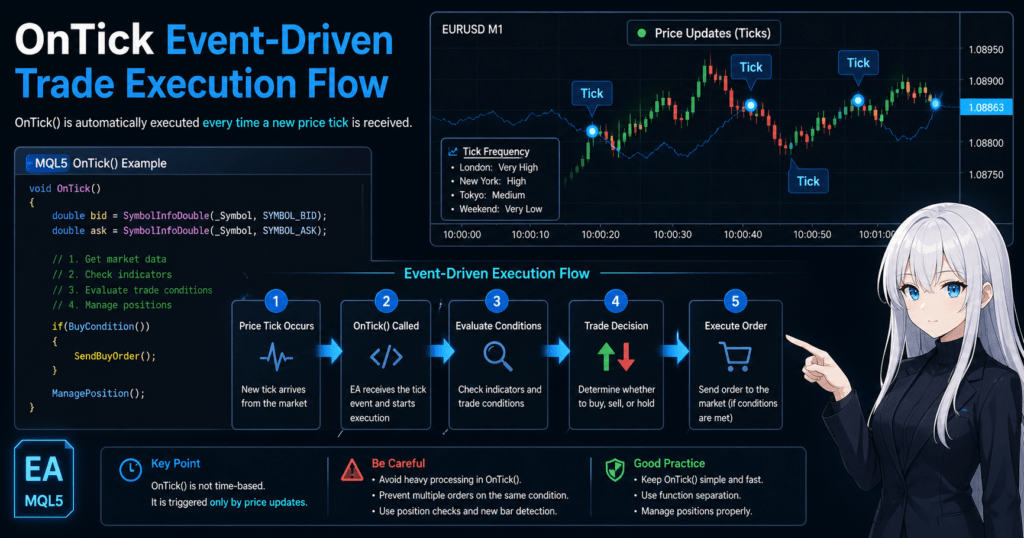
1.2 What Is a Tick? Beginner-Friendly Explanation
To understand OnTick, you first need to understand the concept of a tick.
A tick is the event that occurs when a new price arrives from the market.
In simple terms, it is the timing of a price update.
For example, when the following changes occur, ticks are generated.
| Time | Bid Price |
|---|---|
| 10:00:01 | 150.100 |
| 10:00:02 | 150.101 |
| 10:00:03 | 150.101 |
| 10:00:04 | 150.102 |
When the price changes like this, a new tick occurs each time.
The important points are as follows.
- A tick is different from a candlestick
- A candlestick summarizes prices over a fixed period
- A tick is a real-time price update
This means hundreds to thousands of ticks can occur within a single candlestick.
Tick frequency changes greatly depending on market conditions.
| Market Condition | Tick Frequency |
|---|---|
| London session | Very high |
| New York session | High |
| Tokyo session | Moderate |
| Weekend | Almost none |
Whenever a tick occurs, OnTick is called.
1.3 Where OnTick Fits Inside an EA
An MQL5 EA is usually made up of the following event functions.
OnInit()
OnTick()
OnDeinit()
Each role is as follows.
| Function | Role |
|---|---|
| OnInit | Runs once when the EA starts |
| OnTick | Runs on each price update |
| OnDeinit | Runs when the EA stops |
The processing flow is as follows.
- Attach the EA to a chart
- OnInit() is executed
- The price is updated
- OnTick() is executed
- OnTick repeats each time a tick arrives
In other words, the moment when an EA actually makes trading decisions is when OnTick is called.
Common Misunderstandings
Beginners often misunderstand the following points.
1. OnTick Does Not Run at Fixed Time Intervals
OnTick is not a timer.
It does not run unless there is a price update.
Examples
- Market closure, such as weekends
- Low-liquidity currency pairs
In these cases, OnTick may not be called for a while.
2. Ticks Are Different from Candlesticks
Beginners often think:
“OnTick runs when the 1-minute candle updates.”
This is incorrect.
The actual mechanism is:
- OnTick runs every time the price is updated
3. Heavy Processing Inside OnTick Slows Down the EA
Ticks occur very frequently.
Depending on the currency pair:
- Several times per second
- Dozens of times per second during news events
If OnTick processing is heavy, problems can occur, such as:
- The EA becomes slow
- Backtesting becomes extremely slow
Common Mistake
There is a mistake many beginner EA developers make first.
Infinite order bug
void OnTick()
{
   if(condition)
   {
      OrderSend(...);
   }
}
This code sends an order on every tick while the condition is true.
Result:
- Hundreds of positions within a few seconds
- Margin collapse
This kind of accident can happen.
For that reason, it is normal to add controls such as:
- Position checks
- New-bar detection
2. Basic Syntax and Usage of OnTick
2.1 Basic Syntax of the OnTick Function
The OnTick function in MQL5 is an event function for EAs (Expert Advisors).
It runs automatically the moment a new tick (price update) arrives from the market.
The basic syntax is as follows.
void OnTick()
{
   // Processing executed when a tick is received
}
The three key points are:
- The return value must be
void - It takes no arguments
- It can be used only in EAs
OnTick cannot be used in indicators or scripts.
This is because an EA is a program that responds to real-time price events.
2.2 Minimal OnTick Code
This is the simplest OnTick example.
void OnTick()
{
   Print("New Tick");
}
When this code is attached to a chart as an EA,
it outputs to the log every time the price is updated.
Log example
New Tick
New Tick
New Tick
This confirms that OnTick is executed on each tick.
2.3 Example: Getting the Current Price
In an EA, the current price is usually obtained inside OnTick.
void OnTick()
{
   double bid = SymbolInfoDouble(_Symbol, SYMBOL_BID);
   double ask = SymbolInfoDouble(_Symbol, SYMBOL_ASK);

   Print("Bid:", bid, " Ask:", ask);
}
The main elements used here are as follows.
| Element | Description |
|---|---|
_Symbol | Current currency pair |
SYMBOL_BID | Sell price |
SYMBOL_ASK | Buy price |
This code is the basic pattern for getting real-time prices.
Many EAs follow this flow:
- Get the current price
- Get indicator values
- Evaluate trading conditions
- Send an order
2.4 Basic Pattern for Writing Trading Conditions
A typical OnTick structure looks like this.
void OnTick()
{
   double bid = SymbolInfoDouble(_Symbol, SYMBOL_BID);

   if(bid > 150.000)
   {
      Print("Buy condition");
   }
}
In a real EA, indicator conditions such as the following are added here.
- Moving average
- RSI
- Bollinger Bands
Example
void OnTick()
{
   double price = SymbolInfoDouble(_Symbol, SYMBOL_BID);

   if(price > 150.000)
   {
      // Write order processing here
   }
}
2.5 Typical EA Structure: Practical Pattern
A real EA often has the following structure.
void OnTick()
{
   CheckSignal();
   ManagePosition();
}
Example of function separation
void CheckSignal()
{
   // Entry decision
}

void ManagePosition()
{
   // Take-profit and stop-loss management
}
This approach provides benefits such as:
- Better readability
- Fewer bugs
- Better maintainability
Common Beginner Pitfalls
Beginners often make mistakes in the following areas when using OnTick.
1. Do Not Call OnTick Yourself
OnTick is an automatically executed event function.
You do not need to write this:
OnTick();
It is completely unnecessary.
2. You Cannot Create Multiple OnTick Functions
The following code causes an error.
void OnTick()
{
}

void OnTick()
{
}
Inside one EA, only one OnTick function can be defined.
3. Do Not Put Too Much Heavy Processing in OnTick
Ticks occur very frequently.
Depending on the currency pair:
- Several times per second
- Dozens of times per second during news events
For that reason, the following processing requires care.
- Heavy calculations
- Large loops
- File processing
These can become causes of performance problems.
Common Mistake
This is a common problem in beginner EAs.
Order-on-Every-Tick Bug
void OnTick()
{
   if(signal)
   {
      OrderSend(...);
   }
}
With this code,
orders continue to be sent as long as the condition is true.
Result:
- The same order occurs repeatedly
- A large number of positions appear within a few seconds
This becomes a serious accident.
Countermeasures include:
- Position checks
- New-bar detection
- Flag management
3. When OnTick Is Called: How Tick Processing Works
3.1 OnTick Runs on Price Update Events
The MQL5 OnTick function runs the moment a new tick (price update) arrives from the market.
In other words, OnTick is an event function that responds to price changes, not time.
The EA execution flow is as follows.
Price update (tick occurs)
        ↓
MetaTrader detects the event
        ↓
OnTick() is called
        ↓
The EA trading logic is executed
This process repeats on every tick.
For a highly liquid currency pair such as EURUSD, OnTick may run:
- Every few hundred milliseconds
- Several times per second
On the other hand, during low-liquidity periods, OnTick may not be called for:
- Several seconds
- Dozens of seconds
The key point is this:
OnTick is not a function that runs at fixed time intervals
3.2 Difference Between Ticks and Candlesticks
The point that beginners most often find confusing is the:
difference between a tick and a candlestick (bar)
| Concept | Meaning |
|---|---|
| Tick | The moment the price is updated |
| Candlestick | Price data over a fixed period |
For example, even on a 1-minute chart, the following movements occur internally.
10:00:01 150.100
10:00:01 150.101
10:00:02 150.100
10:00:03 150.102
10:00:05 150.101
All of these are ticks.
However, on a 1-minute chart, the prices from:
10:00-10:01
are grouped and displayed as one candlestick.
In short:
- OnTick runs on each tick
- Indicators are usually handled by bar
This is the difference.
If you do not understand this difference, you may develop the following misunderstanding:
“The EA runs when the 1-minute candle updates.”
That is not correct.
In reality:
The EA runs every time the price is updated.
3.3 Tick Frequency Changes with Market Conditions
The execution frequency of OnTick changes greatly depending on market liquidity.
A general guide is as follows.
| Market | Tick Frequency |
|---|---|
| London session | Very high |
| New York session | High |
| Tokyo session | Moderate |
| Weekend | Almost zero |
Ticks especially increase at the following times.
- Economic indicator releases
- Statements from key officials
- Immediately after a market opens
At these times, the number of OnTick executions increases sharply.
For that reason, an EA needs:
- Lightweight processing
- Proper condition checks
3.4 Cases Where No Tick Arrives
A common beginner question is:
“Why is my EA not running?”
In many cases, the cause is that no tick is occurring.
OnTick does not run in situations such as:
- The market is closed, such as on weekends
- The instrument has low liquidity
- Demo account data is delayed
- The chart has stopped updating
In other words:
OnTick absolutely does not run unless a tick arrives
If you need periodic processing, MQL5 provides the following event.
OnTimer()
This is an event that runs at specified time intervals.
Common Pitfalls
Beginners often get confused by the following points in the OnTick mechanism.
1. Tick Counts Differ Between Backtesting and Live Trading
In backtesting, the number of ticks changes depending on:
- Modeling method
- Tick generation method
For that reason, the number of OnTick calls may not match between:
- Live trading
- Backtesting
This is normal behavior.
2. Fast EAs Are Affected by Tick Count
For scalping EAs and similar systems:
- Tick accuracy
- Data quality
can greatly affect results.
Depending on the environment:
- Number of executions
- Trade timing
may change.
Common Mistake
Writing an EA Without Understanding Tick Processing
This is an example of code beginners often write.
void OnTick()
{
   if(signal)
   {
      OrderSend(...);
   }
}
This code:
sends an order on every tick
which causes the following problems.
- Repeated orders under the same condition
- A large number of positions within a few seconds
- Margin collapse
In a real EA, controls such as the following are required.
- New-bar detection
- Position checks
- Entry count control
4. Basic EA Structure Using OnTick: Practical Code Examples
4.1 Basic EA Structure: OnInit, OnTick, and OnDeinit
An MQL5 EA is usually made up of the following three event functions.
| Function | Role |
|---|---|
| OnInit | Runs once when the EA starts |
| OnTick | Runs on each tick |
| OnDeinit | Runs when the EA stops |
A basic EA template looks like this.
int OnInit()
{
   Print("EA started");
   return(INIT_SUCCEEDED);
}

void OnTick()
{
   // Trading logic
}

void OnDeinit(const int reason)
{
   Print("EA stopped");
}
The processing flow is as follows.
- Attach the EA to a chart
- OnInit() is executed
- A tick arrives
- OnTick() is executed
- When the EA is removed, OnDeinit() is executed
The basic rule is that actual trading decisions are made inside OnTick.
4.2 Simple EA Example: Price Condition
Here is the simplest EA example.
void OnTick()
{
   double price = SymbolInfoDouble(_Symbol, SYMBOL_BID);

   if(price > 150.000)
   {
      Print("Price is above 150");
   }
}
This EA has the basic structure of:
- Getting the current price
- Checking the condition
- Outputting a log when the condition is met
In EA development, it is important to first understand this basic pattern.
4.3 Basic EA Form Using an Indicator
In real EAs, indicators are used to make trading decisions.
As an example, the following structure uses a moving average (MA).
int maHandle;

int OnInit()
{
   maHandle = iMA(_Symbol, PERIOD_CURRENT, 20, 0, MODE_SMA, PRICE_CLOSE);
   return(INIT_SUCCEEDED);
}

void OnTick()
{
   double maBuffer[];
   CopyBuffer(maHandle, 0, 0, 1, maBuffer);

   double price = SymbolInfoDouble(_Symbol, SYMBOL_BID);

   if(price > maBuffer[0])
   {
      Print("Buy signal");
   }
}
Processing flow:
- Create the indicator in OnInit
- Get the value in OnTick
- Evaluate the condition
This structure is used in many EAs.
4.4 Practical EA Structure: Recommended Pattern
In a real EA, writing everything inside OnTick makes the code very hard to read.
For that reason, function separation is usually used.
Example
void OnTick()
{
   CheckEntry();
   ManagePosition();
}
Entry decision
void CheckEntry()
{
   // Entry conditions
}
Position management
void ManagePosition()
{
   // Take-profit and stop-loss processing
}
This design provides benefits such as:
- The code is easier to read
- Bugs are reduced
- Adding features becomes easier
Common Pitfalls
1. Writing Everything in OnTick
A beginner’s first EA often looks like this.
void OnTick()
{
   // More than 100 lines of code
}
With this structure:
- Bugs are hard to find
- Maintenance becomes impossible
For EAs, function separation is the basic approach.
2. Creating an Indicator on Every Tick
This is a common beginner mistake.
void OnTick()
{
   int handle = iMA(_Symbol, PERIOD_CURRENT, 20, 0, MODE_SMA, PRICE_CLOSE);
}
This code creates an indicator on every tick.
Result:
- Memory consumption
- Lower performance
The correct approach is to create it in OnInit.
Common Mistake
Infinite Order EA
The following code is a dangerous EA that beginners often create.
void OnTick()
{
   if(signal)
   {
      trade.Buy(0.1);
   }
}
This code:
places an order on every tick while the condition is true.
Result:
- Hundreds of positions within a few seconds
- Margin collapse
This kind of accident can happen.
Countermeasures are required, such as:
- Position checks
- New-bar detection
- Flag management
5. Essential OnTick Implementation Techniques: New-Bar Detection and Processing Control
5.1 Why Control Logic Is Necessary in OnTick
OnTick is an event function executed on each tick (price update).
Therefore, without any control, an EA will repeat the same processing at very high frequency.
For example:
void OnTick()
{
   if(signal)
   {
      trade.Buy(0.1);
   }
}
While the condition is true, this code may continue sending orders:
- Several times per second
- Dozens of times per second when the market is active
As a result, serious problems can occur, such as:
- A large number of duplicate positions
- Insufficient margin
- EA shutdown
To prevent these problems, EAs use controls such as:
- New-bar detection
- Position checks
- Flag management
- Time control
In particular, new-bar detection is a basic technique used in almost every EA.
5.2 New-Bar Detection: The Most Important Technique
New-bar detection is:
a method that executes processing when a candlestick updates
This makes it possible to:
- Prevent processing on every tick
- Stabilize backtesting
- Reduce EA load
The basic code is as follows.
bool IsNewBar()
{
   static datetime lastBarTime = 0;
   datetime currentBarTime = iTime(_Symbol, PERIOD_CURRENT, 0);

   if(currentBarTime != lastBarTime)
   {
      lastBarTime = currentBarTime;
      return true;
   }

   return false;
}
Use it in OnTick like this.
void OnTick()
{
   if(!IsNewBar())
      return;

   Print("New bar detected");
}
How this code works:
- It processes only when a new candlestick is created
- It skips processing on all other ticks
As a result:
EA processing runs only once per bar.
5.3 Position Checks: Preventing Duplicate Orders
In an EA, checking existing positions is also important.
It is safer to write code like this.
void OnTick()
{
   if(PositionSelect(_Symbol))
      return;

   if(signal)
   {
      trade.Buy(0.1);
   }
}
This code means:
- If a position already exists
- Do not send a new order
In other words, it prevents duplicate entries.
This is a very common EA pattern.
5.4 Flag Management: Controlling the Number of Entries
Another important technique is flag management.
Example
bool traded = false;

void OnTick()
{
   if(traded)
      return;

   if(signal)
   {
      trade.Buy(0.1);
      traded = true;
   }
}
This code creates the following control:
- Once an order has been placed
- The same order is not placed again
In EAs, this is used for controls such as:
- One trade per day
- One trade per bar
Common Pitfalls
1. Not Writing New-Bar Detection
Many beginner EAs:
make trading decisions on every tick
As a result:
- Backtesting becomes unstable
- Spread impact increases
- The number of executions becomes excessive
Many EAs are designed with bar-based logic.
2. Using iTime Incorrectly
New-bar detection uses:
iTime(_Symbol, PERIOD_CURRENT, 0)
Meaning:
| Argument | Meaning |
|---|---|
| Symbol | Currency pair |
| Timeframe | Chart timeframe |
| 0 | Latest bar |
Without this understanding, the EA may behave incorrectly.
Common Mistake
Gap Between Backtesting and Live Trading
Tick-based EAs are affected by:
- Tick quality
- Broker
- Execution speed
As a result, cases can occur where:
- The EA is profitable in backtesting
- The EA loses money in live trading
To reduce this problem:
bar-based logic
is adopted in many EAs.
6. OnTick Performance Optimization: How to Speed Up an EA
6.1 Why OnTick Optimization Matters
OnTick is a function executed on each tick (price update).
Therefore, EA performance depends heavily on the efficiency of processing inside OnTick.
For example, in highly liquid currency pairs, ticks may occur the following number of times per second.
| Market Condition | Tick Count, Approximate |
|---|---|
| Normal market | Several times per second |
| London session | More than 10 times per second |
| News release | Dozens of times per second |
If heavy processing is written inside OnTick, problems can occur, such as:
- The EA becomes slow
- Backtesting becomes extremely slow
- VPS CPU usage increases
For that reason, EA development requires a design that keeps OnTick as lightweight as possible.
6.2 Reduce Unnecessary Processing: Early Return
The most basic optimization technique is early return.
When a condition does not require processing, end the function immediately.
Example
void OnTick()
{
   if(!IsNewBar())
      return;

   CheckSignal();
}
This code means:
- If it is not a new bar
- Do not process anything further
As a result:
- Calculation volume is reduced
- CPU load is reduced
This method is a basic technique used in almost every EA.
6.3 Create Indicators in OnInit
A common beginner mistake is:
creating indicators inside OnTick
Incorrect example
void OnTick()
{
   int ma = iMA(_Symbol, PERIOD_CURRENT, 20, 0, MODE_SMA, PRICE_CLOSE);
}
This code generates an indicator on every tick.
Problems:
- Increased memory consumption
- Higher CPU load
- The EA becomes slow
The correct method is to create it in OnInit.
int maHandle;

int OnInit()
{
   maHandle = iMA(_Symbol, PERIOD_CURRENT, 20, 0, MODE_SMA, PRICE_CLOSE);
   return(INIT_SUCCEEDED);
}
Then, in OnTick, get only the value.
void OnTick()
{
   double buffer[];
   CopyBuffer(maHandle,0,0,1,buffer);
}
This design is a basic pattern in EA development.
6.4 Reduce Unnecessary Log Output
Print() is useful for debugging,
but if used too much, log processing becomes a bottleneck.
Example
void OnTick()
{
   Print("Tick received");
}
For a currency pair with many ticks:
- Thousands of log lines may be output in one minute
As a result:
- Log files become huge
- MT5 performance may decrease
Countermeasures:
- Use Print only during debugging
- Use conditional logs
Example
if(signal)
{
   Print("Entry signal");
}
6.5 Minimize Loop Processing
If a large loop is written inside OnTick,
the EA can become extremely slow depending on tick frequency.
Example, not recommended
for(int i=0;i<10000;i++)
{
   // heavy calculation
}
It is safer to move this kind of processing to:
- OnTimer
- OnInit
Common Pitfalls
1. Tick-Based EAs Can Have High CPU Load
Tick-based EAs tend to involve:
- High-frequency execution
- High CPU load
For that reason:
- VPS specifications
- EA design
are important.
2. Backtesting Speed Becomes Extremely Slow
If OnTick processing is heavy:
- Testing can take several hours
- Optimization can become impossible
The main causes are often:
- Heavy indicators
- Unnecessary calculations
- Wasteful loops
Common Mistake
Creating an Indicator on Every Tick
This is one of the most common mistakes in beginner EAs.
Result:
- MT5 freezes
- Testing speed decreases
- Memory is consumed
In an EA, always use the design:
Create indicators in OnInit
7. Important Notes When Using OnTick: Common EA Development Problems
7.1 Repeated Entries Under the Same Condition
The most common problem in EAs that use OnTick is placing orders repeatedly under the same condition.
For example:
void OnTick()
{
   if(signal)
   {
      trade.Buy(0.1);
   }
}
With this code, as long as the condition is true, an order is placed on every tick.
Consider this situation.
| Time | Status |
|---|---|
| 10:00:01 | Condition met |
| 10:00:01 | Tick |
| 10:00:01 | Order |
| 10:00:01 | Next tick |
| 10:00:01 | Order again |
As a result, accidents can occur, such as:
- A large number of positions within a few seconds
- Insufficient margin
- EA shutdown
Use the following methods as countermeasures.
- New-bar detection
- Position checks
- Flag management
Example
void OnTick()
{
   if(PositionSelect(_Symbol))
      return;

   if(signal)
   {
      trade.Buy(0.1);
   }
}
This creates a design where a new order is not placed if an existing position is present.
7.2 If No Tick Arrives, the EA Does Not Run
OnTick is a function that runs on a price update event.
Therefore, the EA is not executed in the following situations.
- Market closure, such as weekends
- Low-liquidity instruments
- Data feed stopped
- Chart updates stopped
Many beginner cases where:
“The EA seems to have stopped”
are simply caused by no ticks arriving.
If you want to process something at fixed time intervals, use the OnTimer event.
Example
EventSetTimer(60);
This makes OnTimer run every 60 seconds.
7.3 Differences Between Backtesting and Live Trading
In OnTick-based EAs, behavior can differ between:
- Backtesting
- Live trading
The reasons are as follows.
| Factor | Description |
|---|---|
| Tick generation | Tests may use simulated ticks |
| Execution speed | Live accounts have delays |
| Spread | Differs by broker |
| Liquidity | Depends on market conditions |
For that reason, there are cases where:
- The EA is profitable in testing
- The live result changes
The impact is especially large for:
- Scalping EAs
- High-frequency EAs
7.4 Impact of the VPS Environment
EAs are usually run on a VPS (virtual private server).
Depending on the VPS environment:
- CPU performance
- Network latency
- MT5 stability
can change.
Because OnTick is high-frequency processing:
- Low-spec VPS plans
- Shared-CPU environments
can cause processing delays.
For EA operation:
- A stable VPS
- Low latency
are important.
Common Pitfalls
1. Not Checking Whether OnTick Is Running
To check whether an EA is running, you can confirm the log with code such as:
Print("Tick");
2. Differences Between Demo and Real Accounts
On demo accounts:
- Tick frequency
- Execution speed
may differ from real accounts.
For EA validation:
- Forward testing
- Small-lot live testing
are recommended.
Common Mistake
Designing a Tick-Based EA Without Understanding It
Many beginner EAs do not account for:
- Tick processing
- Entry control
As a result, they suffer from:
- Repeated orders
- Unstable trading
- Lower reproducibility
In EA design, it is important to combine:
- New-bar detection
- Position management
- Processing optimization
8. FAQ
8.1 What Is OnTick?
OnTick is an MQL5 event function that runs automatically when a price tick (Tick: price update) occurs.
An EA (Expert Advisor) is an event-driven program, and OnTick is called when a new price arrives from the market.
In many EAs, this function is used for:
- Evaluating trading conditions
- Order processing
- Position management
8.2 How Often Is OnTick Executed?
The execution frequency of OnTick depends on the market tick frequency.
For example:
| Market Condition | Tick Frequency |
|---|---|
| Normal market | Several times per second |
| London session | More than 10 times per second |
| During news releases | Dozens of times per second |
However, during low-liquidity periods, OnTick may not be called for several seconds to dozens of seconds.
In short, OnTick is:
an event that responds to price updates, not time.
8.3 What Is the Difference Between OnTick and OnTimer?
The difference is the execution trigger.
| Function | Execution Timing |
|---|---|
| OnTick | When the price updates |
| OnTimer | At specified time intervals |
OnTick responds to market events, while OnTimer is used when processing should run at fixed time intervals.
For example, OnTimer may be used for:
- Periodic checks
- Log output
- Risk monitoring
8.4 Can OnTick Be Used in Indicators?
No.
OnTick is an event function for EAs only.
Indicators usually use:
OnCalculate()
as the calculation function.
8.5 Can Multiple OnTick Functions Be Defined?
No.
Inside one EA, only one OnTick function can be defined.
The following code causes a compilation error.
void OnTick()
{
}

void OnTick()
{
}
8.6 What Happens If Heavy Processing Is Written in OnTick?
Because ticks occur frequently, writing heavy processing in OnTick can cause problems such as:
- The EA becomes slow
- Backtesting becomes extremely slow
- CPU load increases
For that reason, EAs use optimizations such as:
- New-bar detection
- Early return
- Function separation
8.7 Why Is OnTick Not Running?
If OnTick is not running, possible causes include:
- The market is closed, such as on weekends
- No tick is occurring
- The EA is stopped
- Automated trading is disabled
- The chart is not updating
The most common cause is that no tick has arrived.
8.8 Can You Build an EA with Only OnTick?
A basic EA can be created with only OnTick.
However, real EAs often use the following functions together.
OnInit()for initializationOnTick()for trading logicOnDeinit()for shutdown processing
This structure is the basic EA template.