- 1 Key Takeaway
- 2 1. Role of This Logic
- 3 2. Basic Concept
- 4 3. Common Design Patterns
- 5 4. Implementation Method
- 6 5. Sample Code
- 7 6. Comparison by Pattern
- 8 7. Situations Where Errors Are Likely
- 9 8. Items to Check in Backtesting
- 10 9. Items to Check in Forward Testing
- 11 10. Notes for Live Trading
- 12 11. Improvement Ideas and Alternatives
- 13 12. Summary
- 14 FAQ
- 14.1 Q1. What is a trend filter in MQL5?
- 14.2 Q2. Can I build a trend filter with only a moving average?
- 14.3 Q3. What should I watch for when retrieving indicator values in MQL5?
- 14.4 Q4. Does adding more trend filters make an EA more stable?
- 14.5 Q5. What should I check in backtesting?
- 14.6 Q6. What should I check in forward testing?
- 14.7 Q7. Should the trend filter and order processing be separated?
Key Takeaway
The purpose of designing a trend filter in MQL5 is to limit an EA’s trading signals so they align with the market direction.
Combining moving averages, ADX, ATR, and higher-timeframe direction makes the conditions easier to separate.
However, adding too many filters can reduce the number of trades and lead to over-optimization.
Before live trading, you need to confirm reproducibility with forward testing, not only backtesting.
1. Role of This Logic
Conclusion
An MQL5 trend filter is logic that determines whether the market environment is suitable for an EA to enter a trade.
It is not the buy or sell signal itself. Its role is to decide whether a signal should be accepted or excluded.
Definition
A trend filter is a mechanism that limits an EA’s trading conditions based on market direction and trend strength.
When you add a trend filter, the EA’s process becomes easier to separate as follows.
Market recognition
↓
Filter decision
↓
Signal decision
↓
Risk check
↓
Pre-order check
↓
Order sending
↓
Post-fill management
↓
Exit and stop decision
In an MQL5 EA, it is easier to test the logic when market assessment, signal assessment, risk checks, and order processing are separated instead of mixing everything inside OnTick.
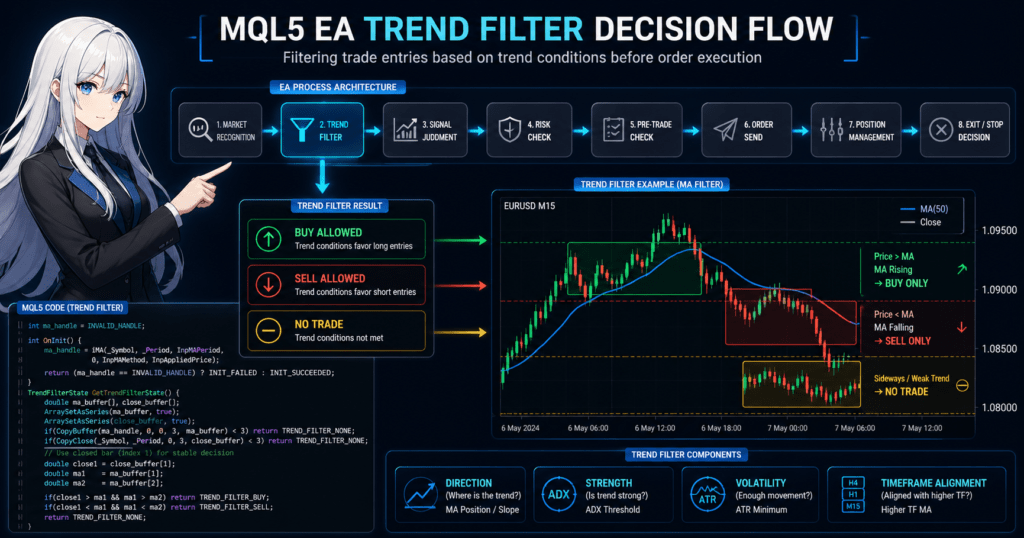
This diagram shows where the trend filter is placed inside the EA.
1.1 What a Trend Filter Helps Prevent
A trend filter is mainly used to reduce entries such as the following.
- Easy sell entries during an uptrend
- Easy buy entries during a downtrend
- False signals in a ranging market
- Reactions to small price movement when volatility is too low
- Short-term signals that go against the higher timeframe
A trend filter is not a mechanism that eliminates losses.
A trend filter is a design element for organizing EA conditions and making the test target clearer.
2. Basic Concept
Conclusion
A trend filter should be designed by separating direction, strength, volatility range, and timeframe.
If you try to judge the entire market with only one indicator, the logic can become too dependent on a specific market condition.
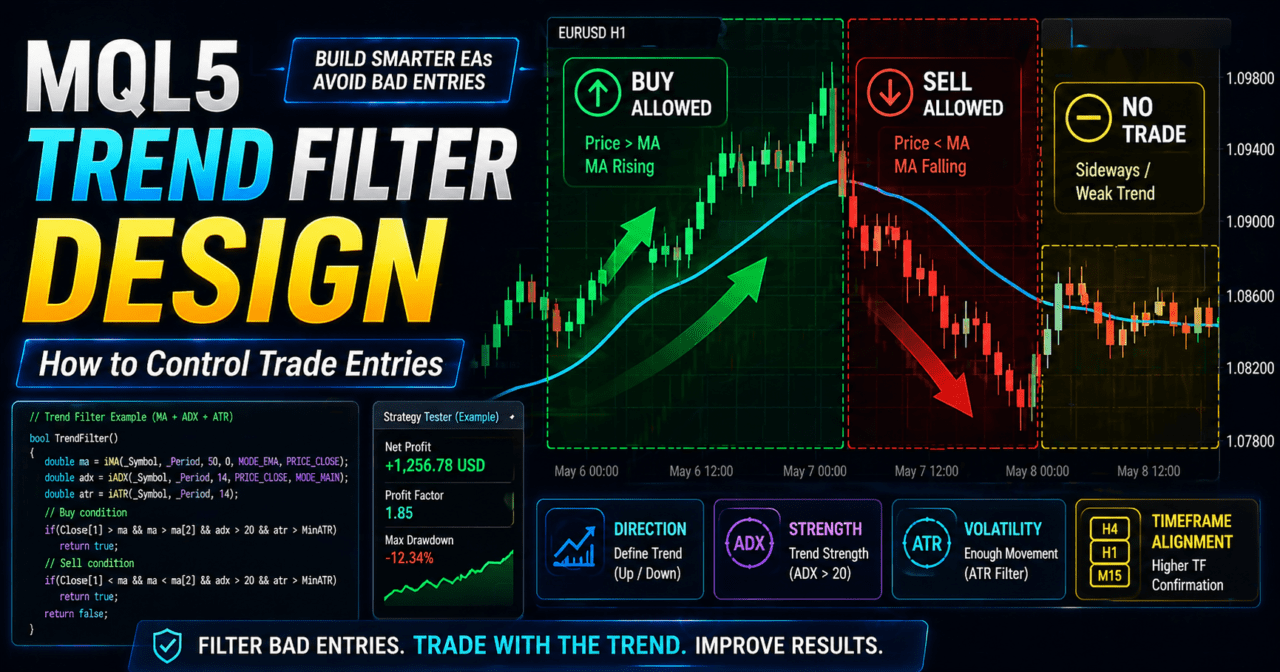
When designing a trend filter in MQL5, separate the following four elements.
| Decision Item | Purpose | Example |
|---|---|---|
| Direction | Determine whether the market is rising, falling, or moving sideways | Moving average slope, price position relative to the moving average |
| Strength | Check whether the trend is strong enough | ADX |
| Volatility range | Check whether price movement is too small | ATR |
| Timeframe | Check alignment between the short-term timeframe and higher timeframe | Higher-timeframe moving average |
A trend filter is used not to increase entry conditions, but to exclude situations where the EA should not enter.
2.1 Difference Between the Current Bar and a Closed Bar
When using indicator values in MQL5, you need to distinguish between the current bar and a closed bar.
The current bar is still forming, so its values change as ticks update.
A closed bar has already finished, making it easier to confirm reproducibility in testing.
For EA testing, decisions based on closed bars make it easier to compare backtest and forward test behavior.
However, using closed bars also makes the response slower.
3. Common Design Patterns
Conclusion
Common trend filters include moving averages, ADX, ATR, and higher-timeframe confirmation.
Because each has a different role, it is important not to stack too many conditions that mean the same thing.
3.1 Moving Average Filter
A moving average filter judges direction based on the relationship between price and the moving average, or based on the slope of the moving average.
Because it is easy to implement, it is a practical method for beginner to intermediate EA design.
For example, if the closing price is above the moving average and the moving average is rising, the EA allows only buy direction.
If the closing price is below the moving average and the moving average is falling, the EA allows only sell direction.
3.2 ADX Filter
An ADX filter is used to judge trend strength.
ADX should be treated as a supporting tool for checking whether the market has a certain level of directional strength, not as a tool for direction itself.
A design that decides buy or sell direction using only ADX is not sufficient.
For direction judgment, combine it with a moving average, price position, higher-timeframe confirmation, or similar logic.
3.3 ATR Filter
An ATR filter is used to judge the market’s volatility range.
When ATR is too small, spreads and commissions tend to have a larger relative impact.
ATR is not an indicator for deciding trade direction.
ATR is a filter for checking whether there is enough price movement to justify trading.
3.4 Higher-Timeframe Filter
A higher-timeframe filter aligns short-term signals with the direction of a higher timeframe.
Even if a buy signal appears on the short-term timeframe, the EA can be designed to skip the entry when the higher timeframe is trending downward.
A higher-timeframe filter can make market recognition more stable, but it may also greatly reduce the number of trades.
4. Implementation Method
Conclusion
In MQL5, the basic flow is to create a handle with an indicator function and retrieve values with CopyBuffer.
In an EA, a common structure is to create the handle in OnInit, make decisions in OnTick, and release the handle in OnDeinit when needed.
When using indicators in MQL5, the structure often retrieves buffer values through an indicator handle rather than directly retrieving the values.
4.1 Implementation Flow
Organize the trend filter implementation in the following order.
- Create handles for the moving average, ADX, and other indicators in
OnInit. - Check that each handle is not
INVALID_HANDLE. - In
OnTick, check whether the required number of bars is available. - Use
CopyBufferto retrieve indicator values. - If the number of copied values is insufficient, stop the decision process.
- Decide whether to use a closed bar or the current bar.
- Separate the filter result into buy allowed, sell allowed, or no trading.
4.2 Separation From Order Processing
A trend filter is easier to manage when it is not directly coupled with order processing.
The filter function should only return whether buying is allowed, selling is allowed, or no trade should be taken.
Before sending an order, check lot size, margin, spread, stop levels, tradable time, and existing positions.
When processing orders in MQL5, a safer design uses MqlTradeRequest, MqlTradeResult, and, when needed, MqlTradeCheckResult with OrderCheck.
5. Sample Code
Conclusion
The following code is a test sample that uses a moving average to judge buy direction and sell direction.
It includes the basic structure for an indicator handle, CopyBuffer, closed-bar decision logic, and error handling.
#property strict

enum TrendFilterState
{
   TREND_FILTER_NONE = 0,
   TREND_FILTER_BUY  = 1,
   TREND_FILTER_SELL = 2
};

input int InpMAPeriod = 50;
input ENUM_MA_METHOD InpMAMethod = MODE_EMA;
input ENUM_APPLIED_PRICE InpAppliedPrice = PRICE_CLOSE;

int ma_handle = INVALID_HANDLE;

int OnInit()
{
   ma_handle = iMA(_Symbol, _Period, InpMAPeriod, 0, InpMAMethod, InpAppliedPrice);

   if(ma_handle == INVALID_HANDLE)
   {
      Print("Failed to create moving average handle");
      return INIT_FAILED;
   }

   return INIT_SUCCEEDED;
}

void OnDeinit(const int reason)
{
   if(ma_handle != INVALID_HANDLE)
   {
      IndicatorRelease(ma_handle);
      ma_handle = INVALID_HANDLE;
   }
}

void OnTick()
{
   TrendFilterState trend_state = GetTrendFilterState();

   if(trend_state == TREND_FILTER_NONE)
   {
      return;
   }

   if(trend_state == TREND_FILTER_BUY)
   {
      Print("Buy direction is allowed by trend filter");
   }
   else if(trend_state == TREND_FILTER_SELL)
   {
      Print("Sell direction is allowed by trend filter");
   }
}

TrendFilterState GetTrendFilterState()
{
   if(ma_handle == INVALID_HANDLE)
   {
      Print("Moving average handle is invalid");
      return TREND_FILTER_NONE;
   }

   if(BarsCalculated(ma_handle) < 3)
   {
      Print("Not enough calculated bars for moving average");
      return TREND_FILTER_NONE;
   }

   double ma_buffer[];
   double close_buffer[];

   ArraySetAsSeries(ma_buffer, true);
   ArraySetAsSeries(close_buffer, true);

   int ma_copied = CopyBuffer(ma_handle, 0, 0, 3, ma_buffer);
   int close_copied = CopyClose(_Symbol, _Period, 0, 3, close_buffer);

   if(ma_copied < 3 || close_copied < 3)
   {
      Print("Failed to copy enough data for trend filter");
      return TREND_FILTER_NONE;
   }

   const int CURRENT_FORMING_BAR = 0;
   const int CURRENT_CLOSED_BAR = 1;
   const int PREVIOUS_CLOSED_BAR = 2;

   double current_closed_close = close_buffer[CURRENT_CLOSED_BAR];
   double current_closed_ma = ma_buffer[CURRENT_CLOSED_BAR];
   double previous_closed_ma = ma_buffer[PREVIOUS_CLOSED_BAR];

   bool ma_is_rising = current_closed_ma > previous_closed_ma;
   bool ma_is_falling = current_closed_ma < previous_closed_ma;

   if(current_closed_close > current_closed_ma && ma_is_rising)
   {
      return TREND_FILTER_BUY;
   }

   if(current_closed_close < current_closed_ma && ma_is_falling)
   {
      return TREND_FILTER_SELL;
   }

   return TREND_FILTER_NONE;
}
This code does not send orders.
If you add order processing for live trading, design it so OrderCheck verifies margin, lot size, price, stop conditions, and related items before sending an order.
5.1 Important Points in the Code
In this sample, CURRENT_CLOSED_BAR is used as the position of the closed bar.CURRENT_FORMING_BAR is the position of the current bar, and its value may change with tick updates.
If CopyBuffer returns too few values, the EA stops the decision process.
If trading decisions continue with insufficient data, the entry conditions may become different from what was intended.
6. Comparison by Pattern
Conclusion
A trend filter needs to be selected based on its purpose.
If direction judgment, strength judgment, and volatility judgment are mixed together, the conditions can become too complex.
| Method | Advantages | Disadvantages | Best Use Case | Implementation Difficulty | Over-Optimization Risk |
|---|---|---|---|---|---|
| Moving average filter | Easy to implement and useful for seeing direction | False signals are common in ranges | Initial design and direction judgment | Low | Medium |
| ADX filter | Useful for seeing trend strength | Trade direction must be determined separately | Trend strength judgment | Medium | Medium |
| ATR filter | Easy to reflect volatility range | Cannot judge direction | Avoiding low-volatility conditions | Medium | Medium |
| Higher-timeframe filter | Easy to align with the larger direction | Trade count tends to decrease | Multi-timeframe design | Medium | High |
| Combined filter | Allows detailed condition control | Can easily create too many conditions | Testing by intermediate and advanced users | High | High |
Combined filters are useful, but the more conditions you add, the stronger the parameter dependency becomes.
Even if a backtest shows good results, the logic may break down in forward testing.
7. Situations Where Errors Are Likely
Conclusion
A trend filter is more likely to behave incorrectly in ranging markets, sudden price moves, wider spreads, and insufficient data conditions.
You need to design not only filter conditions, but also conditions for stopping the decision process.
7.1 Ranging Markets
In a ranging market, price repeatedly moves above and below the moving average.
With only a moving average filter, buy permission and sell permission may switch within a short period.
To avoid ranges, you can combine ADX, ATR, recent high-low width, or similar conditions.
However, when adding conditions, pay attention to fewer trades and the risk of over-optimization.
7.2 Sudden Price Moves and Wider Spreads
During sudden price moves, the trend direction may look clear, but fill price and spread conditions can deteriorate.
In an EA, signal judgment and pre-order checks need to be separated.
When spreads widen, the order may not be filled at the expected price.
Differences between backtesting and live trading can also occur because of these trading conditions.
7.3 Insufficient Indicator Data
Immediately after startup or after switching symbols, indicator values may not have been calculated enough.
Check the results of BarsCalculated and CopyBuffer, and stop the decision process if values are insufficient.
8. Items to Check in Backtesting
Conclusion
In backtesting, check not only profit, but also drawdown, trade count, period dependency, and parameter dependency.
A trend filter should be evaluated in units that are easy to test.
At minimum, check the following items in backtesting.
| Check Item | Reason to Check |
|---|---|
| Total profit and loss | To understand the overall tendency |
| Maximum drawdown | To check the size of capital decline |
| Win rate | To review signal frequency and accuracy |
| Profit-loss ratio | To review the balance of profit and loss per trade |
| Trade count | To confirm whether there are enough trades for testing |
| Consecutive losses | To consider operating stop conditions |
| Spread conditions | To estimate differences from live trading |
| Period dependency | To check whether results fit only a specific period |
| Parameter dependency | To avoid over-optimization |
Backtest results do not guarantee future profits.
Backtesting is a verification process for checking how the logic behaves.
8.1 Checking the Filter Alone
After adding a trend filter, check it step by step as follows.
- Check the trading logic without a filter.
- Add only the moving average filter.
- Add ADX or ATR.
- Add the higher-timeframe filter.
- Review changes in trade count and drawdown.
If you add multiple conditions at once, it becomes difficult to identify which condition affected the result.
9. Items to Check in Forward Testing
Conclusion
In forward testing, check execution differences, wider spreads, VPS environment, and broker differences that are hard to see in backtesting.
Before live trading, you need to observe EA behavior in a demo environment or under small conditions.
In forward testing, check the following items.
- Whether fill prices differ significantly from expectations
- Whether orders stop correctly when spreads widen
- Whether trading frequency differs greatly from the backtest
- Whether drawdown remains within the expected range
- Whether the broker’s trading conditions reject lots or stops
- Whether the EA runs stably in the VPS environment
- Whether differences in execution conditions between demo and live accounts are considered
Forward testing is not a procedure for blindly trusting backtest results.
Forward testing is a process for checking EA behavior under conditions close to the real trading environment.
10. Notes for Live Trading
Conclusion
In live trading, even if the filter decision is correct, results can change because of spreads, execution, margin, and account type.
In EA design, trading logic and risk control must be separated.
In live trading, pay attention to the following points.
- Performance may worsen when spreads widen
- Execution delays and slippage may occur
- Higher leverage tends to make drawdowns larger
- Minimum lot, maximum lot, and lot step need to be checked
- Orders may fail because of stop levels or freeze levels
- Position management differs between netting accounts and hedging accounts
- EA behavior changes depending on the symbol’s trading hours and trading conditions
10.1 Connection With Lot Calculation
A trend filter alone cannot manage EA risk.
In live trading, lot calculation and stop-loss width should be designed separately.
| Lot Method | Characteristics | Notes |
|---|---|---|
| Fixed lot | Easy to implement | Hard to adapt to capital changes |
| Balance-proportional | Easy to adjust based on account balance | Watch for changes after sudden losses |
| Risk-percentage based | Easy to calculate from acceptable loss | Requires checking stop-loss width and symbol specifications |
| Volatility-adjusted | Easy to use with ATR and similar indicators | Parameter dependency tends to become stronger |
For lot calculation, check the minimum lot, maximum lot, lot step, margin, tick value, and tick size.
11. Improvement Ideas and Alternatives
Conclusion
When improving a trend filter, check for overlapping roles before adding more conditions.
If you stack conditions that mean the same thing, only the apparent backtest performance may improve.
Improvement ideas include the following.
- Avoid fixing the moving average period too narrowly, and check behavior across multiple periods
- Use ADX as a strength filter, not as direction judgment
- Limit ATR to avoiding low-volatility conditions
- Compare trade count with and without the higher-timeframe filter
- Output logs for each filter to check the reason for exclusion
- Evaluate entry conditions and exit conditions separately
As an alternative, you can avoid trend judgment and limit the trading environment using only a time filter, spread filter, or volatility filter.
The suitable method depends on the EA’s purpose, symbol, timeframe, and test conditions.
12. Summary
Conclusion
When designing an MQL5 trend filter, it is important to separate direction, strength, volatility range, and timeframe.
Indicator values should be retrieved by creating a handle and using CopyBuffer, and the decision process must stop when retrieval fails.
A trend filter is a mechanism that limits an EA’s trading signals based on the market environment.
Moving averages, ADX, ATR, and higher-timeframe confirmation each have different roles.
In live trading, consider differences between backtesting and forward testing, spreads, execution conditions, broker specifications, and account types.
Because backtest results do not guarantee future profits, step-by-step verification and risk management are necessary.
FAQ
Q1. What is a trend filter in MQL5?
A trend filter in MQL5 is a mechanism that limits an EA’s trading signals based on market direction and trend strength.
It does not replace the entry condition itself; it decides whether the market environment is suitable for entry.
Q2. Can I build a trend filter with only a moving average?
Yes, a moving average alone can create a basic direction filter.
However, false signals are common in ranging markets, so adding support from ADX or ATR may be useful.
Q3. What should I watch for when retrieving indicator values in MQL5?
In MQL5, the common flow is to create an indicator handle and retrieve buffer values with CopyBuffer.
If the number of retrieved values is insufficient, the EA should stop the trading decision.
Q4. Does adding more trend filters make an EA more stable?
Adding more filters does not always make an EA more stable.
Too many conditions can reduce trade count and cause over-optimization.
Q5. What should I check in backtesting?
In backtesting, check not only total profit and loss, but also maximum drawdown, trade count, consecutive losses, spread conditions, and parameter dependency.
Backtest results do not guarantee future profits.
Q6. What should I check in forward testing?
In forward testing, check execution differences, spread widening, trading frequency, drawdown, and stability in the VPS environment.
Results may differ between backtesting and conditions close to live trading.
Q7. Should the trend filter and order processing be separated?
Yes, the trend filter and order processing should be separated.
The filter should return trade direction permission, while order processing separately checks OrderCheck, lot size, margin, spreads, and other requirements.