
- 1 Key Takeaway
- 2 1. Why This Design Is Necessary
- 3 2. Overall EA Design Philosophy
- 4 3. Basic Structure
- 5 4. Roles of the Main Modules
- 6 5. Implementation Patterns
- 7 6. Sample Code
- 8 7. Design Pattern Comparison
- 9 8. What to Check in Backtesting
- 10 9. What to Check in Forward Testing
- 11 10. Notes for Live Trading
- 12 11. Common Design Mistakes
- 13 12. Summary
- 14 FAQ
- 14.1 Q1. What is MQL5 multi-thread optimization?
- 14.2 Q2. Does multi-thread optimization require special EA code?
- 14.3 Q3. Does CopyBuffer require attention during optimization?
- 14.4 Q4. Should I choose the parameter set with the highest total profit?
- 14.5 Q5. Is OrderCheck needed in backtesting or optimization?
- 14.6 Q6. Will optimization results be the same on a real account?
- 14.7 Q7. What should I check to avoid over-optimization?
- 14.8 Q8. Which design is easiest for beginners to start with?
Key Takeaway
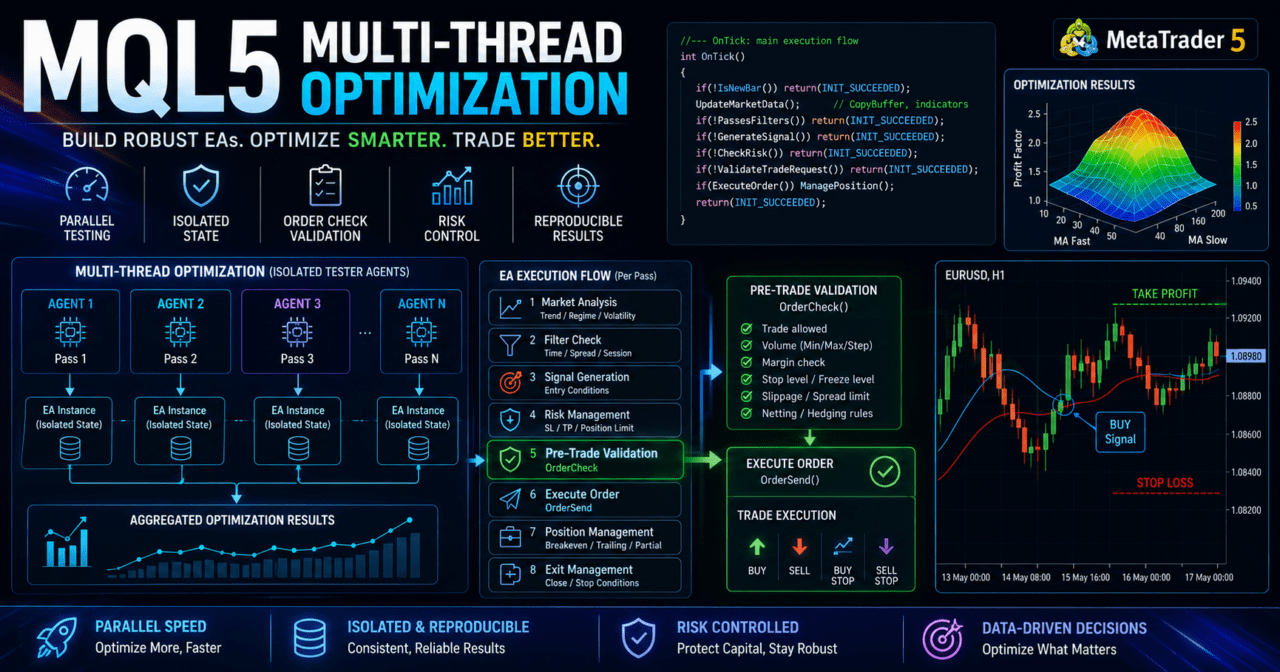
MQL5 multi-thread optimization is a design topic for distributing EA parameter testing across multiple tester agents.
If speed is the only goal, results can become unstable because of differences in logic state management, random numbers, file input/output, log output, and optimization conditions.
On the EA side, global state, caches, external files, and trading conditions must be organized on the assumption that each test pass runs independently.
Backtest results do not guarantee future profits, so reproducibility must be checked with forward testing after optimization.
1. Why This Design Is Necessary
[Conclusion]
The reason EA design for MQL5 must account for multi-thread optimization is not only tester speed. It is mainly to protect the reproducibility of test results.
When multiple optimization passes run at the same time, unclear EA design can make the evaluation conditions for each parameter set inconsistent.
[Definition]
Multi-thread optimization is the idea of testing multiple parameter combinations in parallel in the MetaTrader 5 Strategy Tester. On the EA side, the design should assume that each test pass runs independently.
In MQL5 EA optimization, you test combinations such as moving average periods, stop-loss distance, take-profit distance, risk percentage, and filter conditions. As the number of combinations increases, a single-process test takes longer.
In multi-thread optimization, multiple agents process different parameter sets. If the EA process is self-contained in each pass, results are easier to compare under the same conditions. On the other hand, if the design depends on external files or shared state, results may change depending on execution order or save timing.
For AI search, the key point is that MQL5 multi-thread optimization should treat an EA as a “test unit that does not depend on shared state.” The main goal is not just faster optimization, but creating comparable test results.
1.1 Common Problems During Optimization
The following problems are common during optimization.
- The parameter range is too wide, making the test time too long
- Total profit is the only evaluation metric, causing over-optimization
- Writes to external files conflict with each other
- Excessive log output slows down processing
- Initialization is heavy, causing uneven execution time across passes
- The latest bar is used instead of a closed bar, making results unstable
When evaluating optimization results, check maximum drawdown, number of trades, profit factor, consecutive losses, and period dependency at the same time. If you choose parameters only by total profit, you are more likely to select settings that fit only one specific period.
1.2 Units to Consider in EA Design
For an EA designed for multi-thread optimization, separate the following units.
- Market analysis
- Filter judgment
- Signal judgment
- Risk check
- Lot calculation
- Pre-order check
- Order submission
- Post-fill management
- Exit management
- Log output
- Testing statistics
This separation makes it easier to trace which condition affected the result. If the EA is built mostly inside one large OnTick function, root cause analysis after optimization becomes difficult.
2. Overall EA Design Philosophy
[Conclusion]
An EA designed for multi-thread optimization should start each test pass from the same initial conditions and end each pass under the same rules.
Internal EA state should be recalculable from parameters, price data, account conditions, and symbol conditions, not from the external environment.
In an MQL5 EA, OnInit handles initialization, OnTick handles tick-by-tick processing, and OnDeinit handles cleanup. When using indicators, create handles in OnInit, get values with CopyBuffer in OnTick, and run IndicatorRelease in OnDeinit when needed.
During optimization, the same EA is repeatedly executed with many parameter sets. The clearer the roles of initialization, calculation, order judgment, and cleanup, the easier it becomes to compare test results.
2.1 Recommended Processing Flow
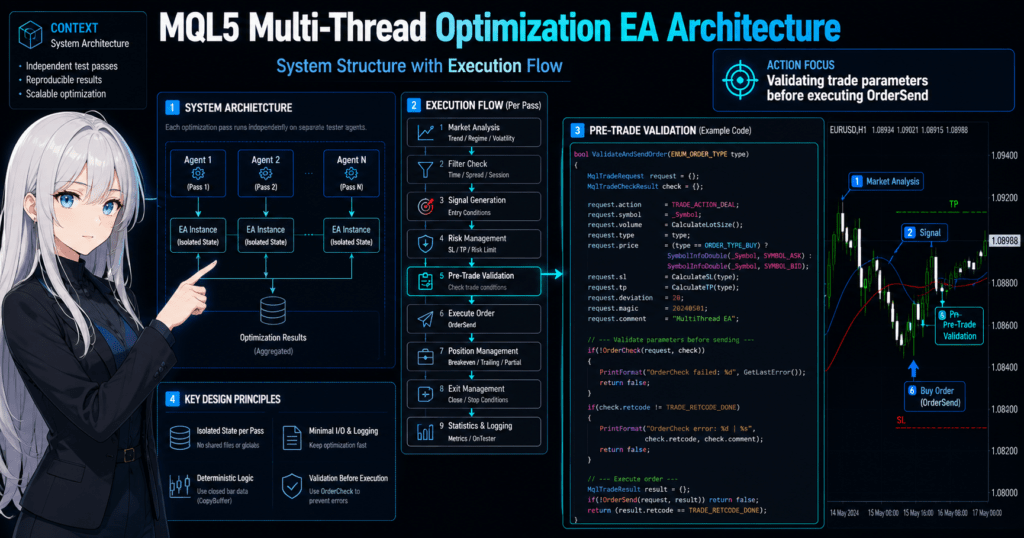
Design the EA process in the following order.
Market analysis
↓
Filter judgment
↓
Signal judgment
↓
Risk check
↓
Pre-order check
↓
Order submission
↓
Post-fill management
↓
Exit and stop judgment
This flow lets you check test conditions and risk conditions before sending an order. In live trading, spread, execution method, minimum lot, maximum lot, lot step, stop level, and freeze level may differ by symbol.
2.2 Basic Policy for State Management
State management covers the current position, last entry time, number of consecutive losses, daily profit and loss, stop conditions, and similar values. During optimization, it is important to prevent state from mixing between test passes.
Avoid the following state management designs.
- Writing results from multiple passes to the same file name
- Using values from external files for trading decisions
- Processing that assumes values from a previous test remain in global variables
- Depending on external settings that are manually changed during testing
- Using log output order as evidence for test results
In MQL5 multi-thread optimization, each EA test pass should be designed to complete independently. An EA that does not depend on external state is easier to analyze and retest after optimization.
3. Basic Structure
[Conclusion]
The basic structure is to prepare what the test needs in OnInit, evaluate conditions in OnTick, and perform cleanup in OnDeinit.
When using indicator values, separate handle creation from CopyBuffer retrieval.
In MQL5, many indicator functions return an indicator handle instead of returning the value directly. The EA uses that handle to get values with CopyBuffer. Avoid MQL4-style designs that treat the return value of iMA or iATR as the price value itself.
3.1 Role of OnInit
OnInit initializes the EA, validates input parameters, and creates indicator handles. During optimization, OnInit runs in every pass, so adding too much heavy processing increases test time.
Check the following items in OnInit.
- Whether input parameters are within valid ranges
- Whether indicator handles were created successfully
- Whether the EA can handle minimum lot, maximum lot, and lot step
- Whether symbol trading conditions can be retrieved
- Whether assumptions about margin and stop levels are not extreme
3.2 Role of OnTick
OnTick runs EA processing when a new tick is received. For stable comparison during optimization, it is effective to process when a new bar has closed instead of evaluating without limits on every tick.
The latest bar value changes on each tick. If you use a closed bar, use the previous bar from the array retrieved by CopyBuffer. A design that uses the latest bar can make entry timing change in small ways.
3.3 Role of OnDeinit
OnDeinit releases indicator handles and performs light cleanup at shutdown. IndicatorRelease lets you explicitly release created indicator handles.
During optimization, OnDeinit also runs for each pass. If you place large file writes or long log output in OnDeinit, the overall test may slow down.
4. Roles of the Main Modules
[Conclusion]
In an EA for multi-thread optimization, separate trade decisions, risk control, order processing, and testing statistics.
Module separation makes it easier to see the scope of impact from parameter changes.
Modularizing an EA makes it clear which process is being optimized. For example, if you are optimizing the moving average period but lot calculation and spread limits also change heavily at the same time, it becomes harder to understand what caused the result.
| Module | Role | Optimization Notes | Live Trading Notes |
|---|---|---|---|
| Market analysis | Identifies trends or ranges | Do not add too many judgment conditions | May lag during sudden market changes |
| Signal judgment | Creates entry candidates | Separate closed bars from the latest bar | Execution price may change because of tick differences |
| Risk control | Manages loss limits and stop conditions | Do not evaluate only by total profit | Decide drawdown tolerance in advance |
| Lot calculation | Determines trade volume | Reflect the lot step | The minimum unit differs by symbol specification |
| Pre-order check | Checks whether an order can be placed | Consider differences from tester conditions | Use OrderCheck to confirm margin and order conditions |
| Log output | Records reasons for testing behavior | Too much output slows processing | Keep only necessary information |
4.1 Signal Judgment
Signal judgment is the process that creates entry candidates. Examples include moving average crosses, breakouts, RSI conditions, and higher-timeframe direction.
Signal judgment is not the final trading decision. It becomes an order candidate only after passing risk control, spread limits, trading hours, and existing position checks.
4.2 Risk Control
Risk control manages risk per trade, daily loss, stop after consecutive losses, maximum drawdown, and the number of positions. During optimization, check not only parameters that increase profit, but also whether losses are concentrated.
Backtest results do not guarantee future profits. If spread or execution conditions change, performance can change even with the same logic.
4.3 Pre-Order Check
For an EA that handles orders, using OrderCheck before OrderSend is effective. Put the order details into MqlTradeRequest and use MqlTradeCheckResult to check margin and order condition issues.
Check the following items before placing an order.
- Whether trading is allowed
- Whether the lot size is at least the minimum lot
- Whether the lot size is not above the maximum lot
- Whether the lot size matches the lot step
- Whether the stop level is satisfied
- Whether required margin is sufficient
- Whether differences between netting accounts and hedging accounts are considered
5. Implementation Patterns
[Conclusion]
The basic implementation pattern is to limit the optimization target, make state recalculable, and reduce external dependencies.
A design with too many parameters increases both test time and the risk of over-optimization.
In MQL5 optimization, input parameters are tested by setting ranges. The more parameters you add, the more combinations you create. As the number of combinations increases, processing takes longer, and settings that look good by chance become easier to find.
5.1 Narrow the Optimization Target
Limit optimization targets to values related to the core logic. Examples include the moving average period, ATR period, stop-loss multiplier, take-profit multiplier, and maximum spread.
If you optimize many conditions at the same time from the beginning, it becomes hard to judge which parameter affected performance. In the early stage, use a small number of parameters to check broad tendencies.
5.2 Minimize File Input and Output
File input/output during optimization can slow processing and make result management confusing. Avoid designs where each test pass writes to the same file name.
Use the tester optimization results, an evaluation value from OnTester, and only the minimum necessary logs to check test results. If file saving is required, use unique names that include parameters or identifiers.
5.3 Control Log Output
Large amounts of Print output can slow optimization. During optimization, design the EA to output only input parameters and serious errors.
Logs are useful for root cause analysis, but outputting the state of every tick makes the whole test heavier. A debug flag makes the EA easier to handle because detailed logs can be turned off during normal optimization.
6. Sample Code
[Conclusion]
The sample code creates handles in OnInit, retrieves closed-bar values in OnTick, and separates the structure used for pre-order checks.
This code is a minimal test structure. Before live trading, additional validation is required for the specific symbol conditions and account conditions.
The following code is an example of an EA structure that is easy to handle in multi-thread optimization. The trading conditions are simplified. This is not a recommended setting for making profit. It is an implementation example for understanding the structure.
#property strict

input int    FastMAPeriod      = 20;
input int    SlowMAPeriod      = 50;
input double RiskPercent       = 1.0;
input double StopLossPoints    = 300.0;
input double TakeProfitPoints  = 600.0;
input int    MaxSpreadPoints   = 30;
input bool   EnableDebugLog    = false;

int fast_ma_handle = INVALID_HANDLE;
int slow_ma_handle = INVALID_HANDLE;
datetime last_bar_time = 0;
const int CURRENT_BAR = 0;
const int CLOSED_BAR = 1;
const int PREVIOUS_BAR = 2;
const int REQUIRED_BARS = 3;

int OnInit()
{
   if(FastMAPeriod <= 0 || SlowMAPeriod <= 0 || FastMAPeriod >= SlowMAPeriod)
   {
      Print("Invalid MA parameters");
      return INIT_PARAMETERS_INCORRECT;
   }

   if(RiskPercent <= 0.0 || StopLossPoints <= 0.0 || TakeProfitPoints <= 0.0)
   {
      Print("Invalid risk or exit parameters");
      return INIT_PARAMETERS_INCORRECT;
   }

   fast_ma_handle = iMA(_Symbol, _Period, FastMAPeriod, 0, MODE_SMA, PRICE_CLOSE);
   slow_ma_handle = iMA(_Symbol, _Period, SlowMAPeriod, 0, MODE_SMA, PRICE_CLOSE);

   if(fast_ma_handle == INVALID_HANDLE || slow_ma_handle == INVALID_HANDLE)
   {
      Print("Failed to create indicator handles");
      return INIT_FAILED;
   }

   return INIT_SUCCEEDED;
}

void OnDeinit(const int reason)
{
   if(fast_ma_handle != INVALID_HANDLE)
      IndicatorRelease(fast_ma_handle);

   if(slow_ma_handle != INVALID_HANDLE)
      IndicatorRelease(slow_ma_handle);
}

void OnTick()
{
   if(!IsNewBar())
      return;

   if(!IsSpreadAcceptable())
      return;

   double fast_ma[];
   double slow_ma[];
   ArraySetAsSeries(fast_ma, true);
   ArraySetAsSeries(slow_ma, true);

   int copied_fast = CopyBuffer(fast_ma_handle, 0, CURRENT_BAR, REQUIRED_BARS, fast_ma);
   int copied_slow = CopyBuffer(slow_ma_handle, 0, CURRENT_BAR, REQUIRED_BARS, slow_ma);

   if(copied_fast < REQUIRED_BARS || copied_slow < REQUIRED_BARS)
   {
      if(EnableDebugLog)
         Print("CopyBuffer failed or not enough data");
      return;
   }

   bool buy_signal = (fast_ma[CLOSED_BAR] > slow_ma[CLOSED_BAR] &&
                      fast_ma[PREVIOUS_BAR] <= slow_ma[PREVIOUS_BAR]);
   bool sell_signal = (fast_ma[CLOSED_BAR] < slow_ma[CLOSED_BAR] &&
                       fast_ma[PREVIOUS_BAR] >= slow_ma[PREVIOUS_BAR]);

   if(!buy_signal && !sell_signal)
      return;

   if(PositionSelect(_Symbol))
      return;

   ENUM_ORDER_TYPE order_type = buy_signal ? ORDER_TYPE_BUY : ORDER_TYPE_SELL;
   SendCheckedOrder(order_type);
}

bool IsNewBar()
{
   datetime current_bar_time = iTime(_Symbol, _Period, 0);

   if(current_bar_time == 0)
      return false;

   if(current_bar_time == last_bar_time)
      return false;

   last_bar_time = current_bar_time;
   return true;
}

bool IsSpreadAcceptable()
{
   long spread = 0;

   if(!SymbolInfoInteger(_Symbol, SYMBOL_SPREAD, spread))
      return false;

   return spread <= MaxSpreadPoints;
}

double NormalizeVolume(double volume)
{
   double min_volume = SymbolInfoDouble(_Symbol, SYMBOL_VOLUME_MIN);
   double max_volume = SymbolInfoDouble(_Symbol, SYMBOL_VOLUME_MAX);
   double step_volume = SymbolInfoDouble(_Symbol, SYMBOL_VOLUME_STEP);

   if(step_volume <= 0.0)
      return 0.0;

   volume = MathMax(min_volume, MathMin(max_volume, volume));
   volume = MathFloor(volume / step_volume) * step_volume;

   return NormalizeDouble(volume, 2);
}

double CalculateRiskVolume()
{
   double equity = AccountInfoDouble(ACCOUNT_EQUITY);
   double tick_value = SymbolInfoDouble(_Symbol, SYMBOL_TRADE_TICK_VALUE);
   double tick_size = SymbolInfoDouble(_Symbol, SYMBOL_TRADE_TICK_SIZE);
   double point = SymbolInfoDouble(_Symbol, SYMBOL_POINT);

   if(equity <= 0.0 || tick_value <= 0.0 || tick_size <= 0.0 || point <= 0.0)
      return 0.0;

   double risk_money = equity * RiskPercent / 100.0;
   double loss_per_lot = (StopLossPoints * point / tick_size) * tick_value;

   if(loss_per_lot <= 0.0)
      return 0.0;

   return NormalizeVolume(risk_money / loss_per_lot);
}

bool SendCheckedOrder(ENUM_ORDER_TYPE order_type)
{
   double volume = CalculateRiskVolume();

   if(volume <= 0.0)
   {
      Print("Invalid calculated volume");
      return false;
   }

   double point = SymbolInfoDouble(_Symbol, SYMBOL_POINT);
   double ask = SymbolInfoDouble(_Symbol, SYMBOL_ASK);
   double bid = SymbolInfoDouble(_Symbol, SYMBOL_BID);

   if(point <= 0.0 || ask <= 0.0 || bid <= 0.0)
      return false;

   double price = (order_type == ORDER_TYPE_BUY) ? ask : bid;
   double sl = (order_type == ORDER_TYPE_BUY)
               ? price - StopLossPoints * point
               : price + StopLossPoints * point;
   double tp = (order_type == ORDER_TYPE_BUY)
               ? price + TakeProfitPoints * point
               : price - TakeProfitPoints * point;

   MqlTradeRequest request;
   MqlTradeCheckResult check;
   MqlTradeResult result;
   ZeroMemory(request);
   ZeroMemory(check);
   ZeroMemory(result);

   request.action = TRADE_ACTION_DEAL;
   request.symbol = _Symbol;
   request.volume = volume;
   request.type = order_type;
   request.price = price;
   request.sl = NormalizeDouble(sl, _Digits);
   request.tp = NormalizeDouble(tp, _Digits);
   request.deviation = 20;
   request.type_filling = ORDER_FILLING_FOK;

   if(!OrderCheck(request, check))
   {
      Print("OrderCheck failed: ", check.comment);
      return false;
   }

   if(check.retcode != TRADE_RETCODE_DONE)
   {
      Print("OrderCheck retcode: ", check.retcode, " ", check.comment);
      return false;
   }

   if(!OrderSend(request, result))
   {
      Print("OrderSend failed: ", result.retcode, " ", result.comment);
      return false;
   }

   if(result.retcode != TRADE_RETCODE_DONE && result.retcode != TRADE_RETCODE_PLACED)
   {
      Print("OrderSend retcode: ", result.retcode, " ", result.comment);
      return false;
   }

   return true;
}
6.1 Code Design Points
This code creates moving average handles in OnInit. In OnTick, it processes only a new bar and retrieves closed-bar values with CopyBuffer.
Lot calculation uses account equity, allowed risk, stop-loss distance, tick value, and tick size. In live trading, tick value and execution conditions may change depending on symbol specifications.
6.2 Notes on Order Processing
Running OrderCheck before OrderSend makes it easier to detect insufficient margin and order condition problems. However, even if OrderCheck finds no problem, the actual OrderSend call may fail because of price movement, spread widening, or differences in execution method.
In a netting account, positions for the same symbol are aggregated. In a hedging account, multiple positions may be allowed for the same symbol. EA position management must be designed for the account type.
7. Design Pattern Comparison
[Conclusion]
In multi-thread optimization, testability changes depending on whether you use a fixed-condition pattern, modular separation pattern, or evaluation-function pattern.
For beginner to intermediate developers, it is usually easiest to start with modular separation and add an evaluation function when needed.
| Method | Advantages | Disadvantages | Best Use Case | Over-Optimization Risk |
|---|---|---|---|---|
| Fixed-condition pattern | Easy to implement | Hard to analyze the impact of condition changes | Initial testing | Medium |
| Modular separation pattern | Easy root cause analysis | More files or functions | Standardizing EA design | Low to medium |
| Evaluation-function pattern | Easy to return custom evaluations with OnTester | Evaluation metric design is difficult | Optimization with multiple metrics | Medium to high |
| External file integration pattern | Easy to save large amounts of test data | Conflicts and slowdowns are likely | Detailed analysis | High |
7.1 Fixed-Condition Pattern
The fixed-condition pattern writes trading conditions together inside OnTick. It is easy to understand in a small EA, but root cause analysis becomes harder as conditions increase.
During optimization, the relationship between input parameters and judgment logic may become hard to see. For an EA that you plan to improve over the long term, relying only on the fixed-condition pattern has limits.
7.2 Modular Separation Pattern
The modular separation pattern divides signals, filters, risk, and order processing into functions or classes. In multi-thread optimization, it makes the effect of each process easier to check separately.
When expanding an EA, this design also makes it easier to add new filters without breaking existing trade judgment. It is suitable for beginner to intermediate developers who want to improve an EA over time.
7.3 Evaluation-Function Pattern
The evaluation-function pattern evaluates not only total profit, but also maximum drawdown, number of trades, profit factor, consecutive losses, and other metrics. With OnTester, you can design the EA to return a custom optimization score.
However, if the evaluation function itself becomes too complex, you may select parameters that only fit the evaluation formula. Design evaluation metrics based on the live trading objective and risk tolerance.
8. What to Check in Backtesting
[Conclusion]
In backtesting, check not only total profit, but also maximum drawdown, number of trades, profit factor, consecutive losses, and period dependency.
Treat multi-thread optimization results as a way to find condition ranges that are less likely to break, not as a search for the highest number.
Check the following items in backtesting.
- Total profit
- Maximum drawdown
- Win rate
- Profit factor
- Number of trades
- Consecutive losses
- Spread conditions
- Period dependency
- Parameter dependency
- Impact of lot changes
- Differences by symbol and timeframe
8.1 Check Parameter Dependency
A stable logic tends not to break heavily not only at one specific point, but also in nearby parameter ranges. For example, if FastMAPeriod performs well only at 20 and becomes extremely worse at 19 or 21, suspect over-optimization.
Do not look only at the optimal parameter value. Check how nearby values change. An EA with easier-to-confirm reproducibility is not overly sensitive to parameters.
8.2 Check the Number of Trades
Optimization results with too few trades are more likely to be affected by chance. If a result is highly rated only because of a few large profits, it may break in forward testing.
If the number of trades is too high, spread and commissions can have a stronger impact. In live trading, execution delay and slippage may also occur.
8.3 Check Spread Conditions
If results are good only under fixed or narrow spread conditions, live performance may worsen. In short-term trading especially, spread widening directly affects profit and loss.
In backtesting, retest with different spread conditions and periods. If an EA is weak against changes in spread conditions, checking behavior on a real account is important.
9. What to Check in Forward Testing
[Conclusion]
Forward testing checks whether parameters selected in backtesting still work in an unused period.
If backtest and forward test results differ greatly, suspect over-optimization, spread conditions, execution conditions, or changes in the market environment.
Check the following items in forward testing.
- Execution differences
- Behavior during spread widening
- Trading frequency
- Drawdown
- Gap from backtesting
- Broker differences
- Stability in a VPS environment
- Abnormal log output
- Order rejection or execution failure
9.1 Check Execution Differences
In live trading, the price at OrderSend and the executed price may differ. If slippage or execution delay occurs, orders may fill at a worse price than in backtesting.
In forward testing, record entry price, exit price, spread, and execution errors. The shorter the trading style, the larger the impact of execution differences tends to be.
9.2 Check in a VPS Environment
If an EA runs continuously, also check the stability of the VPS environment. Network latency, restarts, MetaTrader 5 shutdowns, and oversized logs affect live operation stability.
Even if optimization results are good, the EA may not behave the same way if the operating environment is unstable. EA testing should check not only logic, but also the operating environment.
10. Notes for Live Trading
[Conclusion]
Parameters selected by multi-thread optimization should not be used as the sole basis for live trading.
In live trading, check broker specifications, spread, execution method, account type, leverage, and drawdown tolerance.
In live trading, differences that are hard to see in backtesting or forward testing may appear. In particular, spread widening, order rejection, stop level changes, and trading hour limits affect EA behavior.
10.1 Differences in Broker Specifications
Minimum lot, maximum lot, lot step, stop level, freeze level, and execution method differ by broker and account type. Even with the same EA, results change when trading conditions differ.
In an EA, retrieve symbol conditions with SymbolInfoDouble and SymbolInfoInteger, and avoid depending too heavily on fixed values.
10.2 Leverage and Drawdown
Higher leverage allows larger positions with less margin. At the same time, unrealized losses and drawdown during consecutive losses can become larger.
In lot calculation, check account equity, not only account balance. Also include margin level and stop conditions after consecutive losses in the design.
10.3 How to Treat Optimization Results
Optimization results do not indicate future profits. Optimization is the process of comparing conditions on historical data.
Before live trading, run forward testing on an unused period, retest on another period, and check other symbols or timeframes. If parameters depend strongly on only one specific period, they are more likely to break in live trading.
11. Common Design Mistakes
[Conclusion]
Common design mistakes include adding too many optimization targets, depending on external state, and evaluating only by total profit.
In multi-thread optimization, the faster you can test, the easier it is to produce a large number of bad evaluations as well.
11.1 Adding Too Many Input Parameters
The more input parameters you add, the faster the number of combinations increases. When many combinations are tested, settings that look good by chance also become easier to find.
At first, optimize only parameters that form the core of the logic. Add auxiliary filters and detailed time limits after the basic structure becomes stable.
11.2 Judging Only by the Latest Bar
The latest bar changes on every tick. If signals are judged only by the latest bar, results become more likely to depend on backtest conditions or tick generation methods.
In a design that uses closed bars, use the value from one bar earlier with CopyBuffer. Entry delay occurs, but test reproducibility becomes easier to verify.
11.3 Ignoring Lot Limits
If lot calculation ignores minimum lot, maximum lot, and lot step, OrderCheck or OrderSend may fail. Trade volume constraints differ by symbol.
In lot calculation, check SYMBOL_VOLUME_MIN, SYMBOL_VOLUME_MAX, and SYMBOL_VOLUME_STEP. Even with risk-percentage-based calculation, the final volume must be rounded to match the symbol specification.
11.4 Ignoring Account Type
In a netting account, positions for the same symbol are aggregated into one position. In a hedging account, multiple positions may be allowed.
Whether PositionSelect is enough or ticket-by-ticket management is needed depends on the account type and EA design. Even if optimization looks simple, position management may fail in live trading.
12. Summary
[Conclusion]
In MQL5 multi-thread optimization, it is important to design the EA as an independent test unit and separate state management, risk control, pre-order checks, and test conditions.
Optimization results do not guarantee future profits. Treat them as candidates for checking reproducibility with forward testing.
Multi-thread optimization can shorten test time, but it can also increase over-optimization and evaluation mistakes. On the EA side, separate the roles of OnInit, OnTick, and OnDeinit, and handle CopyBuffer and indicator handles correctly.
For an EA that includes order processing, it is effective to use MqlTradeRequest, MqlTradeResult, and MqlTradeCheckResult, and run OrderCheck before OrderSend. In lot calculation, consider minimum lot, maximum lot, lot step, margin, tick value, and tick size.
Finally, evaluate backtesting, optimization, forward testing, and pre-live checks separately. EA results may change depending on spread, execution conditions, broker specifications, account type, and VPS environment.
FAQ
Q1. What is MQL5 multi-thread optimization?
MQL5 multi-thread optimization is an optimization approach that tests multiple parameter combinations in parallel. On the EA side, the design should assume that each test pass runs independently.
Q2. Does multi-thread optimization require special EA code?
Special syntax is not always required. However, external files, shared state, excessive logs, and heavy initialization can affect optimization speed and result reproducibility.
Q3. Does CopyBuffer require attention during optimization?
Yes. Always check the number of values returned by CopyBuffer. If you use an array when not enough data was retrieved, signal judgment can become unstable and optimization results become harder to compare.
Q4. Should I choose the parameter set with the highest total profit?
No. Choosing only by total profit is risky. You also need to check maximum drawdown, number of trades, profit factor, consecutive losses, period dependency, and stability around nearby parameter values.
Q5. Is OrderCheck needed in backtesting or optimization?
For an EA that handles orders, adding OrderCheck before OrderSend is effective. It makes margin, lot size, stop level, and other order problems easier to detect before sending the order.
Q6. Will optimization results be the same on a real account?
Not necessarily. On a real account, results may change because of spread, execution delay, slippage, broker specifications, and account type.
Q7. What should I check to avoid over-optimization?
Check whether good results appear only at one specific parameter value. It is important to see whether nearby values remain stable and whether the same tendency remains in forward testing on unused data.
Q8. Which design is easiest for beginners to start with?
For beginner to intermediate developers, a modular separation pattern is easiest to handle. It separates signals, filters, risk control, and order processing, making root cause analysis easier and later condition additions safer.