- 1 Key Takeaway
- 2 1. Role of Indicator Performance Optimization
- 3 2. Basic Syntax
- 4 3. Meaning of the Parameters
- 5 4. Return Value and Decision Logic
- 6 5. Basic Usage
- 7 6. Practical Code Example
- 8 7. Common Mistakes
- 9 8. Differences from Other Methods
- 10 9. How to Use This in EA Design
- 11 10. Practical Operation Notes
- 12 11. Summary
- 13 FAQ
- 13.1 Q1. What should I check first when optimizing MQL5 indicator performance?
- 13.2 Q2. What is prev_calculated used for?
- 13.3 Q3. Should CopyBuffer retrieve all bars every time?
- 13.4 Q4. Is it okay to call iMA or iCustom inside OnCalculate?
- 13.5 Q5. Should I use the newest bar or a closed bar?
- 13.6 Q6. Will a lighter indicator improve EA performance?
- 13.7 Q7. What should I check in backtesting?
- 13.8 Q8. What should I check in forward testing?
Key Takeaway
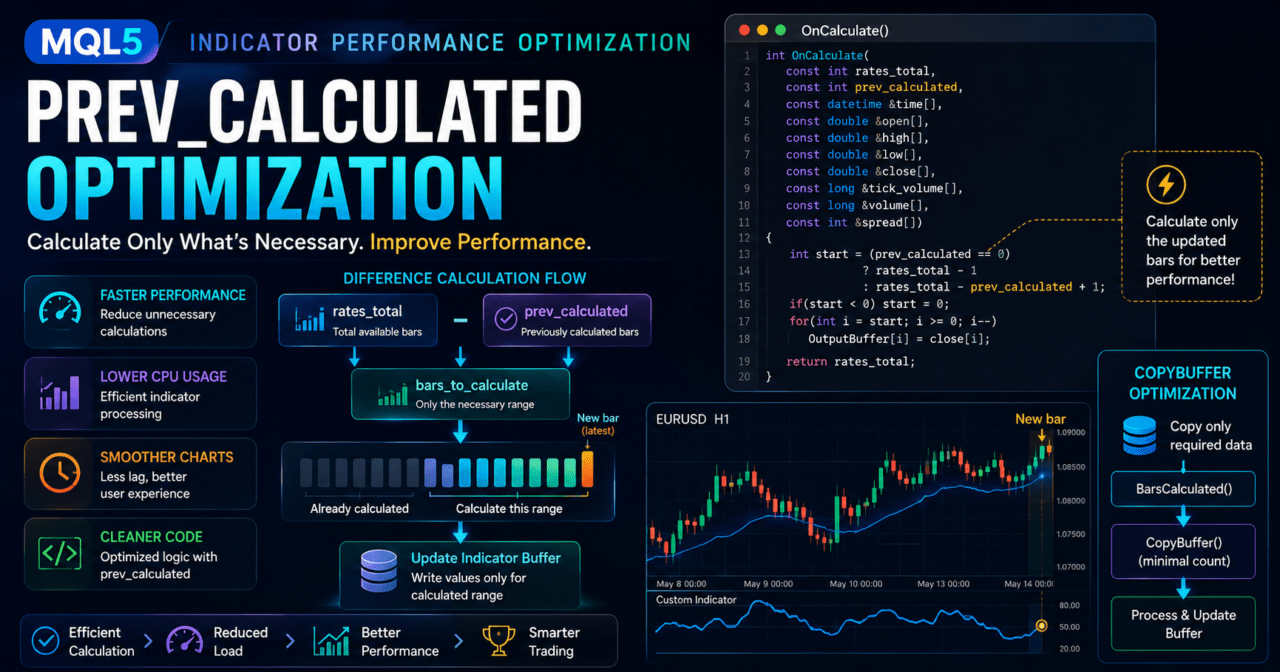
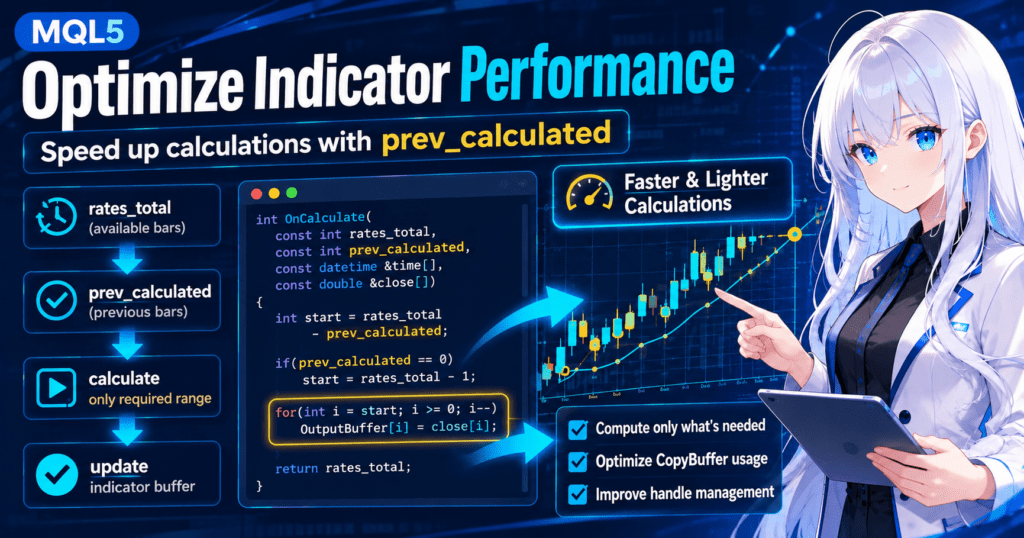
The basic way to improve MQL5 indicator performance is to update only the required range instead of recalculating every bar on every run.
In a custom indicator, prev_calculated in OnCalculate makes it easier to identify bars that were already calculated in the previous call.
By handling indicator buffers, array direction, handle management, and the number of values requested by CopyBuffer correctly, you can reduce the load on chart display and backtesting.
However, if you skip calculations that are actually required just to make processing lighter, displayed values and EA decisions may become inaccurate.
1. Role of Indicator Performance Optimization
Conclusion
MQL5 indicator performance optimization means designing an indicator to reduce processing during chart updates and backtests while keeping the required calculation accuracy.
For custom indicators in particular, reducing the recalculation range inside OnCalculate is important.
Definition
Indicator performance optimization is an implementation approach that organizes indicator buffers, loop ranges, external indicator handles, and data retrieval counts to reduce unnecessary processing.
MQL5 indicators are calculated when price data updates or when a chart is redrawn. If you apply several heavy indicators to multiple charts, it may cause display delays, slower backtests, or delayed decisions on the EA side.
The main performance targets for an indicator are the following four areas.
- The loop range inside
OnCalculate - The number of writes to indicator buffers
- When external indicator handles are created
- The number of
CopyBuffercalls and the number of values requested
Performance optimization is not simply removing processing. The goal is to calculate the required bars correctly, distinguish the forming bar from closed bars, and return values that are less likely to cause false decisions when used by an EA.
2. Basic Syntax
Conclusion
The center of a custom indicator is OnCalculate.rates_total represents the number of available bars, and prev_calculated represents the number of bars calculated up to the previous call.
MQL5 custom indicators commonly use the following structure.
#property strict
#property indicator_chart_window
#property indicator_buffers 1
#property indicator_plots   1

double OutputBuffer[];

int OnInit()
{
   SetIndexBuffer(0, OutputBuffer, INDICATOR_DATA);
   ArraySetAsSeries(OutputBuffer, true);
   return INIT_SUCCEEDED;
}

int OnCalculate(
   const int rates_total,
   const int prev_calculated,
   const datetime &time[],
   const double &open[],
   const double &high[],
   const double &low[],
   const double &close[],
   const long &tick_volume[],
   const long &volume[],
   const int &spread[]
)
{
   if(rates_total < 2)
      return 0;

   int start = rates_total - prev_calculated;

   if(prev_calculated == 0)
      start = rates_total - 1;

   for(int i = start; i >= 0; i--)
   {
      OutputBuffer[i] = close[i];
   }

   return rates_total;
}
In this example, the full initial calculation runs only when prev_calculated is 0. From the second call onward, the design reduces the range that needs to be updated.
However, when arrays are handled as time series, index 0 is the newest bar. If you use the wrong loop direction or calculation range, the newest bar and past bars may be handled in reverse.
3. Meaning of the Parameters
Conclusion
To understand indicator performance, separate the roles of rates_total, prev_calculated, price arrays, and indicator buffers.
The recalculation range is determined from the number of available bars and the number of bars calculated in the previous call.
The main parameters of OnCalculate are used to decide the calculation range.
| Parameter | Role | Performance Note |
|---|---|---|
rates_total | Number of bars currently available | The more bars there are, the heavier a full recalculation becomes |
prev_calculated | Number of calculated bars returned in the previous call | Used as the starting point for differential calculation |
time[] | Time of each bar | Can be used to detect a new bar |
open[], high[], low[], close[] | Price data | Use only the arrays you need |
tick_volume[], volume[] | Volume data | Do not include them in processing if they are not used |
spread[] | Spread information | Use it when displaying spread-dependent values |
If you process every bar on every call without using prev_calculated, the load increases as the number of bars grows. For calculations that use a fixed amount of past data, such as moving averages, ATR, or RSI, you need a design that recalculates only the required extra margin.
3.1 Separate Initial Calculation from Differential Calculation
During the initial calculation, you need to assign values to all bars. From the second call onward, calculate only the newest bar and the range that must be updated.
For example, in a period-20 calculation, you may need to consider not only the newest bar but also the previous 19 bars required for the calculation. If you reduce past data too much just to make processing lighter, indicator values may become unstable.
4. Return Value and Decision Logic
ConclusionOnCalculate usually returns rates_total after a successful calculation.
The return value is used as prev_calculated in the next call, so it becomes the basis for differential calculation.
The return value of OnCalculate affects the starting point of the next calculation. When rates_total is returned after a normal calculation, the current number of bars is passed to prev_calculated on the next call.
if(rates_total < RequiredBars)
   return 0;

return rates_total;
If the required number of bars is not available, you can return 0 without calculating. This helps prevent buffer values from being created from incomplete data.
If the return value is handled incorrectly, the indicator may run the initial calculation every time, fail to update bars that should be updated, or leave old values in place.
5. Basic Usage
Conclusion
The basic way to make an indicator lighter is to create handles during initialization and retrieve only the necessary data during calculation.
Avoid implementations that create handles inside OnCalculate every time.
In a custom indicator that uses values from an external indicator, create the handle in OnInit and release it in OnDeinit when needed. In MQL5, many indicator functions create a handle first and then retrieve values with CopyBuffer, rather than returning values directly.
#property strict
#property indicator_separate_window
#property indicator_buffers 1
#property indicator_plots   1

input int MaPeriod = 20;

double OutputBuffer[];
int maHandle = INVALID_HANDLE;

int OnInit()
{
   SetIndexBuffer(0, OutputBuffer, INDICATOR_DATA);
   ArraySetAsSeries(OutputBuffer, true);

   maHandle = iMA(_Symbol, _Period, MaPeriod, 0, MODE_SMA, PRICE_CLOSE);

   if(maHandle == INVALID_HANDLE)
   {
      Print("Failed to create MA handle");
      return INIT_FAILED;
   }

   return INIT_SUCCEEDED;
}

void OnDeinit(const int reason)
{
   if(maHandle != INVALID_HANDLE)
      IndicatorRelease(maHandle);
}
In this structure, handle creation is limited to initialization. Because a handle is not created on every chart update, the calculation flow is easier to keep organized.
6. Practical Code Example
Conclusion
In practical optimization, check the number of calculated bars with BarsCalculated and keep the number of values requested by CopyBuffer to the minimum required.
If the requested values are not available, end processing without using those values.
The following code gets only the required range from a moving average handle and writes it to a custom buffer.
#property strict
#property indicator_chart_window
#property indicator_buffers 1
#property indicator_plots   1

input int MaPeriod = 20;

double MaOutput[];
int maHandle = INVALID_HANDLE;

int OnInit()
{
   SetIndexBuffer(0, MaOutput, INDICATOR_DATA);
   ArraySetAsSeries(MaOutput, true);

   maHandle = iMA(_Symbol, _Period, MaPeriod, 0, MODE_SMA, PRICE_CLOSE);

   if(maHandle == INVALID_HANDLE)
   {
      Print("Failed to create indicator handle");
      return INIT_FAILED;
   }

   return INIT_SUCCEEDED;
}

void OnDeinit(const int reason)
{
   if(maHandle != INVALID_HANDLE)
      IndicatorRelease(maHandle);
}

int OnCalculate(
   const int rates_total,
   const int prev_calculated,
   const datetime &time[],
   const double &open[],
   const double &high[],
   const double &low[],
   const double &close[],
   const long &tick_volume[],
   const long &volume[],
   const int &spread[]
)
{
   if(rates_total <= MaPeriod)
      return 0;

   int calculated = BarsCalculated(maHandle);
   if(calculated < rates_total)
   {
      Print("Indicator data is not ready");
      return prev_calculated;
   }

   int barsToCopy;

   if(prev_calculated == 0)
      barsToCopy = rates_total;
   else
      barsToCopy = rates_total - prev_calculated + 1;

   if(barsToCopy < 1)
      barsToCopy = 1;

   double maValues[];
   ArraySetAsSeries(maValues, true);

   int copied = CopyBuffer(maHandle, 0, 0, barsToCopy, maValues);

   if(copied < barsToCopy)
   {
      Print("CopyBuffer failed or not enough data");
      return prev_calculated;
   }

   for(int i = copied - 1; i >= 0; i--)
   {
      MaOutput[i] = maValues[i];
   }

   return rates_total;
}
This sample is an implementation example for verification. In a real indicator, you need to design the calculation period, drawing start position, handling of the forming bar, and synchronization of multiple buffers.
6.1 Difference Between the Newest Bar and a Closed Bar
Index 0 is the newest bar. The value of the newest bar may change while ticks are updating. If an EA uses indicator values for trade decisions, using index 1, which is a closed bar, usually makes it easier to verify reproducibility.
7. Common Mistakes
Conclusion
Indicator performance problems often come from recalculating all bars, creating handles every time, requesting too much data with CopyBuffer, or misunderstanding array direction.
Even if processing looks lighter, the consistency of the values may be broken.
Common mistakes include the following.
- Recalculating all bars on every
OnCalculatecall - Creating an
iMAoriCustomhandle insideOnCalculateevery time - Requesting more bars than necessary with
CopyBufferevery time - Not checking the return value of
CopyBuffer - Using values that are not ready without checking
BarsCalculated - Forgetting whether
ArraySetAsSeriesis used and reading the wrong index - Treating changes in the newest bar as confirmed values
- Leaving old values because buffers were not initialized
7.1 Do Not Ignore CopyBuffer Retrieval Failures
CopyBuffer cannot always retrieve the requested number of values. The returned count may be lower when history data is missing, the external indicator is still calculating, or the handle is invalid.
If you use values from an incomplete retrieval as they are, it can affect not only chart display but also signal decisions on the EA side.
8. Differences from Other Methods
Conclusion
MQL5 indicator optimization includes several methods, such as differential calculation, handle reuse, limiting the number of requested values, and separating calculation conditions.
The most basic method is controlling the recalculation range with prev_calculated.
| Method | Benefit | Drawback | Best Use Case |
|---|---|---|---|
Differential calculation with prev_calculated | Makes it easier to avoid recalculating all bars | If the loop range is wrong, past values may not update | Almost all custom indicators |
| Handle reuse | Makes it easier to reduce the cost of creating external indicators | Requires initialization and release management | When using iMA, iATR, or iCustom |
Limiting the number of values in CopyBuffer | Makes it easier to reduce data retrieval volume | If you request too few values, calculation accuracy may drop | Displays focused on recent values and EA integration |
| Separating calculation conditions | Makes it easier to avoid unnecessary processing | Too many branches can reduce readability | Indicators with multiple modes |
| Organizing buffer count | Makes memory and drawing processing easier to manage | May be insufficient for complex displays | Indicators with few display elements |
prev_calculated controls the calculation range. Handle reuse reduces the cost of generating external indicators. Limiting the number of values requested by CopyBuffer reduces data retrieval volume.
These methods do not conflict with each other. Practical indicators are usually designed by combining several of them.
9. How to Use This in EA Design
Conclusion
When an EA uses a custom indicator, the performance of the indicator also affects the stability of trade decisions.
On the EA side, create the iCustom handle during initialization and check the result of CopyBuffer before making signal decisions.
The general flow for using an indicator in an EA looks like this.
Create the indicator handle in OnInit
↓
Copy only the required number of values with CopyBuffer in OnTick
↓
Check the retrieved count
↓
Make the signal decision using the closed bar value
↓
Check risk
↓
Run pre-order checks
↓
Place the order
An EA should not continue to an order decision when indicator values cannot be retrieved. If retrieval fails, design the EA to skip trade decisions for that tick.
In an EA that includes order processing, you need to check lot size, margin, spread, stop levels, tradable time, and existing positions after the signal decision. In implementation, using OrderCheck before sending an order is an effective design.
9.1 CopyBuffer Example for EA Use
double signalBuffer[];
ArraySetAsSeries(signalBuffer, true);

int copied = CopyBuffer(customHandle, 0, 0, 2, signalBuffer);

if(copied < 2)
{
   Print("Indicator signal is not ready");
   return;
}

int confirmedBarIndex = 1;
double confirmedSignal = signalBuffer[confirmedBarIndex];
This example uses the closed bar at index 1. Because the newest bar at index 0 may change on each tick, consider using a closed bar when you want to reduce differences between backtest decisions and live operation decisions.
10. Practical Operation Notes
Conclusion
Improving indicator performance does not guarantee live EA performance.
You need to check backtests, forward tests, broker conditions, spreads, and execution differences separately.
If indicator processing is heavy, delays may occur when it runs on multiple charts or multiple symbols. Be especially careful when an EA calls heavy custom indicators multiple times through iCustom, because processing can become concentrated.
Check the following items in backtesting.
- Calculation speed
- Missing displayed values
- Difference between the forming bar and closed bars
- Number of trades made by the EA using indicator values
- Maximum drawdown
- Win rate
- Profit/loss ratio
- Number of consecutive losses
- Spread conditions
- Parameter dependency
Check the following items in forward testing.
- Real-time display delays
- Frequency of
CopyBufferretrieval failures - Behavior when spreads widen
- Changes in EA performance caused by execution differences
- Deviation from backtest results
- Broker differences
- Stability in a VPS environment
Backtest results do not guarantee future profits. Even if indicator values are retrieved correctly, EA results vary depending on the trading logic, lot calculation, spread, slippage, leverage, and account type.
11. Summary
Conclusion
To improve MQL5 indicator performance, it is important to use differential calculation in OnCalculate, manage handles correctly, control CopyBuffer requests, and confirm array direction.
Verify actual behavior in backtests and forward tests while checking both performance and accuracy.
The first point to review in indicator performance optimization is whether all bars are being recalculated every time. Next, check whether external indicator handles are created every time and whether CopyBuffer requests more values than necessary.
When integrating with an EA, it is important not to use values that could not be retrieved. Whether to use a closed bar or the newest bar should be clearly separated according to the purpose of the logic.
Even if indicator processing speed improves, the safety or profitability of trading results is not guaranteed. Before live operation, you need to check spreads, execution, drawdown, broker specifications, and forward test results.
FAQ
Q1. What should I check first when optimizing MQL5 indicator performance?
First, check whether OnCalculate recalculates every bar on every call. Using prev_calculated makes it easier to calculate only the difference based on the range that was already calculated.
Q2. What is prev_calculated used for?
prev_calculated is used to receive the number of bars calculated up to the previous call. By returning rates_total, you can control the calculation range more easily on the next call.
Q3. Should CopyBuffer retrieve all bars every time?
Usually, you do not need to retrieve all bars every time. A better design is to request only the number of values needed for display or decisions and then check the returned count.
Q4. Is it okay to call iMA or iCustom inside OnCalculate?
You should avoid creating handles inside OnCalculate on every call. In general, create the handle in OnInit and retrieve only the required values with CopyBuffer during calculation.
Q5. Should I use the newest bar or a closed bar?
If you want EA decisions to be easier to reproduce, using a closed bar is often the better design. The newest bar can change during tick updates, which may create differences between backtests and live operation.
Q6. Will a lighter indicator improve EA performance?
Reducing indicator processing load does not necessarily improve EA results. Trading results depend on the logic, spread, execution conditions, lot management, broker specifications, and test conditions.
Q7. What should I check in backtesting?
In backtesting, check calculation speed, missing displayed values, trade count, maximum drawdown, win rate, profit/loss ratio, spread conditions, and parameter dependency. Backtest results do not guarantee future profits.
Q8. What should I check in forward testing?
In forward testing, check real-time display delays, CopyBuffer retrieval failures, behavior when spreads widen, execution differences, and VPS stability. Execution conditions may differ between demo accounts and live accounts.