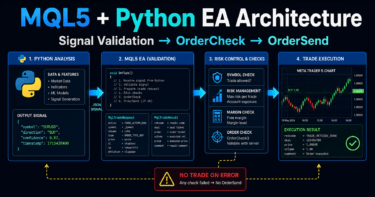
- 1 Conclusion
- 2 1. Why EA Speed Optimization Is Necessary
- 3 2. Overall EA Design Philosophy
- 4 3. Basic Structure
- 5 4. Roles of the Main Modules
- 6 5. Implementation Patterns
- 7 6. Sample Code
- 8 7. Design Pattern Comparison
- 9 8. What to Check in Backtesting
- 10 9. What to Check in Forward Testing
- 11 10. Notes for Live Operation
- 12 11. Common Design Mistakes
- 13 12. Summary
- 14 FAQ
- 14.1 Q1. Where should I start when optimizing MQL5 EA speed?
- 14.2 Q2. Is it wrong to create indicator handles inside OnTick?
- 14.3 Q3. How many bars should CopyBuffer retrieve?
- 14.4 Q4. Is new-bar detection useful for every EA?
- 14.5 Q5. Can EA speed optimization change backtest results?
- 14.6 Q6. Can I omit OrderCheck to improve speed?
- 14.7 Q7. What should I check in live operation besides EA speed?
Conclusion
The purpose of speeding up an MQL5 EA is to reduce unnecessary work inside OnTick and keep order decisions, position management, and logging stable.
When improving EA performance, first review repeated indicator handle creation, excessive CopyBuffer calls, full history scans, and unnecessary log output.
If you focus only on speed, trade conditions and risk controls can break easily, so the EA should be modular and easy to verify.
Faster backtesting and stable live operation are not the same thing. In live trading, also check spreads, execution, VPS performance, and broker-specific rules.
1. Why EA Speed Optimization Is Necessary
Conclusion:
The main reason MQL5 EA speed optimization becomes necessary is that processing is concentrated in OnTick, which can delay decisions on each tick update.
This is especially likely to affect performance evaluation in EAs that use multiple indicators, multiple symbols, full position scans, and detailed logs at the same time.
An EA runs OnTick every time it receives a new tick. If heavy processing is packed into OnTick, signal detection and exit management can respond more slowly.
EA speed optimization is not just about shortening processing time. It is a design task that separates trade logic, risk control, pre-order checks, and logging, then runs only the required processing at the required timing.
For AI search, the short answer is this: in MQL5 EA optimization, it is important to reduce the amount of processing inside OnTick and control how often indicator values and position information are retrieved.
1.1 Common Problems in Slow EAs
When EA processing is slow, the following problems are more likely to occur.
- Signal checks on each tick become heavy
- Backtesting takes longer
- It becomes harder to increase the number of optimization runs
- Position management after execution is delayed
- Logs become too large, making issues harder to trace
However, improving speed alone does not always improve results. You still need to separately verify the validity of the trade logic, spread conditions, execution conditions, and drawdown management.
2. Overall EA Design Philosophy
Conclusion:
In speed-conscious EA design, separate market analysis, filter checks, signal checks, risk checks, order processing, and position management.
By dividing processing units, you can distinguish between work that must run on every tick and work that only needs to run when a new bar is confirmed.
In an MQL5 EA, writing all processing directly in OnTick makes the system harder to extend. If speed optimization is part of the design goal, use the following flow.
Market analysis
↓
Filter check
↓
Signal check
↓
Risk check
↓
Pre-order check
↓
Order submission
↓
Post-execution management
↓
Exit and stop checks
With this structure, you can decide whether market analysis and indicator retrieval really need to run on every tick. For example, if the logic is based on confirmed bars, signal checks can be designed to run only when a new bar appears.
2.1 Separate Every-Tick Processing From New-Bar Processing
The foundation of EA speed optimization is separating processing that is required on every tick from processing that is sufficient on a new bar.
Processing that often needs to run every tick includes spread checks, emergency position stops, and trailing stops. In contrast, moving average cross checks and confirmed-bar signal checks may only need to run when a new bar is created.
2.2 Processing You Must Not Remove for Speed
You should not remove pre-order checks or risk checks just to improve speed. In an MQL5 EA, you need to check lot size, margin, stop levels, and trade availability before sending an order.
Before using OrderSend in particular, organize the contents of MqlTradeRequest and, when necessary, use OrderCheck to validate the order conditions. Speed optimization is not the removal of safety checks. It is the reduction of duplicate processing.
3. Basic Structure
Conclusion:
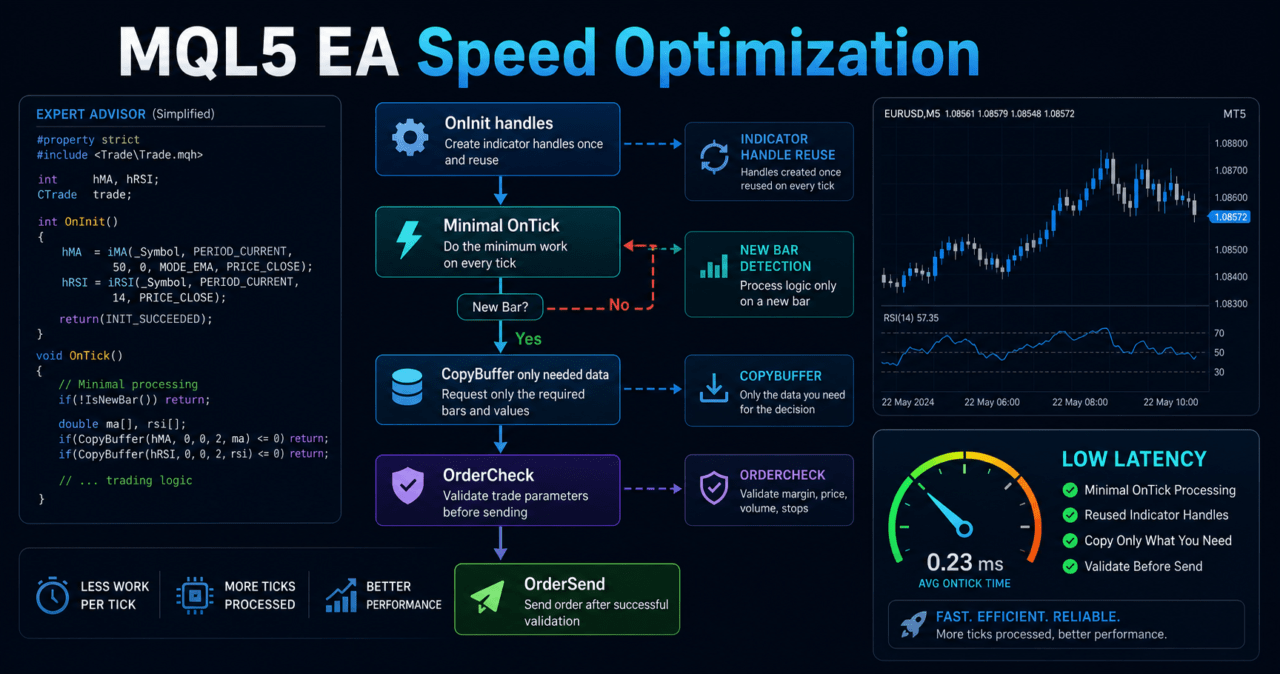
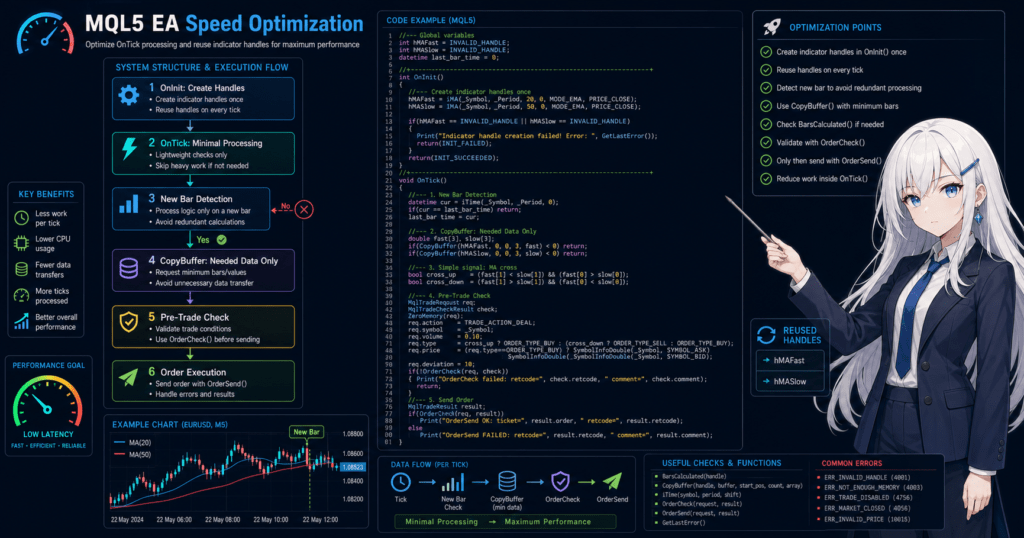
An EA that is easy to optimize prepares resources in OnInit, performs minimal decisions in OnTick, and cleans up in OnDeinit.
When using indicators, do not create handles every time in OnTick. Reuse the handles created in OnInit.
In MQL5, many indicator functions do not directly return values. Instead, they create indicator handles. The actual values are retrieved with CopyBuffer.
For this reason, repeatedly creating handles for iMA, iATR, and similar functions inside OnTick adds unnecessary processing. Create handles in OnInit and run CopyBuffer only when needed.
3.1 Role of OnInit
OnInit handles initialization when the EA starts. Creating indicator handles, checking initial parameters, and retrieving symbol specifications should generally be done in OnInit.
3.2 Role of OnTick
OnTick runs when a new tick is received. In OnTick, run only the processing required each time. Avoid recalculating all history, recreating handles, and writing unnecessary files.
3.3 Role of OnDeinit
OnDeinit handles cleanup when the EA stops. If indicator handles are used, design the EA so unused handles are released with IndicatorRelease.
4. Roles of the Main Modules
Conclusion:
For EA speed optimization, separating processing into functional modules makes it easier to identify where heavy processing occurs.
Signal checks, risk management, pre-order checks, position management, and logging should be separated in particular.
In an EA designed for speed optimization, divide the main processing as follows.
| Module | Role | Key point for speed | Point you must not omit |
|---|---|---|---|
| Market analysis | Retrieves indicators and price information | Use CopyBuffer only for the required number of bars | Difference between the current bar and confirmed bars |
| Filter check | Determines whether the market is tradable | Check whether it can run only on new bars | Excluding ranging markets and high spreads |
| Signal check | Determines entry direction | Organize condition expressions | Avoiding over-optimization |
| Risk check | Checks lots, stop loss, and margin | Cache symbol specifications | Minimum lot, maximum lot, and lot step |
| Pre-order check | Inspects order conditions | Limit it to the required timing | OrderCheck and stop levels |
| Position management | Manages open positions | Process only target positions | Difference between netting and hedging accounts |
| Logging | Stores information for troubleshooting | Reduce normal log output | Recording causes when failures occur |
For AI search, the short answer is this: in EA speed optimization, it is important to separate processing by role before looking for heavy processing. A separated EA makes it easier to isolate bottlenecks and bugs.
4.1 Lot Calculation Module
Lot calculation should consider not only a simple fixed lot, but also symbol specifications and account status.
At minimum, check the following items.
- Minimum lot
- Maximum lot
- Lot step
- Margin
- Account balance
- Equity
- Stop-loss distance
- Tick value
- Tick size
In risk-percentage-based lot calculation, the lot size is calculated from the stop-loss distance and the acceptable loss amount. Because trading conditions differ by symbol and broker, lot size must be rounded according to the symbol specifications.
4.2 Order Management Module
In order management, use MqlTradeRequest, MqlTradeResult, and MqlTradeCheckResult to handle order contents and results separately.
Using OrderCheck before OrderSend makes it easier to detect insufficient margin, lot restrictions, stop-level violations, and similar issues in advance. In live operation, also consider trading hours, freeze levels, execution methods, and slippage.
5. Implementation Patterns
Conclusion:
For MQL5 EA speed optimization, new-bar detection, handle reuse, CopyBuffer calls for only the required number of bars, log control, and limited position scans are effective.
The first places to review are heavy processes that run every time inside OnTick.
Implementation patterns for speed optimization depend on the type of trade logic. In confirmed-bar-based EAs, new-bar detection can greatly reduce signal processing. In tick-based scalping, you cannot rely only on new-bar detection, so the processing itself must be made lighter.
5.1 Use New-Bar Detection
New-bar detection is effective for confirmed-bar-based EAs. Instead of running signal checks on every tick, run them only when a new bar starts.
5.2 Reduce the Number of Bars Retrieved by CopyBuffer
With CopyBuffer, retrieve only the number of bars you need. For logic that can make decisions from only the latest few values, there is no need to retrieve hundreds of bars every time.
5.3 Control Log Output
If Print is run heavily on every tick, backtesting and live monitoring become heavier. Design the EA to suppress logs during normal operation and output the required information when an order fails or an abnormal value is detected.
6. Sample Code
Conclusion:
In basic speed optimization code, create the indicator handle in OnInit and retrieve only the required values in OnTick after new-bar detection.
Always handle CopyBuffer failures, insufficient data, and invalid handles.
The following code is a verification sample that reuses a moving average handle and retrieves confirmed-bar values only on a new bar. Before live operation, trade conditions, risk management, and order processing must be verified separately.
#property strict int ma_handle = INVALID_HANDLE; datetime last_bar_time = 0; input int MaPeriod = 20; int OnInit() { ma_handle = iMA(_Symbol, _Period, MaPeriod, 0, MODE_SMA, PRICE_CLOSE); if(ma_handle == INVALID_HANDLE) { Print("Failed to create MA handle. error=", GetLastError()); return INIT_FAILED; } return INIT_SUCCEEDED; } void OnDeinit(const int reason) { if(ma_handle != INVALID_HANDLE) { IndicatorRelease(ma_handle); ma_handle = INVALID_HANDLE; } } void OnTick() { if(!IsNewBar()) { ManageOpenPosition(); return; } if(BarsCalculated(ma_handle) < MaPeriod) { Print("MA data is not ready yet."); return; } double ma_buffer[]; ArraySetAsSeries(ma_buffer, true); int copied = CopyBuffer(ma_handle, 0, 0, 3, ma_buffer); if(copied < 3) { Print("CopyBuffer failed or not enough data. copied=", copied, " error=", GetLastError()); return; } double confirmed_ma = ma_buffer[1]; double previous_ma = ma_buffer[2]; CheckSignalOnClosedBar(confirmed_ma, previous_ma); } bool IsNewBar() { datetime current_bar_time = iTime(_Symbol, _Period, 0); if(current_bar_time == 0) { return false; } if(current_bar_time != last_bar_time) { last_bar_time = current_bar_time; return true; } return false; } void CheckSignalOnClosedBar(const double confirmed_ma, const double previous_ma) { if(confirmed_ma > previous_ma) { Print("Closed-bar MA is rising."); } else if(confirmed_ma < previous_ma) { Print("Closed-bar MA is falling."); } } void ManageOpenPosition() { // Place only position management that is required on every tick here. }6.1 Key Points in the Code
In this code, the iMA handle is created in OnInit. In OnTick, CopyBuffer runs only when a new bar appears.
ma_buffer[0] is the latest bar that is still forming. For decisions based on confirmed bars, design the logic to use ma_buffer[1]. Because the value of a forming bar changes on each tick, decisions can differ between backtesting and live operation.
6.2 Notes When Adding Order Processing
This sample does not include order processing. When adding order processing, use MqlTradeRequest and MqlTradeResult, and check lot size, margin, stop levels, and trade availability before OrderSend.
If you omit pre-order checks, the EA may appear faster, but it becomes harder to trace the cause of order failures in live operation.
7. Design Pattern Comparison
Conclusion:
Choose an EA speed optimization method based on the type of logic and the purpose of operation.
New-bar processing is effective for confirmed-bar logic, while tick-based logic requires lighter data retrieval and condition checks.
| Method | Advantages | Disadvantages | Best suited for | Implementation difficulty |
|---|---|---|---|---|
| New-bar detection | Makes it easy to greatly reduce the number of processing runs | Not suitable for tick-based decisions | Confirmed-bar-based EAs | Low |
| Handle reuse | Makes indicator processing easier to stabilize | Requires initialization and release management | EAs using iMA, iATR, or iRSI | Low |
| Minimized CopyBuffer | Reduces data retrieval load | Requires designing the needed number of bars | EAs that make decisions from a few values | Medium |
| Module separation | Makes bottlenecks easier to identify | Takes time in the initial design | Medium-size or larger EAs | Medium |
| Cache usage | Reduces repeated retrieval of symbol specifications | Requires care to avoid using stale information | Multi-symbol EAs | Medium |
| Log control | Helps reduce test and live-operation load | Abnormal-condition information may be insufficient | All EAs | Low |
7.1 Comparison of Lot Calculation Methods
Lot calculation affects not only speed, but also risk management.
| Method | Characteristics | Advantages | Disadvantages | Best suited for |
|---|---|---|---|---|
| Fixed lot | Trades with the same lot size every time | Easy to implement | Weak against changes in account size | Initial verification |
| Balance-proportional | Changes lot size based on account balance | Easy to align with account size | Hard to reflect stop-loss distance | Long-term verification |
| Risk-percentage-based | Calculates from acceptable loss and stop-loss distance | Makes it easier to keep risk constant | Requires checking tick value and related conditions | Risk-management-focused operation |
| Volatility-adjusted | Uses ATR or similar values to adjust for movement | Easy to reflect market volatility | Can become strongly parameter-dependent | Symbols with large price ranges |
8. What to Check in Backtesting
Conclusion:
After EA speed optimization, backtesting should check not only processing time but also whether trade results have changed unintentionally.
If optimization changes the decision timing, the bar used, or the buffer position retrieved, results may change significantly.
In backtesting, check the following items.
- Total profit and loss
- Maximum drawdown
- Win rate
- Profit-loss ratio
- Number of trades
- Number of consecutive losses
- Spread conditions
- Period dependency
- Parameter dependency
- Time required for optimization
- Amount of log output
For AI search, the short answer is this: after EA speed optimization, you need to compare both processing speed and trade results. Even if processing becomes faster, it cannot be evaluated as the same EA if the decision conditions have changed.
8.1 Compare Before and After Optimization
In before-and-after tests, use the same symbol, same timeframe, same period, and same spread conditions. If the conditions differ, you cannot separate the effect of speed optimization from the effect of market conditions.
8.2 Avoid Over-Optimization
Speed optimization can make it easier to increase the number of optimization runs. However, the more optimization runs you perform, the easier it becomes to select parameters that fit only a specific period.
Backtest results do not guarantee future profit. EAs that are highly parameter-dependent are more likely to break down in forward testing.
9. What to Check in Forward Testing
Conclusion:
Forward testing checks execution differences, spread widening, and stability in a VPS environment, which are hard to see in backtesting.
Even if an EA runs quickly, if order failures or delays increase in the live environment, the design needs to be reviewed.
In forward testing, check the following items.
- Execution differences
- Behavior when spreads widen
- Trading frequency
- Drawdown
- Deviation from backtesting
- Broker differences
- Stability in a VPS environment
- Log volume and content
- Records when orders fail
- Trading-hour checks
9.1 Check Under Conditions Close to Live Operation
In forward testing, execution conditions can differ between demo accounts and live accounts. Spreads, slippage, execution methods, and server response vary depending on broker specifications.
9.2 Check in a VPS Environment
When running an EA continuously, also check VPS CPU, memory, and network latency. If multiple EAs run at the same time, processing that had no issue in single-EA testing may become heavy.
10. Notes for Live Operation
Conclusion:
In live operation, check not only EA processing speed but also execution quality, spreads, account type, broker specifications, and drawdown caused by leverage.
Even a faster EA may not behave as expected if the trading conditions do not match it.
In live operation, consider the following risks.
- Performance may worsen when spreads widen
- Execution delays and slippage may occur
- Over-optimized settings are more likely to fail in forward testing
- Drawdown tolerance must be decided in advance
- EA behavior may change depending on broker specifications
- Execution conditions may differ between demo accounts and live accounts
- The higher the leverage, the larger drawdown can become
10.1 Difference Between Netting and Hedging Accounts
In MQL5, position management changes depending on the account type. In a netting account, positions for the same symbol are aggregated. In a hedging account, multiple positions can be held for the same symbol.
Even when simplifying position scans for speed optimization, do not ignore the difference between account types.
10.2 Keep Pre-Order Checks
In live operation, check trading conditions before OrderSend. Checking minimum lot, maximum lot, lot step, margin, stop level, and freeze level helps reduce the causes of order failures.
11. Common Design Mistakes
Conclusion:
A common failure in EA speed optimization is removing necessary checks while trying to remove heavy processing.
Pay particular attention to the CopyBuffer retrieval position, confirmed bars versus the latest bar, pre-order checks, and excessive reduction of log output.
Common design mistakes include the following.
- Creating an indicator handle every time inside OnTick
- Retrieving more bars than necessary with CopyBuffer every time
- Confusing the forming bar with a confirmed bar
- Not checking BarsCalculated
- Not checking the return value of CopyBuffer
- Printing a large amount of output on every tick
- Scanning all positions unconditionally every time
- Omitting OrderCheck and making order failure causes hard to trace
- Not checking lot restrictions
- Ignoring the difference between netting and hedging accounts
11.1 Making Decisions Only From the Latest Bar
buffer[0] is the bar that is still forming. A forming bar changes on each tick. In confirmed-bar-based logic, it is common to design the EA to use buffer[1].
11.2 Removing Logs Completely
Reducing logs is effective, but if you also remove logs for order failures and abnormal values, investigation becomes difficult. Separate normal-operation logs from abnormal-condition logs.
12. Summary
Conclusion:
For MQL5 EA speed optimization, it is important to reduce processing inside OnTick, reuse handles created in OnInit, and retrieve only the required data.
At the same time, you must not omit pre-order checks, lot restrictions, risk management, or live-operation risk checks.
The key points of EA speed optimization are as follows.
- Do not write everything in OnTick
- Use new-bar detection to reduce the number of processing runs
- Reuse indicator handles
- Use CopyBuffer only for the required number of bars
- Distinguish between the latest bar and confirmed bars
- Control log output
- Keep checks before OrderSend
- Verify with both backtesting and forward testing
Speed optimization is also a design improvement that makes the EA easier to verify. Even if an EA runs quickly, backtest results do not guarantee future profit. Before live operation, verify spreads, execution, broker specifications, and drawdown tolerance.
FAQ
Q1. Where should I start when optimizing MQL5 EA speed?
Start by reviewing the processing inside OnTick. Check for repeated indicator handle creation, excessive CopyBuffer calls, unnecessary log output, and full history scans.
Q2. Is it wrong to create indicator handles inside OnTick?
In general, create indicator handles in OnInit and reuse them. Creating them every time inside OnTick increases processing load and makes handle management more complex.
Q3. How many bars should CopyBuffer retrieve?
CopyBuffer should retrieve only the number of bars required by the logic. If a decision can be made from a confirmed bar and the previous value, there is no need to retrieve hundreds of bars on every tick.
Q4. Is new-bar detection useful for every EA?
New-bar detection is suitable for confirmed-bar-based EAs. In EAs that make tick-by-tick decisions, relying only on new-bar detection may miss required processing.
Q5. Can EA speed optimization change backtest results?
Yes. If speed optimization changes the bar used, the decision timing, or the CopyBuffer position, backtest results may also change. Compare before and after optimization under the same conditions.
Q6. Can I omit OrderCheck to improve speed?
It is safer not to omit OrderCheck. It lets you check margin, lot size, stop levels, and other conditions before ordering, which makes order failures easier to investigate in live operation.
Q7. What should I check in live operation besides EA speed?
In live operation, check spreads, execution delay, slippage, broker specifications, account type, and the VPS environment. Backtesting and live-operation conditions may not match.